

I made VRC Light Volumes, I guess? https://xitter.cf/t.co/fNX0P8aFPA https://xitter.cf/t.co/SDkyXpo7uE
Warsaw, Poland
Joined October 2011
- Tweets8.5K
- Following682
- Followers6K
- Likes8.1K




Ah! I know what you mean... You need to use "Mirror reflection" layer instead of "local player" in your light source, otherwise the head will not cast any shadows.
RED_SIM retweeted

updated my feather/fur shader to support Light Volumes 3.0 and added dithered transparency
jinxxy.com/normalizedcrow/Fe…
normalizedcrow.gumroad.com/l…

RED_SIM retweeted

One interesting thing about Light Volumes is that they can be updated at runtime, allowing for baked lighting toggles!
Here, I have two switches controlling two Light Volumes, plus an additional one for the light shining through the window.
Everything is baked.
#VRChat

Today is the last day of the VRC Light Volumes 3 celebration sale. All my assets are sitll 40% OFF today, so hurry up: redsim.booth.pm
jinxxy.com/red_sim
patreon.com/red_sim


It took me 4+ months of full-time work. If you like it, you can support VRCLV’s development on Patreon or check out my other assets on Booth!
To celebrate the release, all my assets are 40% OFF this week: redsim.booth.pm
jinxxy.com/red_sim
patreon.com/red_sim
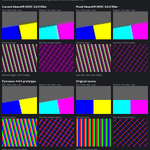
No, bitrate is more than enough. The reason is that overlays do not use global supersampling resolution, so what you see in your headset is an upscaled image. However, there is a hack to force higher overlays resolution editing steamvr.vrsettings file.
It's still not fully fixed! Only partially, so just wait for the future updates! However, overlays blurness is a separate problem.
Partially. What I can say, if you want a sharp image, you have to use at least 250% supersampling. Because this amount will give you roughly 100% pixel density with almost no blur at the center. It happens because of the lens undistortion.
I know, I managed to contact the right person. But the fix is not fully there. It's just one of the few issues, and the most noticeable bug will probably be fixed soon in one of the next updates!