

💙 https://xitter.cf/t.co/pknq6YRzlA Army Head of community at @OPLabsPBC taking @guildxyz around the interwebz head of product @OPLabsPBC #BlueMove #MOVErs
(💙,🧡) 🦇🔊(L3, ❄️) 🛸🐐
Joined February 2021
- Tweets2.5K
- Following1.5K
- Followers101
- Likes662






tisara.lens (💙,🧡) 🛸 .L2 🔴✨ 🌸, 🚀MATR1XCoin retweeted

si queréis APRENDER sobre IA solo os diré que SIGAIS a esta cuenta, no diré nada mas

Realmente no entiendo por qué nadie está usando esta configuración
graphify, una herramienta que convierte cualquier carpeta en un grafo de conocimiento que tu agente puede consultar, acaba de superar los 126k estrellas en GitHub y entró en Y Combinator.
La gente dejó de hacerle preguntas a la IA. Le están dando un escritorio, una memoria y un trabajo.
Le das una carpeta a Claude Code, conectas tu correo, calendario y un navegador, y se convierte en un agente. Lee, recuerda, actúa y se revisa a sí mismo antes de hacer algo estúpido.
No importa si eres fundador, marketer o estudiante, lo necesitas
La configuración completa:
> Crea una carpeta llamada AGENT, abre Claude Code dentro de ella y agrega un CLAUDE.md con una regla: "guarda cada decisión, persona y proyecto en la memoria/"
> Ejecuta npm install -g @googleworkspace/cli, luego gws auth setup. Ahora lee tu Gmail, Calendario y Drive
> Ejecuta claude mcp add playwright npx @playwright/mcp@latest. Consigue su propio navegador para abrir sitios, llenar formularios y extraer datos para ti
> Ejecuta uv tool install graphifyy, luego graphify install, luego escribe /graphify .. todo en la carpeta se convierte en un grafo de conocimiento que consulta en segundos en lugar de excavar archivo por archivo
> Ejecuta npm i -g jev-guard, jev-guard key "...", jev-guard install claude. Un modelo diminuto llamado Jev puntúa cada acción antes de ejecutarla. rm -rf se bloquea, un correo envenenado se marca, por unos 4 centavos por 1.000 verificaciones
> Escribe /schedule y dile "todas las mañanas a las 7:30, envíame lo que entró, lo que redactaste y lo que espera mi sí". De ahora en adelante trabaja en una rutina
15 minutos para configurar, y nunca más empiezas desde un chat en blanco.
repo:
-> github.com/Graphify-Labs/
guárdalo y sígueme para más → @karlarboledas
tisara.lens (💙,🧡) 🛸 .L2 🔴✨ 🌸, 🚀MATR1XCoin retweeted

这效果太酷了!🤯
作者用 Anatomy,直接生成了一个可交互的路灯照明模拟器。
你可以自由调整路灯的高度、光线的照射范围,亲眼看到光线如何在道路、房屋和天空之间变化。
最惊艳的是打开 LUX(照度)热力图!
光照强度瞬间变得可视化,哪里亮、哪里暗,一目了然。
Anatomy的价值还在提升!

tisara.lens (💙,🧡) 🛸 .L2 🔴✨ 🌸, 🚀MATR1XCoin retweeted

Claude Codeがコードだけでどこまで動画作れるかチャレンジしてみた。
ちなみに投げたプロンプトもGemini 4 Argonに相談して作ってもらっただけ。詳細は👇️
tisara.lens (💙,🧡) 🛸 .L2 🔴✨ 🌸, 🚀MATR1XCoin retweeted

i can't f*cking wrap my head around what Claude did
the model cracked a 25-year-old NSA cryptography mystery in under half an hour
in 2000 the US government published the NIST elliptic curves like P-256. they sit under ECDSA, one of the most widely used digital signature standards in the world
the starting values for those curves came from the agency. with zero explanation
so for years people suspected a backdoor
the most popular theory said NSA engineer Jerry Solinas derived them from a joke phrase about giving Bob and Jerry a raise
he died in 2023 without remembering the details. several people at Anthropic had already hunted for that joke with no luck
then one employee simply asked an internal research model to figure it out. it wasn't told a word about the hint
the answer turned out to be almost funny:
> there was no phrase
> the parameters came from lrand48, a plain random number generator from the C library
> it was seeded with the time on the system clock
> the runs happened between May 1997 and April 1998
> now anyone can reproduce the result
the AI even wondered whether it was inside a test because the answer looked too simple for such an old mystery
this isn't a hack. if anything the hidden backdoor theory now looks far less plausible
the only open question is why other suitable candidates were thrown out
for years everyone chased that one phrase and built the whole search around it
Claude came at it from the other side. it pictured how a late-90s program would have worked and checked the guess with math
people spent decades looking where the hint pointed
the model was simply never given it


tisara.lens (💙,🧡) 🛸 .L2 🔴✨ 🌸, 🚀MATR1XCoin retweeted

immediate add to the skills bookmark folder. such a cool one.

Many asked me how to make these, so I turned it into a skill~
Colorfigures: Describe an everyday object, and Claude draws it hand-inked and isometric, with buttons that actually work.
You can also ask how something works and the skill will label the parts to explain how each part does its job.
Free and open source 👇
tisara.lens (💙,🧡) 🛸 .L2 🔴✨ 🌸, 🚀MATR1XCoin retweeted

Claude Code tip: install the colorfigures skill, say "draw a gumball machine", and Opus 5.5 builds 𝗮 𝗵𝗮𝗻𝗱-𝗱𝗿𝗮𝘄𝗻 𝗺𝗮𝗰𝗵𝗶𝗻𝗲 𝘆𝗼𝘂 𝗰𝗮𝗻 𝗮𝗰𝘁𝘂𝗮𝗹𝗹𝘆 𝗽𝗹𝗮𝘆 𝘄𝗶𝘁𝗵: drop in a coin, turn the crank, and a gumball rolls out of the chute.
The whole machine is one HTML file you open with a double-click. A see-through window shows the wheel turning, the parts are labelled, and 𝘄𝗵𝗶𝗰𝗵𝗲𝘃𝗲𝗿 𝗽𝗮𝗿𝘁 𝗶𝘀 𝗺𝗼𝘃𝗶𝗻𝗴 𝗹𝗶𝗴𝗵𝘁𝘀 𝘂𝗽, so a kid can figure out how it works just by pressing the buttons. The one in the video was made exactly this way.
After installing, restart Claude Code and send it this 👇
"Use colorfigures to draw a gumball machine: a coin slot, a crank, a see-through window showing the wheel, and a chute. Label the parts, light up the label of whichever part is moving, and give it buttons in this order: insert a coin, turn the crank, take the gumball."
Install:
mkdir -p ~/.claude/skills && curl -fsSL april-zhu.com/colorfigures/c… | tar -xz -C ~/.claude/skills

Give Opus 5.5 𝗮 𝗰𝗹𝗶𝗰𝗸𝗮𝗯𝗹𝗲 𝗺𝗼𝘁𝗶𝗼𝗻 𝗱𝗶𝗰𝘁𝗶𝗼𝗻𝗮𝗿𝘆: 𝟭𝟮𝟬 𝗺𝗼𝘃𝗶𝗻𝗴 𝘀𝗮𝗺𝗽𝗹𝗲𝘀, each labelled with its name and a ready-made prompt. Click the ones you like, and Claude Code builds them into your video or site.
Five packs: motion graphics, camera moves and transitions, UI components, landing page and web effects, and photo looks and lighting.
Four steps:
1. Paste the line at the end into Claude Code to install the skill
2. Tell it "Open the motion-prompt library"
3. Tick the samples you like in the gallery and press "Send to AI"
4. Back in Claude Code, say "Edit the opening of this video like this"
It gets each sample's motion spec and reference code, and it works with Remotion, CSS or Canvas. Without the skill, press "Copy picks" and paste them in.
Paste this into Claude Code and it installs itself 👇
"Read github.com/showheyohtaki/mot… and install the motion-prompt skill in this environment. When it is installed, tell me how to use it in three lines."
tisara.lens (💙,🧡) 🛸 .L2 🔴✨ 🌸, 🚀MATR1XCoin retweeted

turn your terminal into a 3D workbench with Claude Code
Boris Cherny (creator of Claude Code) gave a team of agents one assignment: build a terminal workspace where you can edit a 3D model, inspect every revision, and verify that the dimensions you locked stay unchanged
the starting model was an 80 mm mounting plate with two 6 mm holes, their centers 40 mm apart
the first edit:
"increase the width to 110 mm. keep both holes centered as a pair, 40 mm apart. preserve their diameter and the plate's thickness"
the outer shape should grow while the mounting pattern stays fixed
rotate the rebuilt model in your terminal. inspect the underside. check the dimensions before accepting the change
give Claude Code agents these rules before the first edit:
→ the builder changes the requested parameters and preserves the editable source
→ a separate reviewer checks the rebuilt geometry against the dimensions you locked
→ every revision includes the changed values and the checks performed
→ a failed check keeps the last accepted version available
now work through revisions:
"make three versions with different widths"
"keep the mounting pattern identical"
"restore the original 80 mm version"
save each version's parameters alongside its export so you can reproduce it later
keep the editable source. an STL export contains the surface geometry; your named dimensions and modeling rules live in the source project
start with one simple part, make one controlled change, and check what stayed fixed
full guide to building interactive 3D with Claude Code below


tisara.lens (💙,🧡) 🛸 .L2 🔴✨ 🌸, 🚀MATR1XCoin retweeted

Websites for design engineers
1. pele.run
2. squints.app
3. squig.sh
4. encyclopedia.iconography.co
5. audiocn.dev
6. mdxcn.dev
7. gauge-ui.dev
8. uiarc.dev
What did I miss?
tisara.lens (💙,🧡) 🛸 .L2 🔴✨ 🌸, 🚀MATR1XCoin retweeted

A few of you asked how this came together. This is the trail of iterations that led to the video!

Who said AI only generates slop?
Second experiment. This time I wanted to see how voice, image and edit could build a climate around Borges’ “Ajedrez”. Fifteen cuts. What do you think?
Stack: Opus 5.5 (x-high), @Paper (editorial), @midjourney.
tisara.lens (💙,🧡) 🛸 .L2 🔴✨ 🌸, 🚀MATR1XCoin retweeted

motion designers are in serious danger, here is why
an AI agent can now model a 3D scene in Blender, animate a website and render a finished MP4. you describe it, the agent builds it.
three repos doing exactly that:
-> HyperFrames: write HTML, get a video. made by HeyGen for AI agents. ask for a 10-second product intro with a fade-in title and background music, and the agent plans it, animates it and renders the MP4
github.com/heygen-com/hyperf…
-> MCP for Blender: connects Blender to Claude or any other model. the agent creates objects, builds scenes and edits them in real 3D while you watch
github.com/ahujasid/mcp-for-…
-> GSAP skills: the official skills that teach coding agents to animate the web properly with GSAP. timelines, scroll effects, the stuff premium landing pages are made of
github.com/greensock/gsap-sk…
the setup for HyperFrames in Claude Code is two lines:
claude plugin marketplace add heygen-com/hyperframes
claude plugin install hyperframes@hyperframes
then just type /hyperframes:hyperframes and describe your video.
the stack in one line: Blender for the 3D, GSAP for the motion, HyperFrames for the final render.
bookmark this before your next client asks for a promo video.


tisara.lens (💙,🧡) 🛸 .L2 🔴✨ 🌸, 🚀MATR1XCoin retweeted

15 GitHub repos can replace a motion design team
Build your own AI video studio, from a single prompt to a cinematic 4K MP4
(1/15) Remotion
turn React code into videos with programmable scenes, transitions, and rendering
▸ github.com/remotion-dev/remo…
(2/15) Excalidraw
map your storyboard, camera movements, and scene sequence
▸ github.com/excalidraw/excali…
(3/15) Penpot
design professional layouts, style frames, and reusable visual components
▸ github.com/penpot/penpot
(4/15) Fontsource
give every scene consistent typography with self hosted fonts
▸ github.com/fontsource/fontso…
(5/15) Lucide
add clean, consistent icons to dashboards and animated interfaces
▸ github.com/lucide-icons/luci…
(6/15) SVGator alternative: Motion
animate interface elements with smooth transitions and spring physics
▸ github.com/motiondivision/mo…
(7/15) GSAP
control complex animation timelines, easing, and synchronized movement
▸ github.com/greensock/GSAP
(8/15) Three.js
create cinematic 3D environments, lighting, materials, and camera movements
▸ github.com/mrdoob/three.js
(9/15) React Three Fiber
build reusable 3D scenes directly inside your React workflow
▸ github.com/pmndrs/react-thre…
(10/15) React Three Drei
add ready made 3D helpers, controls, and scene utilities
▸ github.com/pmndrs/drei
(11/15) Blender
model detailed objects, build environments, and render 3D assets
▸ github.com/blender/blender
(12/15) Lottie Web
play lightweight vector animations inside web based scenes
▸ github.com/airbnb/lottie-web
(13/15) Audacity
clean voiceovers, edit sound effects, and balance audio
▸ github.com/audacity/audacity
(14/15) Whisper
generate speech transcripts for captions and subtitle timing
▸ github.com/openai/whisper
(15/15) FFmpeg
encode, compress, inspect, and export your final MP4
▸ github.com/FFmpeg/FFmpeg
The best part?
You don’t need 15 separate workflows
Use an AI coding agent to orchestrate the tools, reuse your scenes, and automate the repetitive work
Start with npx create-video@latest, build one reusable 10 second scene, then expand it into a complete video
Save these 15 repos before your next video project

tisara.lens (💙,🧡) 🛸 .L2 🔴✨ 🌸, 🚀MATR1XCoin retweeted

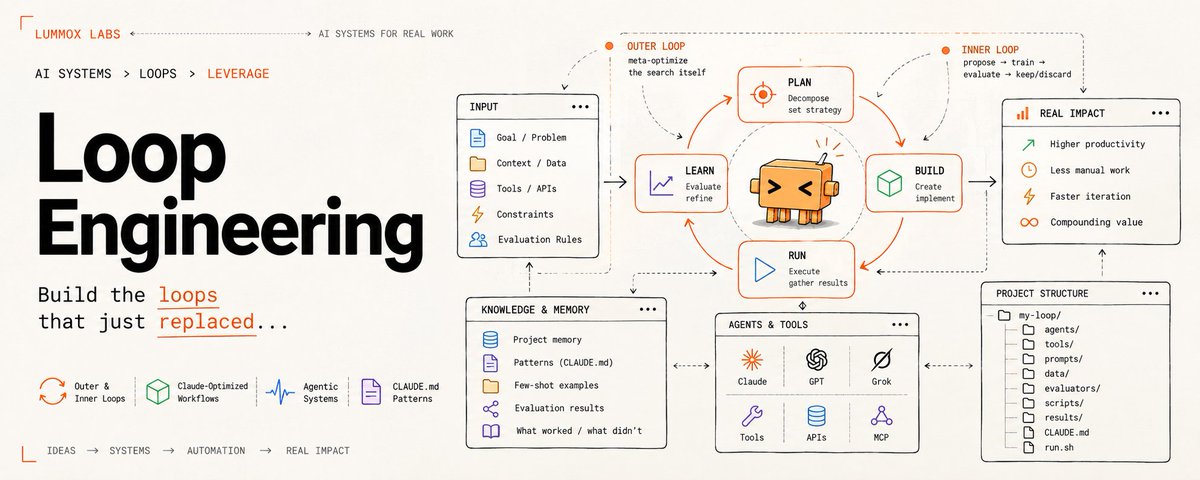
Opus 5.5 + /anatomy skill is great for motion design but...
add /anatomy-reveal to turn Claude into premier motion design studio
• Real-size 3D models from a photo or name
• Motion-blurred reveal films, 1:1 to 16:9
• Exploded views you can take apart
send skills your Claude:
> typingmind.com/skills/annngu…
> skills.wheresryan.sh/anatomy


tisara.lens (💙,🧡) 🛸 .L2 🔴✨ 🌸, 🚀MATR1XCoin retweeted

Opus 5.5 read 61 papers, found 4 that disagreed, and refused to publish until it had argued with itself
Richard Feynman said the first principle of science is that you must not fool yourself, and you are the easiest person to fool. this agent took that literally
i. gather
61 sources pulled in. papers, blogs, filings, its own notes from last time
ii. read
412 facts pinned. it read the methods before the conclusions
iii. weigh
14 strong, 9 weak, and one rule written in the margin: RCTs beat blogs
iv. contradiction
4 papers said opposite things. the agent stopped itself, wrote "do not publish", and held
v. the skeptic
it spun up a second agent with one job, attack every claim. Karl Popper's idea of science, running as a subagent
vi. revised
3 claims rewritten. the real effect size turned out to be 0.31, smaller than the headline
vii. published
18 pages. 52 of 52 claims cited. 0 left open
201 tool calls, 183.9k tokens, 95% of it served from cache
most AI research tools give you a confident summary of whatever they read first. this one went looking for the paper that proved it wrong
the smartest thing Opus 5.5 did all night was say HOLD


tisara.lens (💙,🧡) 🛸 .L2 🔴✨ 🌸, 🚀MATR1XCoin retweeted

มีคนทำ Claude Skill ชื่อ Anatomy ไว้อธิบายการทำงานของสิ่งต่างๆ
github.com/wheresryan22/anat…
กรอกลงไปปู้ดเดียว มันพ่นมาเป็น interactive แบบนี้เลย
นึกถึงสมัยเรียนที่ต้องแย่งหนังสือเล่มเดียวในห้องสมุด โคตรอยากเป็นเด็กยุคนี้เลยว่ะ แต่นิสัยความดิ้นรนอยากรู้อยากเห็นนั้น จะยังเหลืออยู่ไหม
tisara.lens (💙,🧡) 🛸 .L2 🔴✨ 🌸, 🚀MATR1XCoin retweeted

Paste this sound design prompt into Opus 5.5 & Fable 5.5
It fixes music → SFX → sync in your motion design videos
Send it now. The difference is f*cking insane:

It's probably the easiest way to make money with ONLY AI in 2026...
Companies are already offering ~$500 for 15-sec videos made with Opus 5.5 & Fable 5.5
In this article, I'll walk you through building a motion studio and share offers from scratch:

tisara.lens (💙,🧡) 🛸 .L2 🔴✨ 🌸, 🚀MATR1XCoin retweeted
Websites for designers
1. prompt-motion.com
2. shotreel.app
3. evilbuttons.com
4. drawably.dev
5. tryalcove.com
6. appllama.io
7. designbookmark.com
8. amicons.design
9. graphicalui.com
What did I miss?
tisara.lens (💙,🧡) 🛸 .L2 🔴✨ 🌸, 🚀MATR1XCoin retweeted

19 year old Japanese student built a trading bot with Claude Code in 2 days.
Used his iPad as a second monitor.
First night: $6,732 profit.
Starting capital: $68.
Total profit so far: $750,000.
[ 𝐍𝐨𝐭𝐞: 𝐅𝐨𝐥𝐥𝐨𝐰 𝐌𝐞 @monicaa_AI 𝐅𝐨𝐫 𝐢𝐧𝐬𝐭𝐚𝐧𝐭𝐥𝐲 𝐚𝐮𝐭𝐨 𝐃𝐌]
Here's how it works👇
The bot scans over 50 markets simultaneously.
Syncs live BTC data from Binance every second.
Spots price errors before humans even notice.
The edge is pure speed + pattern recognition.
While traders stare at charts trying to predict the next move, his bot is already executing on mispricing across dozens of markets.
No guessing.
No emotions.
No hesitation.
Just Claude Code logic finding gaps that close in seconds.
He built the entire system in 48 hours:
→ Claude Code handles the trading logic
→ Binance API feeds real-time BTC data
→ iPad displays multi-market monitoring
→ Executes trades when arbitrage windows open
The system runs 24/7.
Every price dislocation = profit opportunity.
Most people are still trading manually, refreshing charts, second-guessing entries.
Meanwhile this 19 year old engineering student turned $68 into $750K by letting Claude Code do what humans can't: process 50 markets instantly and execute without fear.
Why are people still trading manually?
I'm giving away the exact Claude Code setup for free.
24 hours only.
To get it 👇
1️⃣ Comment " Claude "
2️⃣ Like and Repost
3️⃣ Follow @monicaa_AI (so I can send it via DM)
tisara.lens (💙,🧡) 🛸 .L2 🔴✨ 🌸, 🚀MATR1XCoin retweeted

12 OPENAI DOTS WORKING AT ONCE LOOK LIKE A LIVING PLANET
I TURNED THE WHOLE SYSTEM INTO A 3D FIELD YOU CAN WATCH
every hill on the map is one Dot with its own job, inbox, research, invoices, outreach, code, support. the more work runs through a Dot, the taller its hill gets
each streak moving across it is a single agent doing a small piece of that work, reading a thread, opening the browser or saving something to Space
that core floating in the middle is Space itself, the shared memory every Dot reads from and writes back to, and the lines pulsing toward it are context moving between them
a gold beam going up means a Dot is waiting on your approval, and everything inside that hill slows down until you say yes
if a rule stops an action, like “never push to main”, the hill flashes red and the agents scatter
a shipped task looks the opposite way, agents shoot up like a fountain and a ring rolls out across the field
once you see it like this, it’s obvious how much of Dots is rules and approvals instead of raw autonomy
full architecture behind it in the article below ↓


tisara.lens (💙,🧡) 🛸 .L2 🔴✨ 🌸, 🚀MATR1XCoin retweeted

this is pure f*cking treasure
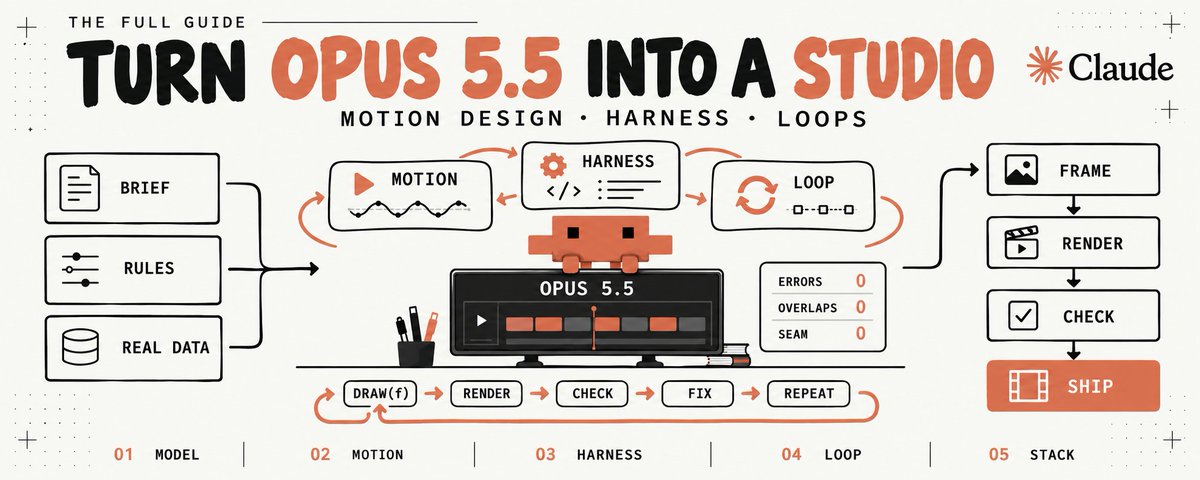
someone just dropped 20 GitHub repos that turn your Opus 5.5 into a f*cking motion studio:
made for Opus 5.5
1. claude-motion: has taste, reviews its own frames, writes the sound in code. built with Opus 5.5 in mind
github.com/whaleyxbt/claude-…
2. claude-motion-design: HTML, Playwright and ffmpeg, zero Remotion. the demo itself was made on Opus 5.5
github.com/howseen-ai/claude…
3. motion-graphics-skills: 13 skills for launch videos. the README says run it on Opus 5.5
github.com/charlie947/motion…
4. claude-remotion-skill: a full Remotion editor from a single prompt. captions, B-roll, sound
github.com/haidrrrry/claude-…
5. klik-anim-skill-creation: the rules of animation and camera, built on Opus
github.com/t3knobox/klik-ani…
6. hyperframes-motion-reel-skill: a showreel cut to the beat at 120 BPM, on HyperFrames
github.com/Sunwood-ai-labs/h…
7. product-launch-motion: a whole launch film. voice-over, camera moves, color grade
github.com/AbubakrChan/produ…
8. animate: a short clip in a single canvas file, storyboarded on the fly
github.com/cth9191/animate
9. motion-design-skills: timing, color, typography, logos, Remotion
github.com/iart-ai/motion-de…
10. hyperframes-student-kit: 14 skills and 406 motion graphics cards
github.com/nateherkai/hyperf…
the engines all of this renders with
11. hyperframes: HTML in, MP4 out. the one nearly everyone installs
github.com/heygen-com/hyperf…
12. remotion: video written in React
github.com/remotion-dev/remo…
13. remotion skills: the official Remotion skills for your agent
github.com/remotion-dev/skil…
14. GSAP: the timelines HyperFrames runs on. skills: npx skills add greensock/gsap-skills
github.com/greensock/GSAP
taste and everything around it
15. motion-design-skill: motion principles that work with any engine
github.com/LottieFiles/motio…
16. awesome-motion-design-agent-skills: a map of GSAP, Remotion, Lottie and Rive skills
github.com/frankxai/awesome-…
17. motion-graphics: B-roll built straight from your transcript
github.com/Barty-Bart/motion…
18. motion-dev-animations-skill: web animation on motion.dev, not video
github.com/199-biotechnologi…
19. motion: Motion itself, the library formerly known as Framer Motion
github.com/motiondivision/mo…
20. lottie-web: for when you need Lottie, not an MP4
github.com/airbnb/lottie-web
the whole stack in one line: Opus 5.5 writes the code, a skill sets the timing and the camera, an engine renders the MP4.
check every repo before you install anything.

tisara.lens (💙,🧡) 🛸 .L2 🔴✨ 🌸, 🚀MATR1XCoin retweeted

10 goldmines for anyone building websites with AI 👀
1. 👑 scrolltide.co
600+ award-winning prompts + full source code for 3D and scroll-driven sites. 100+ 3D scenes, 200+ interactive gradients, 200+ UI components. Copy the prompt. Paste into Claude, Cursor or Lovable. Launch live.
2. godly.website - hand-picked sites with serious craft
3. awwwards.com - the sites that actually won
4. mobbin.com - real app flows from real products
5. component.gallery - every UI component, across design systems
6. 21st.dev - community components, ready to drop in
7. ui.aceternity.com - animated components, big visual impact
8. motion-primitives.com - motion components, ready to paste
9. shadertoy.com - shaders to study and remix
10. threejs-journey.com - the best way to learn 3D on the web
Save this 🔖 you'll need it before your next project.
Which one would you build first?