Personal account, but also CCO at Ting. DM me if I can help with anything...
- Tweets15.4K
- Following667
- Followers9.1K
- Likes4K
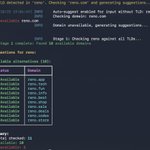






ALT A dark-themed terminal screenshot showing output from a command-line domain suggestion tool called “reno.” At the top, a yellow message says that no top-level domain was detected in the input “reno,” so the tool checks “reno.com” and generates suggestions. Timestamped INFO log lines follow, indicating auto-suggest is enabled, the domain reno.com is checked, and the domain is unavailable. A red “Unavailable reno.com” message appears. The tool then reports “Stage 1: Checking reno against all TLDs,” followed by a green confirmation that Stage 1 is complete with 18 available domains found. Below, a section titled “Suggestions for reno” lists “Available alternatives (10)” in a boxed table with two columns: Status and Domain. Each row shows a green checkmark and the word “Available,” followed by several domains. At the bottom, a summary states: Total checked: 11, Available: 10, Unavailable: 1.