

Building Battery Orbit, a Mac app that keeps your Mac working while you're away. Solo, in public. AI agents, macOS, IIT Delhi.
Joined November 2013
- Tweets355
- Following55
- Followers23
- Likes73






Pinned Tweet
I build Battery Orbit, a Mac app for people who leave their Mac working.
With the cable still in:
🔋 Charging your way: Desk Hold, Daily, Custom Orbit, Natural Flow or Adaptive
🌙 Awake with the lid closed, and locked
📱 From your phone: check it, change mode, unlock it, and approve Claude Code or Codex requests with a 6-digit code
✅ Every change is checked against macOS before it counts
Works on macOS 27.
3-day free trial with every feature: batteryorbit.app/?ref=x
I'm building it alone, in public. Follow along.
2
3
73

Your Mac plugged in for days.
Charge held where you set it.
Awake with the lid closed.
Your AI agents still working.
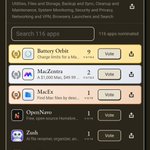
That's Battery Orbit, and it's #1 in Best Utility at the @macpiphq Awards 2026 🏆
Help keep it there? Vote below 👇
Thankyou @macpiphq and @JustinasRoland0 for building this awesome plateform for solo dev like me


If you're an indie dev, your first user is you.
If your product breaks your own day, it will break your users' days too.
Yesterday it broke mine.
My Mac was running a virtual machine, a couple of test suites and Chrome. Load average above 100.
Battery Orbit showed "A change wasn't confirmed" and handed charging back to normal. Twice in six minutes.
I'd never seen that before.
Why it happened:
Battery Orbit doesn't trust its own changes. After every change, it waits for macOS to confirm it, reading after reading, before it calls the change done.
On a Mac that busy, one reading came in a little slow, and another arrived 4 seconds late. Battery Orbit treated "slow" as "wrong" and gave up on the change.
It stayed safe, because when it isn't sure, it gives charging back to macOS. But it was wrong. And busy Macs are exactly who it's for: people running AI agents and builds all day.
The fix:
🐢 A slow or late reading now restarts the count instead of ending the change
🛑 A reading that disagrees still ends it, and the time limit hasn't changed
🔒 The checks before a change, and when undoing one, stay as strict as before
Test your product on your worst day, not your best one.

15
Gone for the weekend?
Your Mac doesn't have to be.
Leave it plugged in at your desk and let your AI agents keep working:
• Stays awake, even with the lid closed
• Holds the charge where you set it, not stuck at 100%
• Check in from your phone any time
Battery Orbit. Everything in between.
$7.99 until 12 December, then $14.99. One-time, 3 days free.
What would you leave running if you knew your Mac would stay on?
fable Built this😅
1
16

Fun facts about fine-tuning: the loss curve is beautiful, the checkpoint is useless, and the plain old rules I wrote by hand still beat it 452 to 0. Curious what it learns next. Not curious enough to sleep, apparently.

1
48
Your Mac already knows how worn its battery is. Most people never look.
Two ways to check:
System Settings → Battery → the ⓘ next to Battery Health
It shows the condition and maximum capacity.
Terminal, one line:
system_profiler SPPowerDataType | grep -E "Cycle Count|Condition|Maximum Capacity"
Mine right now:
• Cycle Count: 335
• Condition: Normal
• Maximum Capacity: 93%
Maximum Capacity is how much charge it can hold compared with new. Cycle Count is how many full charges it has done.
Run it and reply with your cycle count. I'm curious who's highest.
1
9
Or skip Terminal: type your two numbers here and see what they mean against Apple's figures. Free, no signup. batteryorbit.app/tools/batte…

3
Navin retweeted
Battery Orbit got nominated in the @macpiphq Awards 2026 🏆
• Best Utility
• Launch of the Year
• Best Pay-Once App
One person, one Mac app, about a month old.
Voting is free and open until Dec 10. If Battery Orbit has earned a spot on your Mac, a vote would mean a lot and it's free 🙏
macpip.com/awards/2026/utili…
Thankyou @macpiphq @JustinasRoland0
Navin retweeted

The MacPip Awards 2026 are live. 15 awards, every Mac app starts at zero, and you pick the winners.
Vote until Dec 10 macpip.com/awards
Battery Orbit got nominated in the @macpiphq Awards 2026 🏆
• Best Utility
• Launch of the Year
• Best Pay-Once App
One person, one Mac app, about a month old.
Voting is free and open until Dec 10. If Battery Orbit has earned a spot on your Mac, a vote would mean a lot and it's free 🙏
macpip.com/awards/2026/utili…
Thankyou @macpiphq @JustinasRoland0

I built a battery app. Then macOS 27 took away the one thing it needed.
Charge-limit apps on Mac usually work one way: flip a hidden switch inside the Mac that stops charging.
On macOS 27 that switch is gone. Not hidden. Gone. Even an admin can't see it.
I found out late on Saturday night. By sunrise my app could hold a battery at 75% again.
The lesson I keep relearning as a solo builder:
Any update can break you. So build for the bad day: when my app couldn't confirm a change, it simply let the Mac charge normally. Nobody's battery was left stuck.
What's the platform change that broke your project?
3
2
60
The $20 Codex plan is unusable for small work with Astra.
Today I hit the 5-hour limit twice. I wasn't building anything, just asking it to review my own code.
"Worked for 5-10m." Then: "You're out of usage until 2:18 am."
Is the $20 plan only meant for trying it out?

3
36
Everyone's saying Gemini 4 Neon beats Opus 5.5.
Meanwhile I upgraded from Claude Max to Ultra this morning. 😅
Did I just pay for the wrong model?
Honest question for people who've tried both on real coding work, not benchmarks:
where does Neon actually win ??

27
How to keep Claude Code running with your MacBook lid closed 💻🌙
caffeinate does not keep your Mac awake when you close the lid.
That's the most common tip for keeping Claude Code or Codex running, and it stops working the moment the lid shuts.
Here's what actually happens, and what works.
What closing the lid does
Your MacBook sleeps. A sleeping Mac runs nothing. Your agent stops mid-task and waits until you open it again. Remote Control on your phone can't reach it either.
What caffeinate covers
• caffeinate -i stops idle sleep, the sleep that comes when you stop touching the Mac
• caffeinate -s does the same, but only on the charger
• Its manual says nothing about closing the lid
So caffeinate is great with the lid open. Close the lid and the Mac sleeps anyway.
What works
1. Apple's closed-display mode
External display + keyboard and mouse or trackpad + charger. Close the lid and keep working on the big screen.
2. No display? There's one system switch:
sudo pmset -a disablesleep 1
It stops all sleep, lid closed included.
Undo it with:
sudo pmset -a disablesleep 0
Two warnings before you use it:
• It never turns itself off. Forget it, and your Mac never sleeps again.
• A closed Mac that can't sleep keeps making heat. Put it on a desk, never in a bag.
And if your agent stops for a permission prompt at 2 am, it waits for you all night anyway.
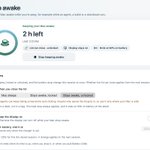
I got tired of all three problems, so I built Battery Orbit's Keep awake around that same switch:
⏱ You pick how long: 30 minutes up to 8 hours, or until you stop it
🔒 Close the lid locked, or unlocked for agents that use the screen
🌡 It stops if the battery gets hot, and at the battery level you pick
📱 Claude Code and Codex permission requests come to your phone. You answer with a code.
When the session ends, sleep comes back by itself.
batteryorbit.app/?ref=x
How long do your agent runs usually take?

2
2
97
Navin retweeted
the makers behind all 111 deals 👇
@navin4501 @terrytz @davidtranjs @ixl21s @ahmedgagan11 @SweetP_Pro @liorpesoa @saltan_pk @ImDannydo @paramientos @trystoicplayer @monholtco @Mike_Andreuzza @dailytimeapp @surendra_pandar @donnguyen_me @Teekam_Suthar @bhardwajshash @divvsaxena @fuzzyfoundry @1dot_AI @gitkraken @emircan_dev @11pmdev @xLohith @ruthranbaskar @Keystrip @seifip @kwaflux @nikhilshares