

Mostly, it creates or modifies KLWP files. / Using Galaxy S25U,Lenovo Y700(2023),iPad Air(2013) / Android Lover XD https://xitter.cf/t.co/qTTgtk5KSV
Republic of Korea(South Korea)
Joined August 2019
- Tweets3.8K
- Following142
- Followers1.8K
- Likes1.3K





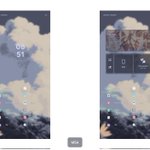


I completely agree with this. In fact, Samsung Electronics is a company within the Samsung corporate group, which is also the largest business group in South Korea. So this phenomenon feels especially strong because the system is bureaucratic and conservative.

The more I use Samsung software, the more I feel like their highest standard is simply: “Does it work? Good enough.”
Samsung has always felt like an extremely engineering-driven company. They care a lot about whether a feature works, whether the system runs properly, and whether everything is technically functional.
But animations? Visual consistency? Beautiful little details? They just don’t seem to care nearly as much.
Home Up is probably the perfect example.
It almost feels like Samsung couldn’t decide what a good animation should look like, so they just gave us a bunch of controls and said, “Here, you guys figure it out.”
And the funny part is, I can spend a few minutes playing around with Home Up and easily create animations that look several times better than Samsung’s own defaults.
That tells you a lot about Samsung’s software philosophy.
They have incredibly strong engineering capabilities, but they’ve never really had that obsession with beauty and polish.
Even in One UI 9.0, you can still find ridiculously basic visual inconsistencies. Widgets that are supposed to belong to the same system can have completely different levels of transparency, blur, and overall material feel.
These aren’t difficult problems to fix. Samsung just doesn’t seem to care enough to fix them.
Sometimes I can literally imagine the conversation with a Samsung engineer:
“Why do these widgets have different transparency levels? They don’t even look consistent.”
Samsung engineer:
“Does it work?”
“Well… yes.”
“Then what’s the problem?”
“But it looks bad.”
“Can you use it?”
“Yes.”
“Then it works. Why do you care so much?”
That’s Samsung in a nutshell.
A company with incredible engineering talent and an extremely technical mindset, but very little obsession with art, animation, visual consistency, or elegance.
They can build the feature. They can make the system run. They can give you a hundred different settings.
But ask them:
“Can you make it beautiful?”
And I swear Samsung would probably look at you and ask:
“Does beautiful improve the benchmark score?”



mocacocoa retweeted

これ、ADHDの「ワーキングメモリが弱い」という特性に適応しようとしてきたからだと思うんだよな。
ワーキングメモリが弱いと一番困るのは「作業手順」で、しっかり細かくメモを取らないとすぐ忘れてしまう。
だから常に「詳細な手順」を書く癖と必要性を理解があるのでマニュアルを丁寧に作ろうとするんだと思う。
実際に僕もかなり丁寧にマニュアルは作るし、AIに教えてもらうときも詳細な手順レベルで出させるようにしている。

mocacocoa retweeted

Ceux qui utilisent Vivaldi sur Android vont apprécier.
Le navigateur vient d’ajouter le support des extensions dans un snapshot (version 4143.3).
Points à retenir :
🔹Installation possible depuis le Chrome Web Store
🔹Il faut activer « Desktop site » sur le store pour installer les extensions
🔹Toutes les extensions ne seront pas compatibles avec la version mobile
C’est encore une version de test, pas la stable.
→ Détails : vivaldi.com/blog/android/and…
Enfin des extensions sur Vivaldi Android… ça change clairement la donne.
Quelles sont les 2-3 extensions que vous installerez en premier sur Vivaldi Android ?
#Android #Vivaldi #Browser #Privacy #FOSS

mocacocoa retweeted

セキュリティという名目でAndroidの長所であった野良APKの導入を阻害するようになったのヤバすぎる
野良APK入れてる時点でリスクくらい自覚してるんだからこんなのいらんだろ
#KeepAndroidOpen


mocacocoa retweeted

サカナクション 山口一郎氏
わたしがうつ病でしんどかった時に、
心が救われた言葉
↓
「当たり前に過ごすって、すごいことだと思う。例えば会社員の人なら満員電車に乗って、上司もいて、人と自分を比べて…体調が悪くなるのも当たり前。今の社会って、あっさり簡単に人を見放すじゃないですか。一回輪の外に出てまた中に入るのはすごく勇気がいる。傷ついたことを受け入れる社会になってほしい。きれいなリンゴも傷んだリンゴも、リンゴはリンゴですよね」
うつ病で苦しむ人の心が少しでも軽くなりますように🙏


