

Founder of Building Realms. Former Staff Product Design Prototyper at Meta Reality Labs. Previously Amazon, Volkswagen Group & Intel. https://xitter.cf/t.co/qe4irhMYB8
San Jose, CA
Joined August 2011
- Tweets1.1K
- Following905
- Followers1.3K
- Likes2K


Pinned Tweet
After 4+ years at Meta Reality Labs building Ray-Ban Meta, Orion, and shipping AR to millions…
I’m starting my own spatial computing studio.
Building Realms is live.
For the last 12 years I’ve turned ideas that felt like science fiction into working products — at Amazon, Meta, and through public prototypes on Apple Vision Pro.
Now we’re taking that craft and applying it where it counts: operating rooms, construction sites, factory floors, classrooms, and brands that want to create real wonder.
Not every problem needs spatial. Knowing when it does (and when it doesn’t) is the part most people get wrong.
We’ll be building in public. More details 👇
If you have a spatial problem worth solving — or know someone who does — DM me or visit buildingrealms.com
What’s one real-world problem you wish spatial computing could actually solve?
I have been following @GregMadison for ages now and he has been a continuous source of inspiration for building magical spatial UIs. His work really shows how to blend the real and virtual.

New follower? I’m Greg Madison. I’ve been pioneering tangible interfaces in XR for decades: making digital illusions part of the physical world, keeping us grounded in it.
A thread on the ideas behind my work. 🧵
Here’s an early exploration from 2009.
fr.slideshare.net/slideshow/…
Amazing Blender workflow alert!

claude opus 5.5 can now build, rig and animate full 3d scenes inside blender...
the trick is letting opus orchestrate instead of model, but there’s a smart way to set it up:
- step 1: install blender 5.2.2 and the official blender mcp server
- step 2: open claude, pick opus 5.5 on high effort, run /mcp to confirm blender is connected
- step 3: install blender kit (edit > preferences > install from disk) for 140k+ free models, materials and hdris
- step 4: ask opus “can you see the blender kit library?” so it runs a test search before you build
- step 5: paste a reference image and a plain prompt. talk to it like a junior 3d designer, no structured prompts
- step 6: for characters, ask for the rig in the same prompt (“keep it realistic, rig it for smooth animation”)
- step 7: render a 480p preview first, then the final render (1080p can take 1-2 hours)
who does what:
- blender kit: chairs, couches, cars, wood beams, textures
- opus 5.5: writes the code, places assets, sets lights, rigs, animates
- blender: renders every frame
- you: review and fix the small stuff by hand
and the rule that saves the project... never let opus build a chair from scratch. it burns tokens and still looks fake. pull the asset and let opus arrange it
i like to check animations step by step before the final render. a glitch you miss early costs you 2 hours later
Sarang Borude retweeted

GPT-6 Astra turned my room into Studio Ghibli, on Apple Vision Pro 🤯
It constructs virtual objects located and sized exactly as real objects. Then they can be styled however we want, in REAL TIME.
I'll share later how this all works. For now, I just want to say, wow.
Sarang Borude retweeted

Duo-Man offers the complete walkman experience on the iPhone Duo. Open the Duo to pick and 'insert' the cassette, Close the Duo to start listening.
Yes, I actually recorded the button clicks and static noise from a real Walkman!
It was fun making this at @bitrig hacks today.
Meta VR Glasses are out! These are a phenomenal leap in VR hardware. I haven’t worked on these but I had a few opportunities to try them during my time at Meta and i just loved how they felt to wear coming from bigger headsets. Personally i feel they are going to be great for longer immersive content consumption sessions.
Sarang Borude retweeted

制作中のApple Vision ProからBlenderを操作するアプリについて、
キーボードからの入力はそのまま利用しマウス操作だけをVision側で置き換える方針だったけれど、
Muse専用モードは状況に応じて変化する階層的ラジアルメニューとギズモによりキーボード不要で主要な操作を可能にするという方針に変更
Challege Accepted - implement the iPhone Duo opening animation without writing any code or AI assistance. Read the method below

Just like many of you I was also fascinated by the iPhone Duo Opening animation. This is what differentiates Apple from the rest. I wanted to really understand how it was implemented . This really showcases Apple embraces the material of glass and how that might have led them to this. The idea is very simple. A sheet of glass folder over the UI and because of the glass' frosted nature, you see the blur as the glass goes farther away from the UI.
I wanted to see if I can do it with a simple mechanic with apple's tools so I used Reality Composer Pro 3
to toy with the idea. I don't think apple have actually implemented it this way but here is my take on it.
The iPhone duo is a glass Portal that shows the world underneath it.
I put the UI in a portal world that is sitting just under the glass and put a portal component on the inner and outer display glass. the portal is layered with another piece of a plane that has a shader that blurs the display based on it's distance from UI. This was done in a simple shader graph with the BlurredBackground node and some math.
Because the UI is the only thing in the portal, you see the black void when turning it.
There is literally no 3D models here just few planes, portals and a shader and that gives me this effect in RCP3,
No code was written, no AI was used. just appreciation of the design.
there are many ways to do this but every once in a while there comes an interaction that must be studied and appreciated.
Just like many of you I was also fascinated by the iPhone Duo Opening animation. This is what differentiates Apple from the rest. I wanted to really understand how it was implemented . This really showcases Apple embraces the material of glass and how that might have led them to this. The idea is very simple. A sheet of glass folder over the UI and because of the glass' frosted nature, you see the blur as the glass goes farther away from the UI.
I wanted to see if I can do it with a simple mechanic with apple's tools so I used Reality Composer Pro 3
to toy with the idea. I don't think apple have actually implemented it this way but here is my take on it.
The iPhone duo is a glass Portal that shows the world underneath it.
I put the UI in a portal world that is sitting just under the glass and put a portal component on the inner and outer display glass. the portal is layered with another piece of a plane that has a shader that blurs the display based on it's distance from UI. This was done in a simple shader graph with the BlurredBackground node and some math.
Because the UI is the only thing in the portal, you see the black void when turning it.
There is literally no 3D models here just few planes, portals and a shader and that gives me this effect in RCP3,
No code was written, no AI was used. just appreciation of the design.
there are many ways to do this but every once in a while there comes an interaction that must be studied and appreciated.
I just watched the iPhone Duo camera dev talk from apple and really there is just so much you can do with that camera that it is totally bonkers. Not to forget that you can also subscribe to the hinge change events. Just imagine the kinds of experiences you can build with it.

This is one of my favorite features of the iPhone Duo.
When you’re on FaceTime, you can utilize both screens and cameras. If you’re pointing the camera at someone in front of you, the person on the other side of the phone can talk to whoever you’re on the call with too.
You don’t need to flip the phone like we do now. Very impressive software/hardware integration.
Sarang Borude retweeted

I HATE HOW SMART THIS IS !!!! animations for kids to look into the camera. sigh

Sarang Borude retweeted

I had the pleasure and honour of creating the official launch video for fovii, an awesome new immersive video platform that launched today on Apple Vision Pro!
The “Magic Castle” one is one of the best immersive videos I’ve ever seen!

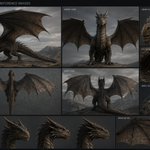
Experiment 2 - Asked GPT-6 Astra to make the same dragon with a reference image, but this time only rely computer use and Blender MCP by @sidahuj and community.
MCP + computer use for Blender
• Python scripts for modeling, materials, camera moves & ambient audio
• ImageGen for textures
• FFmpeg for editing & MP4 export
this is amazing for an output but there are imperfection. This was iteration 1. Cannot really replace artists in my opinion. One thing I am noticing is that it doesn't really go towards sculpting to create the textures on the face etc. I think explicitly telling it will lead to the sculpting with computer use.
Experiment 1 in thread below
Experiment 3 - Here I just provided Astra with just the reference image and asked it to make all the decisions. It didn't use the MCP for this one too.
bpy scripted the scene + 5 camera moves. Headless Cycles/Metal rendered 240 frames; FFmpeg assembled the film + audio. Computer use handled UI/playback checks. This was again done in the first iteration
Experiment one does look better but after couple iterations, the first iteration of that looked bad as well. My observation from 3 different approaches is that just let Astra decide what to use and then iterate on it. I feel that this model will work well on architectural rendering. Overall I really like how well the model lights the scene.