

3D Pipelines & AI Tooling for Game Development
Joined March 2021
- Tweets4.3K
- Following12
- Followers3.3K
- Likes23.9K




Pinned Tweet
Open for work.
Self-taught 3D pipeline and AI-tooling engineer. I ship games solo, fast.
Built a 100-player game alone in 2 weeks. Built pipelines that took production from 2 weeks to 5 days and cut costs by 60%. Consulting or project work. Remote, in Bali.
Work's at ilyakurkin.com, you can contact me fast in TG: @UNDERUNDER1
#gamedev #3dart #UnrealEngine #Unity #Roblox #indiedev


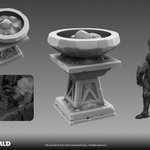
Smart tip: Modular props let you create far more unique combinations at no additional production cost.


Agreed, Three.js + Claude is a killer

Trying to write my own hair designer with three.js and claude. Because all other designers suck and I want my own lol.
Super early but I dig the interactivity already, very nice to see strands growing dynamically.
And it's all on curves with custom profiles with allows for precise editing later like in Nomad.
Three.js is the future 🤟
In my opinion, @marmosetco Toolbag has the best rendering engine for presenting 3D models.
Do you agree? 🤔


Here's an interesting example of how I went about implementing a crowd of NPCs for a Roblox project.
1. First, I created a modular pipeline for character customization that includes interchangeable mesh parts for the head, upper body, lower body, shoes, hands, and accessories.
2. Next, I created a base model, set up the rig, and then expanded it with additional interchangeable modular content. This way, all NPCs share the same rig and can use the common animations. Most of the animations were sourced from Mixamo, and I refined them further in Cascadeur by tweaking the base versions and enhancing them with subtle micro-movements.
3. After the pipeline was set up and the content was refined for high-quality modularity, I moved on to working in Roblox Studio. To add some variety, and with the help of Claude Code, I created a Roblox Studio plugin that lets me change NPC body types and randomize the design and color of modular parts based on tags. Each modular set uses a single PBR material. To change the color of the modular parts, I used SurfaceAppearance TintMask.
Now that I have this system, I can easily add unique pieces of new character content to the general pool and create millions of unique combinations without spending much time.
And the best part is that this system works great for any modular character system.


