







Yoze Hariando retweeted

this harness paper is f*cking gold
Anthropic engineers broke down what actually makes Claude Code work so well. spoiler: it's not the model.
the secret: the harness. that's the whole gap.
prompt engineering → context engineering → harness engineering.
the 6 layers of the harness:
layer 1 → tools
fewer tools, one job each.
every error tells the agent what to try next.
layer 2 → context
short CLAUDE.md → files on demand → compaction when it fills up.
layer 3 → permissions
reads + tests → auto.
deploys + deletes → ask a human.
everything → sandbox.
layer 4 → hooks
before a tool runs → block secrets and protected files.
after every edit → format, lint, typecheck. no exceptions.
layer 5 → verification
fresh reviewer reads the diff, not the summary → runs the tests → fail? fix → rerun.
layer 6 → evals
every harness change scored → success, tokens, turns → keep what wins.
the model is the engine. the harness is the whole car.
they even folded all 6 layers into one prompt. paste it into Claude Code and it engineers the harness for you.
6 layers. 1 prompt. 0 infinite loops.
save this before your next agent build
then read the article below ↓


Yoze Hariando retweeted

We are experiencing the death of thought.
Yesterday, I had to review a hefty contract.
Rather than throw it into Claude & type something like “Review this whole file, break down the key points, and share feedback as if you’re my lawyer,” I did something radical.
I printed the contract, grabbed a mechanical pencil, and spent 90 minutes marking up the document with questions & commentary.
I finished writing down my thoughts in the margins, put down my pencil, and reflected on what just happened.
I felt deeply satisfied & wildly embarrassed all at once.
I couldn’t remember the last time I had used my brain for an end-to-end process without AI. I felt command over the subject matter, I felt clear about what I understood & didn’t understand. And I was left with conviction in my POV. Moreover, I felt the high of “clean” dopamine, a feeling only earned through hard-fought, unadulterated effort.
Then I felt embarrassed. How long had I been depriving myself of thinking? How long had I used an LLM as a crutch, offloading thought for time and understanding for convenience.
And then I got curious.
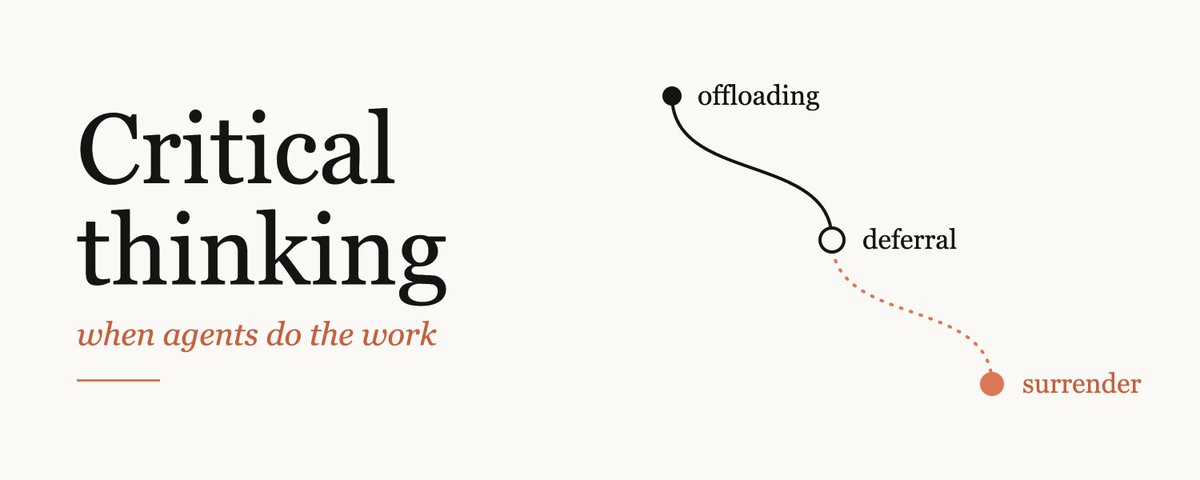
Why is AI creating the death of thought. And what can I do to make sure I don’t surrender my brain to the machine?
The answer lies in what Daniel Kahneman called System 1 and System 2 thinking.
System 1 is fast, automatic, and gut-driven thought. It’s great for quick reactions and routine tasks, but can be riddled with cognitive bias and misunderstanding.
System 2 is deliberate, analytical, effortful, and conscious. It’s essential for careful reasoning and operates as a “lazy controller,” keeping System 1 in check.
Technology has been hijacking System 2 thinking for longer than you might think.
In 370 BC, Socrates warned that writing “creates forgetfulness” because people would rely on marks on a page instead of memory.
Calculators hijacked mental math as a System 2 exercise.
GPS hijacked navigation as a System 2 exercise.
Google hijacked the fight for knowledge as a System 2 exercise.
But AI is different.
AI doesn’t just take over one effortful thinking job, like calculation or research.
It hijacks all of them at once.
Remembering. Summarizing. Researching. Calculating. Writing. Problem-solving. Weighing Trade-offs. Deciding. Planning. Navigating people. Reflecting. Creating.
These System 2 activities are all at risk all at once & we’re not adequately prepared to defend against it. For 200,000 years, our brains have been trained to embrace shortcuts. Effort was historically rare & expensive, so any “easy out” the brain could take, it was rewarded.
But shortcuts come at a cost, and that’s especially true post-AI.
Cost 1: A summary feels like understanding - when you consume information that’s been compressed by someone else, you’re left with a feeling that you understand the subject, even though you never did the work to truly grok it.
Cost 2: The messy middle is the space for growth - Robert Bjork’s research at UCLA shows that learning that feels harder in the moment, sticks much better than faster review. “Cognitive offloading” (Risko and Gilbert) helps short-term, but you pay the price in memory & understanding.
But there’s a third cost far more existential. The disappearance of judgement.
As we approach AGI/ASI, what will stay uniquely human?
1. Intent
2. Accountability
3. Relationships
4. Judgement
And if we think about what judgement really is, it is compressed System 2 thinking. Every time you slowly pore through a report or marinate on a key decision, you’re locking in a pattern, good or bad, that shifts to future System 1 thinking. Taste is thousands of those patterns firing at once.
So, how do we take back our thinking, while embracing the beauty of such transformative technology?
It resolves down to one key principle: control the space between stimulus & response
One of my favorite quotes is by Viktor Frankl:
“Between stimulus and response there is a space. In that space is our power to choose our response. In our response lies our growth and our freedom.”
AI has collapsed the gap between stimulus (question) and response (answer) to zero. That gap used to be where thinking happened. So, we must rebuild that space intentionally, otherwise it will be taken from us, and with it, our judgement.
How you rebuild it is up to you. Pick your poison:
- Create 30-60 minute no-AI blocks in your day
- Go analog & print out what matters
- Focus your prompts on refining your thinking ( “Where is my logic weakest?”) vs. driving your thinking (“Explain like I’m five.”)
- Write your answer before you ask AI for its answer
- Write your first draft by hand
- Say it out loud: explain the topic to someone without notes before reading a summary
- Read the full source, not the summary
- Set a 10-minute rule: struggle with a problem for 10 minutes before you reach for AI
- Brainstorm ideas & only ask AI for feedback
- Treat AI as an “editor” not a “writer”
AI is like the sun.
It’s a once in a species gift to humanity.
It will cure cancer.
It will put a tutor in every child’s hands.
It will create a world of abundance.
But it’s also powerful beyond measure.
We must remember what the final frontier of being human means and protect it at all costs.
We must fight against the death of thought.
Yoze Hariando retweeted

BUAT KALIAN YANG PAKE GEMINI NEON, WAJIB COBA TOOLS INI!
Google baru aja open-source gemini-api-cli yang bisa bikin AI Agent kalian punya kemampuan multimodal langsung dari terminal.
Cukup install CLI, setup API Key, dan tambahkan official Skill ke agent kalian.
Agent kalian langsung bisa:
- Generate dan edit gambar dengan Nano Banana.
- Generate video dengan Veo.
- Generate voice-over dan musik dengan TTS & Lyria.
- Analisis PDF, gambar, bahkan video YouTube.
- Generate subtitle SRT secara otomatis.
- Menjalankan Deep Research.
Yang lebih GILA lagi, berdasarkan benchmark yang dibagikan, penggunaan token rata-rata bisa dihemat hingga 85,8% dengan eksekusi hampir 2x lebih cepat.
Gak perlu setup MCP, runtime tambahan, atau bikin script Python berulang kali.
Bayangin kalian bikin website, aplikasi, game, atau konten faceless, sementara agent kalian sekaligus mengurus aset visual, sound effect, hingga video.
Cocok banget buat kalian yang lagi eksplorasi AI Automation.
Catatan: Penggunaan Gemini API bisa dikenakan biaya terpisah dari subscription Google AI Pro.
🔗 github.com/google-gemini/gem…
Happy building!


If you're building things w/Gemini 4 Neon that could benefit from easy access to Gemini's ability to do video analysis, OCR, or multi-media gen (tts, music, videos, images) you will be blown away by simple installing `gemini-cli`, setting an API key & installing skill
It's even OSS: github.com/google-gemini/gem…


Yoze Hariando retweeted

OpenAI nge-gaji lo $8k per bulan buat bantu small business implementasi AI di bisnis mereka
Sekarang masih di US only tapi nanti pasti akan available di semua negara juga. Jadi masih ada waktu buat lo bikin portfolio.
> Chat temen/keluarga lo yg punya usaha
> Bilang ke mereka lo bakal bantu implementasi AI (pro bono)
> Pake experience itu untuk bikin case study dan portfolio
> Gunakan itu untuk daftar OpenWorks nanti, or just start your own AI implementation business
Based on my experience, small business itu ga butuh CRM, aplikasi, atau system. Mereka cuma butuh satu: MORE REVENUE!
Learn AI for Marketing and Sales. Help implement this to small business.

Through our new program OpenWorks, we fund local AI experts to help small businesses develop the tools and skills they need to grow their own business, at no cost to them.
We invite AI experts who love teaching others and small business owners who want to learn to implement AI to join us at openai.com/openworks.

Yoze Hariando retweeted

如果你正用 Gemini 4 Neon,强烈建议给你的 Agent 装一个 Google 官方刚开源的小工具:gemini-api-cli。
这个新出的 google-gemini/gemini-api-cli(命令叫 gemini-api)是一个零依赖的 Go 单文件,专门给你的 AI Agent 当“多模态外挂”用的。
装上它、配个 API Key、再装上官方的 gemini-api-cli Skill,你的编程 Agent 直接就能在终端里干这些活:
- 一句话生图、改图(Nano Banana)、生视频(Veo)
- 合成多角色语音(TTS)、生成纯音乐配乐(Lyria)
- 分析本地 PDF、图片 OCR、甚至直接丢个 YouTube 链接让它看
- 音视频直接转带时间戳的 SRT 字幕,还能拉起后台 Deep Research
最有意思的是 Google DeepMind 工程师自己跑的实测数据:
以前让 Agent 调多模态能力,它得自己猜模型名、写临时 Python 脚本或拼 curl,动不动还把一堆 Base64 塞进上下文撑爆窗口。
换成这个 CLI + Skill 后,文件直接写进硬盘,终端只吐一个文件路径:
实测平均省了 85.8% 的 Token,跑完快了接近 2 倍。
也不用折腾常驻后台的 MCP 服务,不用配运行环境,原生自带 --help、--schema 和 --dry-run,Agent 拿起来就会用。
做全栈或者独立开发,一边写代码一边顺手让 Agent 把页面配图、音效、演示视频全部完成。
项目地址:github.com/google-gemini/gem…
官方 Skill:github.com/google-gemini/gem…
If you're building things w/Gemini 4 Neon that could benefit from easy access to Gemini's ability to do video analysis, OCR, or multi-media gen (tts, music, videos, images) you will be blown away by simple installing `gemini-cli`, setting an API key & installing skill
It's even OSS: github.com/google-gemini/gem…
Yoze Hariando retweeted

APLIKASI COVATOM: CHAT, TELEPON, DAN SOS TANPA SINYAL 📡
Aplikasi buatan Chalid Ade Rahman yang ramai di Threads ini ternyata sudah bisa dicoba. Ini ulasannya:
APA ITU COVATOM
1. Aplikasi yang menyambungkan HP langsung ke HP di sekitarnya, tanpa internet, tanpa pulsa, tanpa BTS.
2. Fiturnya: chat, walkie-talkie, telepon, peta offline, dan SOS.
3. Gratis untuk warga, tanpa iklan. Dulu bernama Saling Jaga.
CARA KERJA
1. Memakai radio yang sudah ada di HP: Wi-Fi Direct (50 sampai 100 m per grup) dan Bluetooth yang meneruskan pesan dari HP ke HP.
2. Tanpa akun dan tanpa nomor HP. Cukup ketuk "Ajak", lalu tetangga langsung masuk satu grup.
3. Ada juga opsi LoRa untuk jangkauan beberapa kilometer, tapi butuh alat radio kecil.
FITUR UNGGULAN
1. SOS satu tombol. Alarm berbunyi di semua HP grup, lengkap dengan jarak, arah, dan sisa baterai pengirim.
2. Kompas dan peta offline untuk menuju lokasi korban.
3. Pengumuman tersemat, misalnya pemindahan titik kumpul, dengan penanda siapa yang sudah menerima.
4. Absen sekali tekan untuk tahu siapa yang aman, terluka, atau belum menjawab.
5. Walkie-talkie suara ke seluruh grup sekaligus.
KELEBIHAN
1. Ringan. Ukuran sekitar 550 KB, cocok untuk HP lama.
2. Privasi. Tanpa server dan akun, pesan berpindah langsung antar HP dan terenkripsi.
3. Tidak perlu SIM. Yang perlu menyala hanya Wi-Fi dan Lokasi.
4. Lintas perangkat. iPhone dan laptop bisa ikut lewat browser yang dibuka dari satu HP Android.
5. Relevan untuk Indonesia yang rawan gempa dan banjir. Cocok untuk keluarga, RT, relawan, pendaki, dan rombongan haji atau umrah.
KEKURANGAN DAN CATATAN
1. Efektif hanya kalau orang di sekitarmu juga memasangnya. Situs sendiri mengakui HP yang mau disambungkan perlu Covatom juga.
2. Jangkauan terbatas. Sekitar 50 sampai 100 m di tempat terbuka, lebih pendek di dalam gedung.
3. Belum untuk iPhone secara native. iPhone hanya bisa ikut lewat browser.
4. Masih tahap awal. Android sedang uji tertutup di Google Play, dan perangkat pendukung seperti power bank darurat masih model konsep, belum dijual.
5. Baterai jadi faktor. Wi-Fi, Bluetooth, dan Lokasi yang menyala terus akan menguras baterai (analisis umum, bukan klaim pengembang).
6. Angka unduhan dan testimoni di situs berasal dari pengembang, belum diverifikasi pihak independen.
TIPS PAKAI
1. Pasang sekarang selagi ada sinyal, lalu ajak keluarga dan tetangga.
2. Coba dulu dengan mematikan data seluler untuk memastikan semua HP bisa saling terhubung.
3. Unduh peta sekitar saat masih online supaya peta offline berfungsi.
4. Sepakati titik kumpul dan satu orang koordinator di tiap RT atau keluarga.
5. Siapkan power bank dan tetap simpan nomor darurat resmi seperti BPBD, SAR, dan 112.
6. Untuk keamanan, pasang lewat tautan resmi di covatom.com/pasang. Hindari file APK dari sumber lain.


Yoze Hariando retweeted

🏍️ SUKA MOTOR? Ini mungkin akan menyita waktu luangmu.
Motor legendaris. Superbike. Motor klasik. Mesin luar biasa dari seluruh dunia.
Buka paket. Temukan yang langka. Tukar duplikat. Lengkapi album.
Dan semuanya 100% GRATIS. Keputusan bisnis yang luar biasa.


Yoze Hariando retweeted

Made a skill for creating browser games
/𝚐𝚊𝚖𝚎 [𝚒𝚍𝚎𝚊]
Give it a short sentence describing your idea and it will build the game for you
github.com/nilbuild/goofyfis…
Yoze Hariando retweeted

Papercraft, Agent Skill for 3D and 2D
Papercraft is an open source agent skill for building games, websites, interactive scenes and animations in a handcrafted pop up paper style.
It includes Three.js and Canvas 2D templates, paper folding structures, hinge animations, layered shadows and procedural sound.
Agents can build scenes from prompts or reference images, then export stills and MP4 videos in formats including 9:16 and 4K.
** This video was made with Gemini 4 Neon.
github.com/xikhar/papercraft

Yoze Hariando retweeted

Thank me later designedtoscale.app

Yoze Hariando retweeted

Being able to quickly visualize and test how color combos could look in real life is such a creative boon.
Papaya Punch – FCA07F
Funnel Cloud – 113366
Color combo from the #MicroPalettes no. 31 color palette.

ALT MicroPalettes no. 31 – Color Combo

ALT MicroPalettes no. 31 – Visual Sample

ALT MicroPalettes no. 31 – Visual Sample

ALT MicroPalettes no. 31 – Visual Sample
Yoze Hariando retweeted

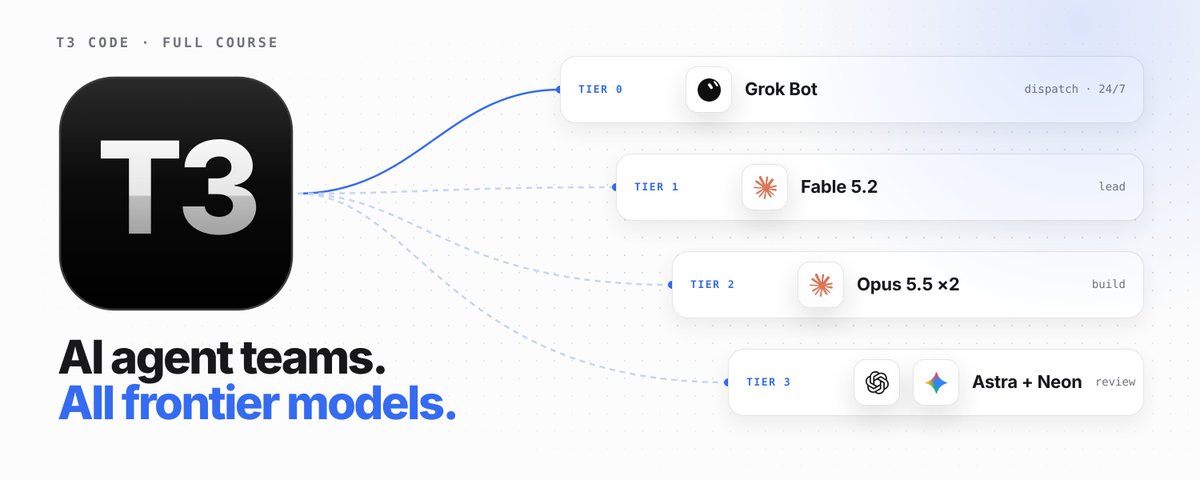
T3 Code founder just shared one prompt that builds a multi-agent team with Opus 5.5 + Grok Bot + Fable 5.2 + Gemini 4 Neon + GPT-6.2 Astra.
It's f*cking unreal…
send it to your T3 or GrokBot and thank me later. Then read the full roadmap with examples below.


Yoze Hariando retweeted

T3 Code founder just shared his personal setup for building agentic teams with Grok Bot + Opus 5.5
one Grok Bot runs your whole fleet of machines. Opus 5.5 does the coding. you only approve
how:
→ Grok Bot gets one MCP link to T3 Code
→ you give it one rule: code goes to Opus 5.5
→ it spins up threads on every machine you own
→ works from your phone, even with the laptop closed
save the video, here's the guide:
• step 0 → what it is:
Grok Bot = always-on agent with its own cloud computer
T3 Code = open-source control plane for coding agents. free, runs on your machines, uses your subscriptions
• step 1 → the stack:
- Claude $100 plan → Opus 5.5 for the actual code
- Grok Bot → the dispatcher that never sleeps
- T3 Code on every box you want it to control
• step 2 → connect the fleet:
run npx t3 connect on each machine. one command, free, no Tailscale needed
• step 3 → give Grok Bot the keys:
Settings → Environments → Copy MCP URL → paste it into Grok Bot, sign in with OAuth. it can now see every linked machine
• step 4 → the one rule Theo uses:
tell Grok Bot "call T3 Code with Opus 5.5 for any task where it is applicable"
code runs on your Claude plan, Grok Bot's limits stay free for planning
• step 5 → make it work:
- "spin up an Opus 5.5 thread on each machine to check disk & RAM"
- "go through these PRs and pick the best ones"
- "split the backlog, one thread per issue, each in its own worktree"
every thread gets its own branch. nothing merges without your approval
what to expect:
- 8 threads on 8 machines from one chat (Theo's demo)
- works over the internet, not computer use
- control everything from your phone
- T3 Code: $0. you pay for Claude + Grok Bot only
honest take:
this is a dispatcher, not magic. bad briefs still give bad PRs, and you still review every diff. the win: your agents keep working while you're away from the desk
Save it so you don't lose it.
then read the full guide on building AI agent teams in T3 Code in the article below ↓
Yoze Hariando retweeted

في يوم من الأيام بنرجع نتذكر ونستوعب إننا عشنا تجربة مشاهدة كل هالأفلام في سنة واحدة


Yoze Hariando retweeted
T3 Code is the MOST underrated AI dev tool right now
It runs Fable 5.2, Opus 5.5, GPT-6.2 Astra and Gemini 4 Neon as one team. Grok Bot feeds it work 24/7
In this full course: how to build it in 6 steps with 14 prompts
