

Building big things for the world’s largest Android ecosystem by day. 💻 Crafting elite setups by night. Living quietly. Play Store & Gumroad 👇
Joined July 2018
- Tweets9.8K
- Following11
- Followers175K
- Likes12.9K



Red is dangerous ..and red is beautiful too 🧧🔴awesome screen 👌👌 @Abhishek179ac

Launcher- Niagara Launcher
Widget- Starlight Widgets @wigebox
Icon- Ghost Icon Pack @justnewdesigns
Wallpaper- t.me/HomeScreen_Haven


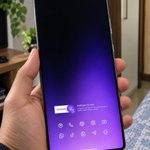
STOCK TO CUSTOMIZED (Step-by-Step) 👇
1. Wallpaper First: Open "Moonlit Walls" app ➡️ Apply the vibrant gradient wallpaper.
2. Setup Icons: Open Samsung Good Lock ➡️ Go to Home Up module ➡️ Resize your stock icons and organize them into the clean dock layout at the bottom.
3. Top Widget: Long-press home screen ➡️ Add KWGT widget ➡️ Open "Aqua KWGT" ➡️ Apply the Clock/Weather/Date widget.
4. Bottom Widget: Add a second KWGT widget below it ➡️ From "Aqua KWGT", select the System info (Humidity/Wind) + Music player widget.
5. Final Touch: Resize and center both widgets perfectly. Done! 🎉


Loving the black 🖤 and white 🤍 combo here .. absolute minimalist 👌👌 @Abhishek179ac
Launcher- Niagara Launcher
Widget- Starlight Widgets @wigebox
Icon- Reev Dark
Wallpaper- t.me/HomeScreen_Haven


Peak minimalism 🔥🔥 @Abhishek179ac superb setup 👌👌
Launcher- Nova Launcher
Widget- Starlight Widgets @wigebox
Icon- Flight Dark
Wallpaper- t.me/HomeScreen_Haven


isnt is looks so clean ...share your thoughts guys
Launcher- Niagara Launcher
Widget- Bonsai kwgt @wigebox
Icon- Flight Dark
Wallpaper- t.me/HomeScreen_Haven


For better result use samsung s26ultra to make it more crisp 👇🔥
Launcher- Niagara Launcher
Widget- Buttercup Kwgt @wigebox
Icon- Niagara Launcher
Wallpaper- t.me/HomeScreen_Haven


Setup details :
Wall : play.google.com/store/apps/d…
Widget : play.google.com/store/apps/d…
Icons : made with icon pack studio
No launcher..just one ui home up
Samsung diy home is absolutely amazing 🔥🤯
you just don't need any launcher to make it 👇
Launcher- OneUI 8.5 (DIY HOME)
Widget- Lost Kwgt @wigebox
Icon- Reev Dark
Wallpaper- t.me/HomeScreen_Haven

