

An open-source, cross-platform, modern terminal for seamless workflows
San Francisco
Joined September 2023
- Tweets178
- Following42
- Followers930
- Likes253



Pinned Tweet
15k ⭐
pretty cool. thanks for building with us.
v0.13 is out -- Wave AI with terminal context, BYOK, and local model support
github.com/wavetermdev/wavet…

Wave Terminal retweeted

An open-source, cross-platform terminal for seamless workflows, built for developers.

Wave Terminal retweeted

12.5K ⭐️ Wave Terminal (@wavetermdev) is an open-source, cross-platform, modern terminal for seamless workflows
star-history.com/#wavetermde…
#starhistory #GitHub #OpenSource #AI

Just Launched Wave AI ✨ and we're trending again! (a bit lower than I'd like, but hey, we made the page) 🚀
github.com/wavetermdev/wavet…

🚀 Wave Terminal v0.11.5 is out!
Another housekeeping + upgrade release:
• WaveAI Cloud Proxy Upgrade → gpt-5-mini
• Frontend upgraded to React 19
• New: Shift+Enter newline (for Claude Code & others)
• Dropped Universal macOS build
• Bugfixes, cleanup, package bumps
🚀 Wave v0.11.4 is out!
Just a quick patch release:
• Updated packages + security fixes
• GPT-5 now supported in WaveAI
• New ai:proxyurl setting (SOCKS/proxy access)
• Small bug fixes & polish

With Wave you can open documentation, github, or a dev server right along side your terminal. Less context switching = more productivity.
#opensource #ProductivityHacks #developerlife


🚀Wave Terminal is at the top of GitHub trending! github.com/wavetermdev/wavet…
#opensource #github #devtools #cli

Wave Terminal just shipped workspaces & command blocks in v0.10 and hit 5k ⭐️ on github... not saying they're related but maybe it's time to check it out: github.com/wavetermdev/wavet…
#opensource #devtools #cli #devex
💻 Command blocks that auto-close on success:
wsh run -x -- npm build
• Close on success (-x), block stays open if there is an error
• Close on exit, always (-X)
#devtools #codinglife
💻 Run commands in their own blocks:
wsh run -m -- git diff
• use -m to launch in magnified mode
• Cmd-W to close
• Enter to re-run
#cli
💻 Navigate blocks with Ctrl-Shift-[Arrows]
Switch tabs with Cmd-[number]
Keyboard-driven workflow ftw.
#cli #developerlife
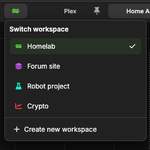
💻 Organize projects into workspaces. Each with their own window and saved tab layouts.
Switch between them with Cmd-Ctrl-[number]
#devtools

💻 Edit remote files with the built-in graphical editor:
wsh edit [filename]
• Syntax highlighting
• Mouse support
• Copy/paste
• Modern editor features
#devtools #commandline
💻 I built Wave Terminal to fix all the little friction points in my dev workflow.
Here are 8 features that make it actually useful.
#devtools #cli #opensource
🧵