







Pinned Tweet
Introducing VLM Run Gateway: run open-weight VLMs, OCR VLMs, embodied VLMs, and specialized ViTs in one OpenAI-compatible API.
You don't need a trillion parameters to parse documents, understand images, or summarize videos.
When every model runs on one API, changing models is as simple as changing a parameter.
The visual frontier just moved. Your AI bill should too.
$ uvx vlmrun gw models
Run and compare open-weight OCR models on the new @vlmrun OCR Playground.
Auto-eval and compare costs between several VLMs including PP-OCRv6, GLM-OCR, PaddleOCR-VL 1.6, DeepSeek-OCR-2, and the new LightOnOCR-3!
Try the OCR Playground on your own data: chat.vlm.run/#ocr

VLM Run retweeted

We're heading into a new era of sports analytics, where any cricket enthusiast or aspiring athlete can analyze their own personal videos and start building an AI-powered personal coach.
I spent about 10 minutes fetching clips, extracting bowling form with the @vlmrun gateway and comparing bowling traces from @Jaspritbumrah93, @malinga_ninety9 and others.
New: System One reads pixels.
Ask a typed question about an image. Get a calibrated distribution over your labels back, not a string to parse.
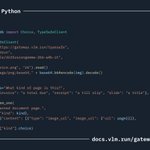
Works with the TypeSafe SDK unchanged: point base_url at gateway.vlm.run/typesafe

ALT 22 numbered lines of Python. A TypeSafeClient for gateway.vlm.run/typesafe with model google/diffusiongemma-26b-a4b-it reads invoice.png as a data URL and asks System One "What kind of page is this?" with choices invoice, receipt and slide, then prints the label.

September changelog.
Lots of exciting updates last month, and lots more to come including new guides and cookbooks.

ALT VLM Run September 2026 changelog: gateway beta with 20+ visual models; new System One (s1) API, TypeSafe-compatible, image inputs; TypeSafe SDK works by swapping base_url; s1 engines DiffusionGemma-26B, Gemma4-26B, Qwen3.8-27B; WebSocket for s1 decisions; new gateway docs.

VLM Run retweeted

I made a computer vision tool for rock climbing holds analysis!
As someone who is newer to climbing and wants to improve, I've noticed more and more recently how everyone solves the route differently. As I said to my friends the other day, "Everyone has to find their own way." 🤣
So I extended my last rock climbing demo with new analytics that I'm really excited about. I added what percentage of the total time your hands and feet are on a hold, as well as which holds each hand and foot is using.
This data can be used in a few ways. For example, I know that I should use my feet and legs more when climbing. This tool can show me how much I use my feet, so I can use that as a baseline to improve.
What I'm most excited about is how it enables comparing climbing sequences on the same route. You can compare against your friends' sequences: maybe you use 1, 3, 5, 7, and another friend uses 1, 2, 6, 7. Or you can compare against your own historical data, like I show here at the end.
I used ViTPose+ Large for pose estimation and SAM 3.1 to segment the holds, both models accessed through the @vlmrun Gateway. I also use SAM 3.1 to segment the gray floor, so we know when the feet leave the ground to help with starting the route timer.
Would love to hear what you think!
The code is open-source on GitHub: github.com/jeremyipark/visio…
VLM Run retweeted
VLMs can be surprisingly accurate and token-efficient on the right tasks.
In a bake-off between VLM-based document classification vs. OCR-based classification using our new @typesafeai-compatible SystemOne API, we're seeing over ~7x token-efficiency!
VLM: 372 tokens/page, fixed.
OCR->Text: 2,002 median, 19,159 on the worst page.
VLM Run retweeted
I made a computer vision tool for evaluating deadlift form!
I've shared a few deadlift demos in the past. This new demo includes some new models, accessed through the @vlmrun Gateway:
- SAM 3.1 to segment the barbell weight plate
- ViTPose+ Large to measure the hip hinge angle, which serves as a backup for segmenting the reps. The pose data can definitely be used more later.
- Gemma 4 26B through the Gateway's TypeSafe-compatible API to output the probability of the back being rounded or not. The predictions line up well with how I intentionally performed each rep.
Of course, there are many caveats to what is good form, as it depends on the individual. All said, this has the pieces in place to quickly make adjustments to fit the individual better.
In short, a tool like this gives people data to assess their form and improve over time.
Let me know what you think!
The code is open-source on GitHub: github.com/jeremyipark/visio…
VLM Run retweeted
You can now classify documents with open-weight VLMs at ultra-low cost with our @typesafeai Jev-compatible API in the @vlmrun gateway!
$1 buys you 6700+ pages, and the full 1,651-page OmniDocBench run cost 25 cents.
It reads the page as pixels (no OCR->LLM hacks) and hands back one typed, calibrated decision per page - ~180ms p50 e2e.
Jev really opened developers' eyes to re-thinking how we process data at the cost-pareto front. A week later we're bringing that to our APIs with vision as a first-class citizen.
Try our gateway today - free to sign-up and try!
VLM Run retweeted
Docs: docs.vlm.run/gateway/system-…
Models: docs.vlm.run/gateway/typesaf…
Streaming Support: docs.vlm.run/gateway/typesaf…
VLM Run retweeted
Jev can't see yet, but it turns you can get @googlegemma to play Snake directly from pixels.
NO this isn't yet-another Jev demo that uses game-state. It's seeing images, making decisions and responding e2e over websockets in <240ms p99 at ridiculously low costs (~$0.00007/image).
We just added @typesafeai SDK compatibility to our @vlmrun gateway where you can try out a whole bunch of VLMs with System One support.
Check it out, and it's free to try! Happy hacking on the weekend!
VLM Run retweeted
I made a computer vision tool for rock climbing analysis in 3D using iPhone LiDAR!
Having learned a lot from sharing my previous rock climbing demos, I realized that a lot of rock climbing analysis is well-suited for 3D. Even something as simple as supporting videos where the person filming moves with the climber requires 3D information.
To get the depth information, I used my iPhone 15 Pro’s LiDAR depth sensor through my local iPhone app. I found that the depth measurements help a lot.
I think the holds activation is better, and I like the final view of all of the holds in 3D. It’s also interesting to see the distance traveled in meters. Plus, it looks cool and it feels like a video game 🙂
In short, I think this new demo is an improvement in that climbers can see the real-world distance traveled and a visualization of which hand and foot activated which hold.
I recorded the video and depth measurements from my iPhone app, and I ran the rest of the analysis on my computer. I used ViTPose+ Large for pose estimation and SAM 3.1 to segment the holds, both models accessed through the @vlmrun Gateway.
Let me know what you think!
The analysis code is open-source on GitHub: github.com/jeremyipark/visio…
Same test on video: MVBench score vs. cost per 1k clips.
Three models land in the optimal quadrant (70+ score, under $10 per 1k clips), including two open-weight models on Gateway:
- qwen3.8-27b (75.5% at ~$5.50)
- muse-glimmer-30b (74% at ~$1.50)
muse-glimmer-30b is the cheapest in the quadrant, delivering high accuracy at ~1/6 the price of Gemini 3.7 Flash.

Free during alpha, no API key needed.
Try the Gateway on your own documents and videos: vlm.run/product/gateway
Docs: docs.vlm.run/gateway/introdu…
Gateway blog: vlm.run/blog/introducing-gat…
