

Verse is a free, interactive video platform that empowers filmmakers, journalists and marketers to tell rich, compelling stories. #freethestory
New York, USA
Joined April 2016
- Tweets1.7K
- Following774
- Followers353
- Likes271


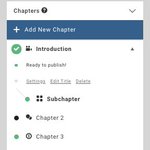



Explainers allows the user to choose which videos they'd like to watch. You can even nest videos inside of videos by clicking and dragging them underneath each other in the chapter settings to the right.

Trying to perfect your Verse experience? Check out all the options Verse offers in customizing the player when using you embed your story. You can find these options when you select the publish tab.

When creating a slideshow in Verse, you have the option of using either video or photos. You can time your slides by checking the auto-advance box in the the slideshow chapter settings.


Hotspots allow you to place interactive calls to action on the screen. You can send your viewers to another part of your story whether it be a chapter or subchapter, or you can send them out to an external webpage.

To share your story, remember to publish it by going to the "Publish Settings" tab and then grabbing its sharing url from the "Published URL" section.


Track what parts of your story need completion by seeing which chapters have a green check mark next to them or a gray exclamation mark.

When creating a slideshow in Verse, you have the option of using either video or photos. You can time your slides by checking the auto-advance box in the the slideshow chapter settings.

Explainers allows the user to choose which videos they'd like to watch. You can even nest videos inside of videos by clicking and dragging them underneath each other in the chapter settings to the right.

Ready to create your own interactive story, but don't know where to begin? Every Verse account comes with several interactive story templates to help you get started and if you still have questions, please reach out to us on messenger.


State of Addiction: An interactive experience exploring the impact of opioids across America. bit.ly/2uryEJj by @wyffnews4
Why does a man in Jordan give up a successful career to sell books out of 1974 Mercedes? bit.ly/2KZazDU
Learn about @marinalsop, the first female conductor of a major orchestra, in this interactive Q&A: bit.ly/2JusRHv #firstwomen
Learn how to act and take part in #SavingSalmon in this informative, interactive series from @McClatchyDC: bit.ly/2KZasIu
"I thought I was going to die." You WON'T BELIEVE these people's ayahuasca stories from the rainforests of Brazil. bit.ly/2uyyIXR
Where do Latin baseball players go after #MLB? Find out in this interactive video documentary. bit.ly/2NmGSJw