






Pinned Tweet
Stocks are on UPPIN, on the same screen as every Solana coin.
The new Stocks hall on Markets lists 105 tokenized stocks, ETFs and pre-IPO names. Nvidia, Tesla, Apple, SpaceX, the S&P 500 and gold are there, and so are OpenAI and Anthropic.
Every price is read from the token's own Solana pool, day and night, and each page shows whether the US market is open.
32 of them have perpetuals, long or short with up to 20x, OpenAI and Anthropic included. There is no liquidation and no margin call. The margin you put in is the most you can lose.
Each position has a max gain and a max loss level, 5% from your entry on a 20x position, and it settles the moment the price touches one. These markets keep trading at night and on weekends, when the stock exchange is closed.
You can also buy and sell the stock tokens themselves with SOL or USDC, from your own wallet, for a 0.30% fee.
Every Solana coin now has a buy and sell ticket on its UPPIN page too, and 65% of the fee on those coin trades buys the coin you just traded and burns it.
Our own share of fees went from 40% to 35%, and those 5 points now go to the pool that stands behind every futures position.
Holder vote #1 is applied as well. 30% of every $ UPPIN trading fee buys $ UPPIN and burns it, and 20% goes to stakers in USDC.
This is what the move to our own server was for. It now watches 41 perpetual markets and reads the prices of all 105 stocks.
The Stocks hall and stock trading are not open to US persons.
app.uppin.fun/markets?hall=s…
On UPPIN, a coin with a tiny price per token still gets a fine Upside or Downside price, since its rights can come in blocks.
A target or a floor can be set in blocks of several tokens. Its rights then trade in whole blocks, and a right for one block delivers exactly that many tokens.
On $ UPPIN, Upside and Downside run in blocks of 100. Pick an amount to lock under a Downside floor on its page, and the panel rounds it to whole blocks and says so under the amount.
Prices still show as USDC per whole token, whatever the size of the block.
app.uppin.fun/docs

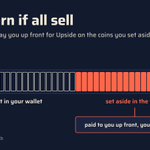
Before your wallet signs a launch on UPPIN, the panel beside the steps ends on one line, You earn if all sell.
It is what buyers would pay you up front for Upside on the coins you set aside from your first buy. That payment stays with you even if the price never reaches the target.
Step 3 starts with half of your first buy set aside, the rest staying in your wallet, and 7 days to the end date. Change the share set aside or the price per coin, and the line follows.
Set-aside coins nobody buys Upside on can be taken back at any time. Coins someone bought Upside on stay in the vault until the end date.
app.uppin.fun/launch

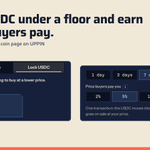
On UPPIN, Lock USDC in a coin's Downside tab earns you what buyers pay for your promise to buy the coin at a lower price.
You join a floor already on sale, or set a new one with a price per token and a length of 1, 3, 7 or 14 days.
Then you pick the price buyers pay you, 2%, 5% or 10% of the floor price, or your own. Signing once locks your USDC in the launch's Downside vault, and your floor goes on sale.
What buyers pay is yours whether or not they ever sell to you.
If the coin falls under your floor, buyers can sell it to you at that price, and those tokens can end up worth far less than the USDC you locked.
app.uppin.fun/docs

A perpetual on UPPIN can be closed 25, 50 or 75% at a time, and the rest runs on between the same two levels.
Those two, max gain and max loss, were set when the position opened. A part close takes size out, with the margin behind it, and leaves both where they are.
Close on a position asks How much to close, then for a Price protection of 0.5, 1 or 2%. Before you sign, it shows about how much USDC comes back and the result after fees.
If the price moves past that protection before the transaction lands, nothing closes, and you can sign again.
The part you close pays back its own margin, plus or minus its result, less the holding fee and the close fee on that part.
app.uppin.fun/docs

Every coin launched on UPPIN starts under UPPIN's own platform account on Raydium LaunchLab, and Receipts lists that account.
A coin's curve account, which Raydium's program owns, keeps the platform's address inside it, next to the coin's own. So the launchpad a coin came from can be read straight from the chain.
When the coin trades on its curve, Raydium takes its fee, and a platform fee goes beside it, in SOL, to the platform fee vault.
That fee counts as service revenue, and part of service revenue is paid to $ UPPIN stakers in USDC.
The platform and its fee vault sit one after the other under Program and vaults, near the end of the Receipts page.
app.uppin.fun/receipts

On UPPIN expiry futures, a coin's price is kept in what its own pool trades it against, SOL or USDC.
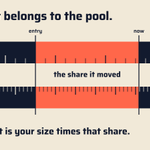
Your result is your size times the share the price has moved since your entry, held inside the position's band. A share has no unit, so the SOL price never enters the USDC you get back.
The unit does decide what you follow. On a SOL pool a position tracks the coin against SOL, so when both move by the same share against the dollar, it stays where it was.
A take profit or stop loss level is set in that unit too.
On 22 Nov, eight coins had expiry futures on UPPIN, seven of them on a SOL pool and one on a USDC pool.
app.uppin.fun/docs

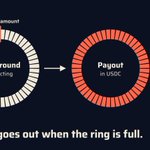
A box named Next round, on the Stake pool card of UPPIN Earn, shows how full the next USDC payout to $ UPPIN stakers is.
Its percentage counts the stakers' part of the fees UPPIN takes in SOL. That part collects toward a set amount, and once it gets there, a round goes out.
The box has no countdown, because fees fill it and fees come at their own pace. Some days hold more rounds than others. Earn lists 5 for 20 Nov and 12 for 21 Nov, in UTC days.
Latest allocation, the box beside it, then shows what that round paid and how long ago it was.
app.uppin.fun/earn

When a coin launched on UPPIN fills its curve, spot trading on it pauses until the move to its Raydium pool has landed.
A curve is full once it has raised its SOL target. The coin and that SOL then go to a Raydium CPMM pool together, and spot opens again there.
While the move is in progress, the coin's page reads Graduating where its bonding percentage was, and the Spot order says trading is paused, so no buy or sell can be sent from it.
The spot price itself is in SOL per token, read from the curve before the move and from the pool after it. The USD figure beside it uses the Pyth SOL/USD price and is only for reading.
app.uppin.fun/docs

6
208
With only SOL in your wallet, you can still become an LP in the futures pool on UPPIN. The pool itself runs on USDC.
Two transactions get you there. The first turns your SOL into USDC through Jupiter, and the second puts that USDC into the pool.
They land one at a time, so the first can go through when the second does not. The USDC is then in your wallet, and you deposit it from there with no new swap.
The pool charges nothing to deposit. Each of the two transactions has its network fee in SOL.
An LP can lose when traders win, as the pool page says.
app.uppin.fun/earn/pool

8
247
On UPPIN, what people put into Upside and Downside sits in different accounts from the fees UPPIN earns, with separate ledger rows.
A launch has two Upside vaults, for the tokens sellers lock and the USDC waiting for those sellers. A launch with Downside on it has two more, for the USDC behind its floors, the prices buyers paid and the tokens sold at a floor.
Nothing leaves those vaults unless a buyer claims or sells at the floor, or a seller unlists, takes back, withdraws or collects.
The service fee on a purchase does not pass through them. It goes from the buyer straight to the service fee vault, which belongs to UPPIN's service revenue.
One program address owns all of these vaults, and it has no private key.
app.uppin.fun/docs

Upside and Downside on UPPIN count USDC in whole micro-USDC, each one a millionth of a USDC, so every amount that moves is exact.
A price is kept on chain to six decimals. What is paid is that price times the quantity, one whole number times another, with nothing left to round.
It holds when a buyer pays for rights, when tokens are claimed and when tokens are sold at a floor.
The service fee is the only figure that gets rounded, because it is a share of the price paid. It drops to the whole micro-USDC below, so any fraction stays with the buyer.
Receipts lists the price paid and the service fee as separate entries, so each can be read on its own.
app.uppin.fun/docs

A coin is launched on UPPIN from the Launch page in three short steps, and then your wallet signs.
Step 1 of 3 is the coin itself. Its name of up to 32 characters, its ticker of up to 10 and its picture, PNG, JPEG or WebP up to 1 MB, are written on chain and stay that way for good.
A description of up to 500 characters is optional, and so are links to X, a website and Telegram, which the coin's market page turns into buttons.
Step 2 is your own first buy of the coin. Step 3 opens Upside on it, and you can skip it.
app.uppin.fun/launch

1
3
148
Every futures market page on UPPIN has a Pool depth ladder, which shows how much size an open can fill up to each price.
Each row gives a price an open would reach, the impact paid on the way there, and the size that fills up to it. Long rows sit above the mark and short rows below it.
The rows are not orders from other traders. They are the program's own impact formula, worked out from the room left on each side and the LP capital in the pool.
A fuller side or a smaller pool spreads the rows further from the mark, and more LP capital or more room brings them closer.
Under the ladder, the page gives the room left for longs and for shorts.
app.uppin.fun/markets

4
109
On UPPIN perpetuals, the longs together can use at most half of a coin's cap, and so can the shorts.
The cap itself is the total open size a coin's perpetual market accepts, sized from the liquidity in that coin's pool.
Any open that would carry its side over that half is refused. However crowded one side gets, it can never take up the whole cap.
The order panel says how much size a new long or a new short can still add, and names the limit that sets it, such as the one-side limit.
app.uppin.fun/docs

5
100
On UPPIN expiry futures, each fill looks at two prices, the coin's live pool price and its 5-minute average, and gives you the worse.
Going long, you open at whichever is higher and close at whichever is lower. Going short, you open at the lower one and close at the higher one.
The spread then goes against you on every fill.
So a quick jump or dip in the pool's price does not get anyone in or out on better terms than the average allows.
The docs set out all four cases under Futures, in The fill price.
app.uppin.fun/docs

2
104
Coin burns on UPPIN read six spans of trading at once, the last minute, 15 minutes, hour, 6 hours, 24 hours and 7 days.
Each burn round splits its SOL evenly between those six windows. A window in which no coin launched on UPPIN traded takes no share, and the round is split between the rest.
So a short burst of trading can put a coin at the top of the short windows, and steady trading over days can put one at the top of the long ones.
The Burns page shows the coin at the top of each window right now, and lists every past round with its windows and its Solscan links.
app.uppin.fun/burns

1
3
114
An expiry futures market on UPPIN is one coin with one end time, and markets open for 1-hour and 4-hour terms.
New positions stop 1 minute before the end. Until it ends, you can close yours at any time.
Whatever the price does in between, a position stays open until you close it or the market ends, and the most it can win is capped by its band.
Positions trade on each coin's Futures tab, under Expiry, where the panel counts down to the market's end.
app.uppin.fun/docs

2
108
On UPPIN you can sell all of what your Downside rights cover at the floor, or only part of it.
The tokens you sell go into the launch's Downside token vault, where they wait for the seller who locked the USDC behind that floor.
Your Downside, on each coin's market page, shows the rights you bought and the floors you backed, with their sell, collect and take-back buttons.
The price you paid for the rights is lost in full if the coin stays at or above the floor until they end.
app.uppin.fun/docs

The settings UPPIN works from sit on chain, in two accounts of their own, both owned by the UPPIN program.
The first, Config, carries four settings: the quote mint, the service fee rate, the buy cutoff and the pause flag.
The second, Futures config, carries the futures side, its fees, spread, impact, limits and time windows, with a separate pause flag.
In the docs each one sits with its address, a Copy button and a Solscan button, so you can open the account itself.
app.uppin.fun/docs

Each coin with futures on UPPIN is tied to one pool, once, and every later futures transaction on it must pass through that same pool.
When a coin is bound, the program checks on chain the venue program, the pair against SOL or USDC, and the pool's own vault addresses.
The market's price checkpoints are read from that pool too.
On PumpSwap, the only pool that can be bound is the canonical one created when the coin graduated.
A coin still trading on its bonding curve has no pool to bind, so its futures wait until it trades in one.
app.uppin.fun/docs

5
130