

ai geekk / dm open
AI
Joined December 2025
- Tweets35
- Following50
- Followers233
- Likes262


unknownnodeee retweeted
THIS IS A F*CKING 38-JOB COMPANY INSIDE ONE GROK BOT
someone finally organized AI automation like an actual business instead of a bunch of agents running around with no purpose.
38 routines. 8 trigger groups. one bot.
and every job has its own reason to wake up.
the setup is surprisingly clean:
→ WEBHOOK runs 7 jobs for deployments, payments, orders, refunds and incoming leads
→ HOURLY + CHECK handles 6 monitors covering prices, repository changes, inbox counts and competitor pages
→ DAILY 08:00 delivers 5 scheduled tasks for morning briefs, metrics, calendar preparation and invoices
→ SLACK runs 5 workflows for standups, thread summaries, support and mentions
→ GITHUB takes care of 5 engineering jobs, including PR reviews, issue labels, CI checks and dependency changes
→ EMAIL manages 4 jobs for invoices, lead drafts, receipts and newsletters
→ NIGHT RULE keeps 3 overnight workflows separate from actions that need human approval
→ MONDAY 09:00 runs 3 maintenance tasks: audit.py, Log Rotator and Cost Report
the last one is my favorite.
every monday, Cost Report tells you what each routine cost over the previous week.
you can finally see which automations are useful and which ones are just burning money.
here's how i'd organize the whole system:
→ events for things that need immediate attention
→ hourly checks for sources that change frequently
→ daily schedules for predictable reporting
→ night rules for work that shouldn't wake you up
→ weekly audits to catch waste and failures
no need to turn every little task into another expensive AI session.
the important part is assigning the right trigger before you enable anything.
paste this into Grok Bot ↓
"Design a routine workspace with 8 trigger groups.
1. Organize my workflows across webhooks, hourly checks, daily schedules, Slack, GitHub, email, overnight rules and weekly maintenance.
2. Give every routine one specific responsibility and an expected output.
3. Use event triggers when supported instead of unnecessary scheduled polling.
4. Skip expensive processing when the underlying information hasn't changed.
5. Keep sensitive actions in draft mode until I approve them.
6. Create a Monday 09:00 Cost Report showing execution counts, failures, estimated spending and routines worth pausing.
Show me the entire configuration before enabling anything."
the dashboard uses 38 of Grok Bot's 50 available routine slots.
but filling every slot isn't the goal.
i'd rather have 12 jobs that finish real work than 50 agents competing to write the same useless status update.
↳ docs.x.ai/grok-bot/skills-ro…


unknownnodeee retweeted
grok bot can run an entire AI team while you sleep. the scary part is how much money that team can waste doing absolutely nothing
a routine checking every 5 minutes wakes up 8,640 times a month.
in this example, running the full AI task every time costs $397/month. checking for changes first brings the modeled bill down to $45.
that's nearly 89% less.
here's the 8-bot setup i'd actually want:
bot 1 → Trigger Scout watches for real changes instead of firing off expensive requests on a timer
bot 2 → CI Watcher checks builds and pull requests, only investigating when a status changes
bot 3 → Price Tracker compares competitor pages and reports new prices, not the same numbers twice
bot 4 → Inbox Desk sorts incoming emails and prepares replies without sending anything risky
bot 5 → Deploy Guard catches failed deployments and collects logs before anyone gets involved
bot 6 → Night Shift handles safe tasks overnight and leaves sensitive decisions waiting for approval
bot 7 → Run Logger records every execution, skipped check, failure and reason behind it
bot 8 → Monday Auditor goes through the history and finds routines that are quietly eating the budget
you don't need all 8 constantly thinking.
most of the time, they should be waiting for a reason to start.
the workflow is ridiculously simple:
event → change check → relevant agent → safe execution → log → weekly audit
the $397 and $45 figures are illustrative API estimates, not Grok Bot subscription prices.
imagine opening your laptop on monday and finding completed work instead of a graveyard of expired approvals.
that's the kind of AI employee i'd keep on payroll.
the ones asking "anything new?" every 5 minutes can pack their desks.
unknownnodeee retweeted
call me insane but grok bot just made me realize how stupid most AI automation actually is
8,640 runs a month just to check if something changed.
grok bot + smart triggers could cut that down without missing the work that matters.
event → change check → grok bot → approval → audit
no change? no run.
3 a.m. approval? leave a draft.
something breaks? wake the right routine.
give grok bot this exact workflow.
let the bots work. not the clock.
unknownnodeee retweeted
SpaceXAI engineer on the Grok Bot team, Lauren Tan:
"if you don't have trust and you try to spawn 100 sub-agents or cloud agents, you're going to quickly find that you're just going to get a ton of slop pull requests and a bunch of regressions"
most people scale agents first and fix the mess later.
she does it backwards:
Verification Skills → Agent Checks Its Own Work → Trust → 100 Parallel Agents → Whole Team Ships
in this 37-minute talk, she shows how agents run the app themselves, take traces, find the hotspots and "hill climb to a better performance in our application automatically."
no babysitting every diff. no wall of slop PRs.
more useful than any agent course you'll pay for this year.
bookmark it and watch it now.
then read my full breakdown below on what Grok Bot routines really cost ↓
unknownnodeee retweeted
SpaceXAI engineer at Grok Bot Galaxy:
"every 3 a.m., my bot will start a research cloud agent across the whole surface of our monorepo. And when I wake up, I just have a set of PRs available."
The setup is basically a 24/7 agent team that only pings a human when it matters.
In this 21-minute workshop, you see how the bots handle research, CI fixes and on-call while nobody is watching.
This is more useful than 10+ surface-level Grok Bot / agent engineering guides.
Watch the workshop, then read the article below ↓
unknownnodeee retweeted
THIS IS ACTUALLY A F*CKING INSANE WAY TO CUT AI COSTS BY 90%
everyone's busy racing frontier models against each other. meanwhile, the expensive mistake happens before the model even gets a turn.
this support desk example is ridiculous:
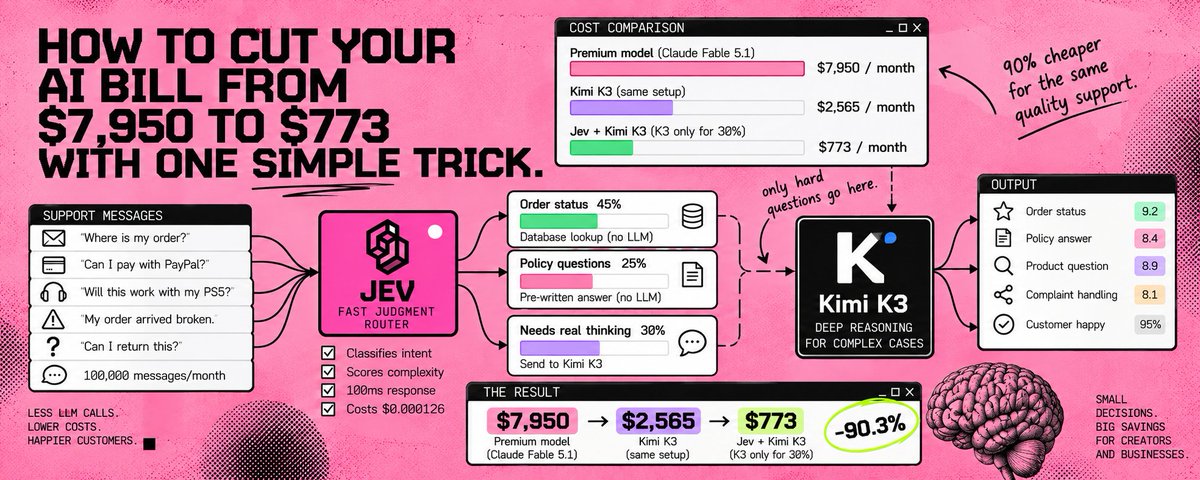
100,000 messages a month, $7,950 in AI costs. then Kimi K3 and Jev enter the picture.
here's the trick:
→ 45% are order updates, handled by code
→ 25% are policy questions, answered from saved replies
→ 30% actually need Kimi K3 to think
→ Jev sorts the entire inbox for just $3.15
the big model never even sees 70,000 of those messages.
and the numbers get pretty stupid:
→ premium model alone: $7,950/month
→ Kimi K3 alone: $2,565/month
→ Jev + Kimi K3: $773/month
that's 90% off the bill in this modeled scenario, without making the hard questions somebody else's problem.
the part i like most is that Jev doesn't try to write anything. it makes the routing decisions, code handles the obvious stuff, and Kimi K3 gets the work that actually needs reasoning.
we spent years making models smarter. now the interesting engineering is deciding when to leave them alone.
want to build the decision layer yourself? ↓
↳ docs.typesafe.ai/
the cheapest model call is the one you never make.

unknownnodeee retweeted
Grok Bot running an entire AI team overnight sounds f**king insane until you see how much work it actually skips
most people keep adding agents, bigger context windows and endless schedules without asking whether anything even changed.
the real bottleneck isn't intelligence. it's the clock.
[one Chief of Staff, 5 independent routines]
→ X-MENTIONS checks activity every 5 minutes
→ CI-WATCH monitors code every 15 minutes
→ INBOX processes messages hourly
→ COMPETITOR runs daily research
→ DEPLOYS wakes only when a webhook fires
each agent follows its own schedule while the Chief decides what deserves a full run.
the overnight simulation:
→ 20 checks across the system
→ 16 skipped because nothing changed
→ 4 full agent runs
→ 1 risky action saved as a draft
the cost model gets even better:
→ full polling: $397/month
→ lightweight checks: $45/month
→ 89% less estimated spending
these are example API costs, not actual subscription charges.
the interesting part isn't keeping agents awake all night.
it's building a system that can finish the important work without waking you.
unknownnodeee retweeted
SpaceXAI engineer Lauren Tan just showed a Grok Bot that literally audits its own agents and catches expensive routines
this is f**king useful...
in this 10-minute breakdown, she shows how her AI team checks its own work, builds new bots and learns when to stop wasting compute:
• 00:48 - cloud agents run evals before a PR lands
• 03:55 - Dr. Eggbot audits other bots and their routines
• 05:12 - an engineering lead delegates work across agents
• 08:12 - turning supervised tasks into reusable skills
the crazy part is that she doesn't just let agents run forever. she builds trust through verification, then gives them more autonomy.
watch the 10-minute breakdown, then read how to build cheaper, safer overnight routines in the article below ↓
unknownnodeee retweeted

Drex 2.0 just gave Jev a serious problem with only 3B active parameters.
two models go head-to-head in a live game. same board, constant decisions, and every bad move is right there on screen.
→ Drex 2.0: 61.0 Decision Index
→ Jev: 58.0
→ 60.9% head-to-head score across 256 games
→ up to 38% faster on 32K–128K inputs
the crazy part? @NaceAI built this to make decisions without dragging a massive model through every single step. $0.06 per 1M input tokens makes that pretty interesting.
think agent routing, tool selection, and hundreds of tiny decisions happening before the expensive model even wakes up.
the game is fun to watch. the real win is making AI agents stop paying full price just to decide what happens next.
🤝 Paid partnership

Introducing Drex 2.0 - our Fastest and Smartest Decision Model!
3B active parameters, super fast inference.
Try Drex 2.0: nace.ai/developers
• Up to 38% faster on 32K–128K inputs vs. Drex 1.5
• $0.06 per 1M input tokens
• Runs on @sgl_project
• $25 Sign Up Bonus
Day 0 support from @FireworksAI_HQ’s FireAttention
dedicated deployment.

unknownnodeee retweeted
xAI engineers just showed how Grok Bot can run an entire AI team 24/7
in a 25-minute session, they walk through persistent memory, cloud computers, integrations and bots working together without starting from scratch every time.
but here's the part most people miss:
one routine running every 5 minutes = 8,640 runs a month. at Grok 4.6 API rates, that's roughly $397 vs $33 for the exact same job running hourly.
same bot. same task. 12x the estimated cost just because of the clock.
this 25-minute walkthrough is worth watching. i also broke down the routines, triggers and approval mistakes in my full article below ↓
unknownnodeee retweeted
Opus 5.5 looks overpriced right up until you count how many times Sonnet has to try again
same migration, very different path:
Sonnet 5.5
> 47 turns
> 3 retries
> 2.31M tokens
> $4.18 total
Opus 5.5
> 19 turns
> 0 retries
> 1.46M tokens
> $5.28 total
the interesting part is not that Opus costs more
it’s that the gap collapses once you price the finished task instead of the individual call
on paper, the model can look 2x more expensive
inside the real loop, this run lands around 1.26x
that happens because long jobs accumulate costs in places the pricing page does not show:
> repeated attempts
> extra tool calls
> growing context
> retries after bad plans
> more turns before the task actually passes
so the number I’d watch is not $/token
it’s how expensive the model is by the time the work is actually done
for clean, obvious tasks, Sonnet still makes sense
for messy work, fewer good turns can beat a pile of cheaper bad ones
price the outcome, not the token ↓
unknownnodeee retweeted

Tesla's Optimus Gamer is learning to play Diablo. But gaming is just the beginning.
What if the same SI could eventually do your job?
Tesla is training SI to see a screen, make decisions, and control a keyboard and mouse. The goal is to build systems that can handle digital tasks without humans guiding every step.
4 predictions for what comes next:
- SI agents will take over repetitive office work.
- One person will be able to manage an entire team of SI workers.
- SI will operate entire software systems, not just write code.
- The same technology could eventually help robots perform complex tasks in the real world.
Today, it's playing Diablo. Tomorrow, it could be doing your job.
How long before SI can handle most tasks people do on a computer?

unknownnodeee retweeted
stop telling Opus 5.5 to make motion “smooth”
that word is doing almost no work
give it curves, springs, durations and actual motion systems instead and the output gets way more predictable
I pulled 10 GitHub repos that are useful for exactly that:
1. motion-canvas
TypeScript animations with generators + real-time preview. great when you want every beat tied to an exact timeline
github.com/motion-canvas/mot…
2. theatre.js
high-fidelity motion graphics for HTML, SVG and 3D. code + visual editing in the same system
github.com/theatre-js/theatr…
3. mo.js
shapes, bursts, staggers and swirls. much better primitives than “make it feel dynamic”
github.com/mojs/mojs
4. mo.js curve editor
live editing for custom easing and property curves
github.com/mojs/mojs-curve-e…
5. popmotion
keyframes, springs and decay animations for numbers, colors, strings and SVG paths
github.com/Popmotion/popmoti…
6. react-spring
spring-physics-first animation for React, React Native and Three
github.com/pmndrs/react-spri…
7. auto-animate
one-line transitions for DOM changes. simple enough for Opus to inspect and reuse fast
github.com/FormKit/auto-anim…
8. barba.js
page-transition engine for fluid site navigation and state changes
github.com/barbajs/barba
9. ant-motion
Ant Design’s motion specification + React animation components with tweening and Bezier motion
github.com/ant-design/ant-mo…
10. manim
a full programmatic animation engine built around precise, reproducible motion
github.com/ManimCommunity/ma…
instead of:
> make it smoother
> make the bounce subtle
> make it feel cinematic
give Opus:
> 420ms duration
> 32px travel
> spring stiffness 170
> damping 22
> 80ms stagger
less adjectives, more numbers
that’s when the motion stops being a guess ↓
unknownnodeee retweeted
holy sh*t. Anthropic basically documented the exact reason most Claude Code setups waste Opus 5.5
the expensive mistake is not using Opus
it’s letting it sit inside work that never needed frontier reasoning in the first place
the clean setup is an escalation tree:
→ Sonnet 5.5 starts the task
→ checkpoint around turn 6
→ pass = keep Sonnet moving
→ fail = stop immediately
→ build a clean handoff
→ fresh Opus 5.5 session only for the hard branch
the math gets weird fast:
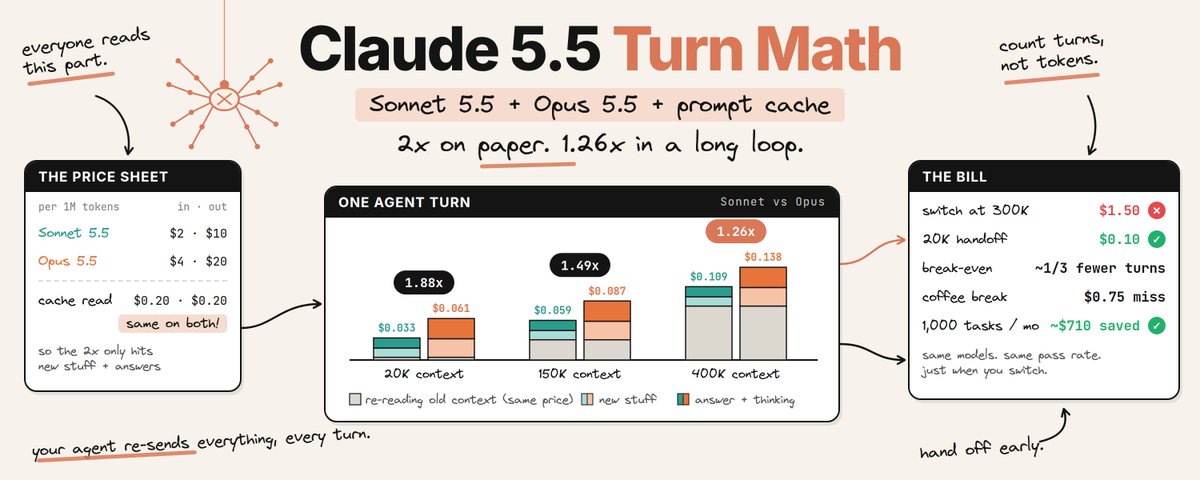
→ 20K context: Opus is 1.88x per turn
→ 150K context: 1.49x
→ 400K context: 1.26x
then comes the expensive part:
→ late switch at 300K = $1.50 just to rebuild cache
→ clean handoff at 20K = about $0.10
that means the real optimization is not “cheap model first”
it’s knowing exactly when Sonnet has earned another turn
- the full routing tree
> Sonnet owns scoped implementation
> compile/tests happen before the loop gets huge
> one clean pass keeps Sonnet running
> repeated failure triggers escalation
> Opus gets the task + failing check + relevant files
> the dead transcript stays behind
> completed work comes back with evidence attached
and at 150K context the difference gets almost stupid:
30 Sonnet turns = $1.76
20 Opus turns = $1.75
so stop asking:
“which model is cheaper?”
ask:
“does this task deserve another Sonnet turn?”
Sonnet explores
the checkpoint decides
Opus finishes the branches that actually need it
↳ platform.claude.com/docs/en/…
unknownnodeee retweeted
the most expensive Claude setup is usually the one that looks cheapest per token
Sonnet 5.5 should do the cheap laps. Opus 5.5 should only enter when the loop proves it needs more reasoning
the tree:
> Sonnet starts the task
> run a real check around turn 6
> if it passes, keep going
> if it fails, stop the session
> build a clean 20K handoff
> start Opus fresh
that one routing rule changes the math:
> 20K context: Opus 1.88x
> 150K: 1.49x
> 400K: 1.26x
> late 300K switch: $1.50
> clean 20K handoff: $0.10
at 150K, 30 Sonnet turns cost $1.76. 20 Opus turns cost $1.75
paste this into Claude Code ↓
“Rebuild my workflow around this routing tree:
1. Start scoped tasks on Sonnet 5.5
2. Add a real verification checkpoint around turn 6. If it passes, continue. If it fails, stop
3. On failure, create a fresh Opus 5.5 session with only the task, failing check and files that matter. Keep the handoff under 20K
4. Never move the full transcript between models. Show me the routing changes before editing anything”
the goal isn’t fewer Opus calls
it’s fewer useless turns before Opus gets called
↳ platform.claude.com/docs/en/…
unknownnodeee retweeted
i made the chrome dino game multiplayer. it's called dinorunner
everyone online races live. 6 zones, daily leaderboard
built it while writing about why opus 5.5 is 1.26x, not 2x
dinorunner-ekw6.onrender.com

unknownnodeee retweeted
this is pure f**king gold
Anthropic basically hid a routing problem inside a pricing table, and once you model the loop properly, Opus 5.5 stops looking like the “2x model”
the trick is that old context gets cheap:
> 20K context: Opus is 1.88x Sonnet per turn
> 150K context: the gap falls to 1.49x
> 400K context: it drops again to 1.26x
cache reads cost the same $0.20 / 1M on both models, so the longer the session runs, the less the sticker price explains the real bill
then the routing starts to matter more than the model:
> clear task? keep it on Sonnet
> real check fails? escalate
> give Opus the failing state + useful files
> never drag the whole dead transcript across
because a 300K switch costs $1.50 just to rebuild cache
the same clean 20K handoff costs $0.10
and at 150K context, 30 Sonnet turns cost $1.76 while 20 Opus turns cost $1.75
so the expensive mistake isn’t choosing Opus
it’s making the wrong model stay in the loop for too long
price the path to “done,” not the logo on the model ↓