

Simple and effective to-do list and task manager to help you stay organized and get things done.
Joined March 2026
- Tweets62
- Following3
- Followers1.1K
- Likes49







Pinned Tweet
Welcome to TickTick 👋
Your all-in-one app for:
✅ Todo list
📅 Calendar Views
🎯 Eisenhower Matrix
🍅 Pomodoro
⏰ Habit Tracker
⏳ Countdown
Stay organized and get things done.
Try TickTick 👇
ticktick.com/features
Meet TickTick AI Assistant ✨
Tell TickTick what you need, and AI can help you:
📝 Create tasks
🗂️ Organize your Inbox
🧩 Break down projects
📋 Plan your day
From quick captures to complex projects, turn ideas into action with AI.
👇 Learn more:help.ticktick.com/articles/7…

Did you know TickTick’s Eisenhower Matrix is customizable? 👀
Adjust the rules for each quadrant and organize tasks based on your priorities.
Eisenhower Matrix → “…” → Edit
Create a workflow that works for you. ✨
🤖 Made with AI


Thanks for sharing your TickTick journey! ✨
We’re happy to be part of your everyday planning and productivity. 🙌

I’ve tried all the major to-do list apps but keep coming back to this one androidauthority.com/keep-co…

Glad TickTick helps you stay organized.

ToDoリストが沢山あると、タスクの山の圧倒感におえーっとなるので、TickTickというアプリの時間管理マトリックスが最強に良かった。
優先順位が分かる👍
登録時の分類のしやすさ️⭕️
完了するまでリマインド️有り⭕️
ポモドーロが入っているのも地味に便利
#ADHDのパワー系ソリューション


TickTick Tip: Capture Ideas Instantly on Desktop ⚡
Got an idea while doing something else?
Use the global shortcut to capture it without opening TickTick.
Windows: "Shift + Alt + A"
Mac: "Control + Shift + A"
Customize via ? → Shortcuts (bottom-left).


TickTick Tip: Quickly Set Task Details ⚡
Set task details as you type—no need to click each option separately.
“~” Select a list
“!” Set priority
“#” Add a tag
“Date & time” Type it directly, and TickTick will recognize it automatically.


TickTick Tip: Easily Plan Irregular Tasks 📅
In Calendar View, hold ⌘ or Ctrl and drag a task to duplicate it. Easily schedule the same task multiple times without a fixed schedule.
Note: Available on Web and Windows. Not yet available on the Mac app.

🎓 Trying to get your student life organized?
Build a simple system for classes, assignments, deadlines, exams, and more with TickTick.
Step-by-step guide 👇
youtube.com/watch?v=BUwS1sYX…

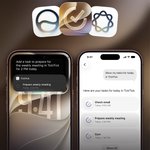
🎉 AI Assistant is now in beta!
Just tell TickTick what you want to do, and let AI help:
📝 Create tasks
🗂️ Organize your Inbox
🧩 Break down projects
From capturing tasks to planning complex projects, just tell AI what you need.
👇 Join the beta

ALT Join the beta: 📱 iOS: https://testflight.apple.com/join/u2huDrr2 🌐 Web: Contact us via a support ticket to join the beta, then visit https://beta.ticktick.com Currently available on iOS and Web. Android, macOS, and Windows are in development. Premium users only.
Join the beta:
📱 iOS: testflight.apple.com/join/u2…
🌐 Web: Contact us via a support ticket to join the beta, then visit beta.ticktick.com
Currently available on iOS and Web. Android, macOS, and Windows are in development.
Premium users only.


New semester, new productivity system. 📚✨
We shared how to organize your semester with TickTick — now show us yours!
Share your setup with @ticktickteam + #ticktick for a chance to win TickTick Premium.

🎓 Build a productivity system for a more organized semester:
1. Keep courses & deadlines organized
2. Plan your time without the chaos
3. Know what matters & keep it visible
4. Stay focused & see where your time goes
👇 Full guide:
ticktick.com/resources/artic…
