

Brand Identity Designer | [email protected]
Lima, Peru
Joined November 2020
- Tweets11.8K
- Following612
- Followers11.4K
- Likes34.9K








Pinned Tweet
Hey, my name is Cesar. I'm from Peru, I'm 21 years old and I've been creating logos for more than 5 years for different brands around the world. I have never stopped to count how many logos I have created, but I think I have designed more than 300, so I have experience.


Segundo prompt: docs.google.com/document/d/1…
El primer prompt es el tweet citado:


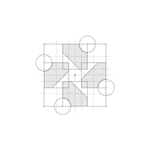
Build a clean logo construction grid in Figma for the logo(s) in this file: [FIGMA URL]. Number of grid directions per logo: 3
Reference images: I'm attaching images of logo construction grids as visual inspiration for tone and restraint: thin precise lines, neutral grays, a clear difference between primary and secondary guides, and a calm editorial feel. Use them for the visual language only. Do not copy their geometry or methods.
1. ANALYZE FIRST
Before drawing anything, read the logo's actual geometry. Export its vector path (SVG) and parse it. Measure, don't eyeball:
- bounding box, centre, any symmetry (mirror or rotational) and how exact it is
- circles: fit them to the curved segments and check radius, centre and tangency to the bounding box or to edges
- straight-edge angles, repeated radii or module sizes, and equal ratios between shapes
- which anchors and intersections matter (arc ends, tangent points, fillets, centres)
Derive the construction from the logo itself. Never force a generic grid onto it. Do not force geometric purity onto an imperfect logo: the goal is to explain the existing mark, not to redesign it or mathematically "fix" it. Where something fits only approximately, keep the real shape and say so.
2. CONSTRUCTION
- Explain the whole mark, not one feature. Use whatever combination of circles, arcs, tangents, axes, angles, polygons, extended edges, fillets, bounding-box relationships or proportions the logo actually supports.
- Every direction must be complete. Each board must combine different element types (for example straight guides, circles or arcs, and polygons or extended edges, plus anchors) wherever the logo has both curves and straight edges. Directions differ in organization and emphasis, not by leaving out whole kinds of element.
- Stay restrained. The grid must never overwhelm the logo. Keep each board to a modest number of guide elements (roughly 25–35), and if a board starts to feel busy, drop the weakest elements and keep the strongest relationships.
- If I ask for 3 directions, develop three genuinely different construction systems derived from the logo's own geometry. Do not use a predetermined set of grid types. The construction methods should emerge naturally from the relationships present in the mark. If the logo genuinely does not support three meaningfully different systems, prioritize quality over artificial variation: do not invent weak alternatives just to reach three.
- Every guide must earn its place. Remove anything decorative, redundant or near-miss: lines that almost coincide with logo edges or with each other look like mistakes.
3. VISUAL RULES (strict)
- Absolutely no text, numbers, labels, dimensions, rulers, tick marks, legends, titles or captions on the boards. Only the logo and its geometry.
- Near-white background, neutral grays only. No colour, gradients, shadows or effects.
- Use three tiers and make them clearly visible, not faint. Primary: solid, about 2.4 px, dark gray. Secondary: dashed, about 1.7 px, medium-dark gray. Auxiliary: solid or dotted, about 1.3 px, mid gray. Check contrast on a render; if any line is barely visible, thicken or darken it.
- Small hollow nodes at key anchors, a centre marker, and small squares at bounding-box corners are fine.
- Keep the logo the strongest element: the logo copy is a flat translucent gray fill (about 10% black) with a dark outline, about 2.6 px.
- Scale: on a 2560×1440 artboard the logo should occupy roughly 40–45% of the artboard height. It must not fill the space; leave generous breathing room, and extend guide lines only a controlled distance beyond the mark.
- If the geometry is accurate but the board looks cluttered, simplify. Overall beauty matters more than completeness.
4. FIGMA IMPLEMENTATION
- Never alter the original logo. Duplicate the vector for each board.
- One frame per board, 2560×1440, named "Construction Grid — Direction 01/02/03" (or "— Logo N"), placed beside the original with clear spacing.
- Everything must be native, editable vectors. Layers, bottom to top: 01 Auxiliary lines, 02 Secondary guides, 03 Primary construction, 04 Logo (copy), 05 Anchors.
- Centre the composition on the artboard.
- Don't delete or overwrite anything you didn't create.
5. VERIFY
Render every board and inspect it. Check that nothing floats off-canvas, arcs and logo edges coincide, line weights read at a glance, the hierarchy is clear, each direction mixes element types, the logo is still the hero, and no text remains. Apply optical judgment, not only mathematical: mathematical alignment is not always visual alignment. Respect the actual logo and any intentional optical corrections in it, and do not "correct" them away to make the construction tidier. Fix and re-render once, then report briefly: what you measured, which relationships are approximate, and what each direction shows.


I saw this image and immediately pictured it as the background for a design, so I started creating a slightly abstract logo. I began by representing the letter M inside a circle, then transformed it into a rover


- dictar cursos en unis o institutos ✅


Acabo de subir uno de los proyectos más completos de Branding a mi Behance, vayan a verlo que vale totalmente la pena.
be.net/gallery/254787529/Lin…

Client: @asprinedits
Asprin needed to feel premium and trustworthy, with personality. Gothic details add character, while modern type keeps it clean and balanced 👑


Ayer fui a ver #SpiderManBrandNewDay y quiero decirles que necesito verlo un par de veces más, sigo en shock y con una sensación rara por el final que creo fue más triste que feliz.


I really liked @poistudioltd style, so I tried recreating it in ChatGPT. This was the result. The original image is on the right
What do you think?


That's true. Everyone's situation is different.
I'm a designer from Latin America, Peru to be exact, and honestly, I'm surrounded by AI-generated designs. And I'm not just talking about small businesses or startups. Even big companies are running shameless AI-made ads. (+)

I’m not going to lie. Whether this was a joke, rage bait, or completely serious, it really got me thinking.
What happens to the people who are just starting their design journey? What about those who looked up to him for inspiration? That’s the part that stayed with me.
AI was meant to be a tool for designers (our own version of Jarvis). It was created to help us work better, faster, and smarter, not to replace creativity. That’s the idea many designers have been standing for from the beginning.
Then I realized something. We all live in different parts of the world and face different realities. It may have been easy for him to walk away if he really did, but here in +234, we’re stubborn, we don’t give up that easily 😂
As long as Adobe, Canva, CorelDRAW, Figma, and every other design tool keep improving and releasing updates, we’re still in the game. Creativity has always adapted, and this moment is no different.
So, good luck to those who decided to quit.
And to everyone still showing up, still learning, still creating, and still believing in their craft, more fire to you. We’re just getting started.
I completely understand designers who decide to quit, and I would never judge them for it. The only thing I'd say is: don't give up too soon. Keep pushing until you genuinely feel you've exhausted every option. But if there's even the smallest chance left, keep going. (+)