

I teach the ABCs of AI Agents Daily: AI news + Claude Code 101 AI team lead @squidgyai, IIT Delhi
Joined November 2013
- Tweets4.5K
- Following1.6K
- Followers346
- Likes151K




Pinned Tweet
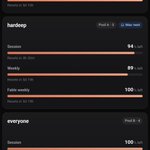
I broke my wrist, so I tested 9 Mac dictation apps on my real Claude Code prompts.
Same recorded audio into every app, and a Claude agent drove all of them.
Most accurate: Aqua Voice (100%)
Fastest: Parakeety and TypeWhisper (0.6 s)
Lightest: FreeFlow (117 MB)
Heaviest: Wispr Flow (1.6 GB)
I'm staying on the one that uses the least RAM, which one is your pick?
Hardeep retweeted

A girl just said she tried to get rejected 1000 times in 2025 and ended up being cast in plays, winning pageants, securing hella paid brand deals, and appearing in commercials.This is your sign to chase rejection to the point of "accidental" success. You'll be surprised.

A Claude agent is just a model in a loop!
Anthropic already gave you a free course, Claude Code 101. I post one tip from it every day.
Day 1/30.
A chat hands you text to copy, but an agent uses tools (actions like reading a file or running a command) in your project.
1. It reads your files. You stop pasting code into a chat window.
2. It acts. It edits files, runs your tests and reads the output to pick the next step.
3. It checks the result. If it misses your goal, it goes around the loop again.
4. You stay in control. It can ask before each edit or command. Shift+Tab sets how often it asks.
Try it today: give it one failing test and watch it loop until the test passes.

DeepSeek's cheap agent model just got a lot better.
DeepSeek shipped V4.1-Flash-1017 on 17 October. Its score on Terminal-Bench 4.0 went from 31.2 to 42.3, and the weights (the model files) are free to download under MIT.
1. You don't change any code. The API name deepseek-flash now points to the new model.
2. Terminal-Bench tests an agent doing real work in a terminal. On DeepSeek's own table it beats GPT-5.6 Sol (39.9). Opus 5 still leads at 51.8.
3. DeepSeek also opened Search and Fetch APIs. Your agent can search the web and read pages with no 3rd-party tool.
4. DeepSeek says answers are shorter and tasks finish faster. Fewer tokens per agent run.
My take: this week I'm moving one coding subagent to deepseek-flash and counting how many tasks it actually finishes.
I post AI news here every day.


Some of the shit I'm cooking with Claude right now is truly insane. None of this should be possible.
None of it will matter but I'm having the time of my life right now

Friday Update 🧑🏻💻
- The leads AI agent I built for a huge car marketplace got approved for production. 🎉
- Took 7 rounds of evals, all under $50
Also this week:
- moved my agents to a Hetzner VPS
- started building Agent Lab, a playground for visually learning to build agents
- broke my wrist, so I tested 9 dictation apps and now I code by voice
I can't work without this skill anymore!
Claude asks me for decisions all day
I can't make good decisions reading walls of text
This skills helps me understand concepts much quicker, in a visual manner.
You should try it out as well!
Get the skill by @nicopreme here - github.com/nicobailon/visual…

Hardeep retweeted
I broke my wrist, so I tested 9 Mac dictation apps on my real Claude Code prompts.
Same recorded audio into every app, and a Claude agent drove all of them.
Most accurate: Aqua Voice (100%)
Fastest: Parakeety and TypeWhisper (0.6 s)
Lightest: FreeFlow (117 MB)
Heaviest: Wispr Flow (1.6 GB)
I'm staying on the one that uses the least RAM, which one is your pick?
Your AI Agents are dumb at search
I ran the same 5 real searches through Exa, Claude's built-in WebSearch and Tinyfish.
Exa returned 25 of 25 results on topic, with no Reddit, Quora or Facebook junk. It also found GitHub repos and official docs that the other two missed.
And it costs ~$0.007 per search.
@ExaAILabs is miles ahead of the competition.


To be honest, this feeling is unmatched.
A tool that I made to watch videos and movies with my long-distance girlfriend is now being used by people across the world.
And I'm being paid for it???

Made CallLane to get full control of the audio setting of my Macbook while in a meeting or a call.
It's helps me keep HD sound in my Airpods while using the HD macbook mic for the call.
Also prevents the annoying MacOS audio ducking which mutes all other media on a call!
CallLane.app


Karpathy is bullish on bespoke 3b1b-style explainer videos.
So I gave one AI Engineering lesson to 4 Claude Code skills. Same voice, but each wrote its own script and visuals.
1. visual-explainer
2. make-it-click
3. HyperFrames
4. anything2explainer
Which one would you watch?

We'll be spending a lot more time trying to understand the outputs of language models. A few thoughts, tips & tricks:
Writing. Something I've had success with: Ask your LLM to explain something in ASD-STE100, it's a controlled language specification originally developed for aerospace maintenance documentation. LLMs well-versed in this language and it comes with heavy constraints on clean writing style that I often find a lot more readable. Sometimes I've tried to soften it a bit e.g. ask for "80% of the way to ASD-STE100" because the spec is quite stringent. But even better:
Diagrams / images. Instead of writing, ask your LLM to create a diagram. These can be a lot easier to process, parse, and understand. But even better:
Web pages. Ask for output "in HTML" to get a beautiful, interactive webpage. LLMs are getting really good at frontend and can create beautiful experiences, animations, etc. But even better:
Explainer videos. The output format I am most bullish on is fully custom / bespoke explainer videos generated on any arbitrary topic. Experiment with things like "Create a 3b1b style video explainer on X. Use my ElevenLabs API key for audio narration". (you'd need an API key for the latter or you can ask your LLM to find you decent free alternatives that use your local compute). This is actually starting to work!
In summary:
- As LLMs get better, they will do more and more of the legwork autonomously, and a lot more of our work will rise up the abstractions into oversight and understanding.
- Luckily, LLMs can help here too because as intelligence and code are increasingly abundant, you can ask for large, custom, discardable software artifacts (e.g. web apps, video explainers) that would have never made sense to create before. Push the boundaries here and you'll be surprised.

None of them ran clean out of the box. Each needed 3 to 10 fixes: missing binaries, fonts never copied, a voice step built for HeyGen, a self-check script that only reads Chinese.
And 3 of 4 slipped in a claim the lesson never makes. Fact-check before you post.
Lesson: generative models, taxonomy and history. Phase 8.1 of @ghumare64's AI Engineering from Scratch (MIT).
Skills: visual-explainer by @nicopreme, make-it-click by @Ajith2Krishna, HyperFrames by @HeyGen, anything2explainer by Vincentwei1021 on GitHub.
Voice: ElevenLabs