Orb has two modes, and you pick which one it uses.
Ask first holds every change until you allow it, and Auto lets Orb draft, schedule and edit on its own. Publishing, deleting and approval decisions ask either way. Press Cmd+J on any page to open it.
Meet Orb, the assistant on every page of Orbitwrite. Ask in your own words and it finds, writes, schedules and plans posts for you. Publishing, deleting and approvals always wait for your OK.
ALT Orb's mascot, a violet sphere with a speech bubble face, above Hey, Maya and the message box with a request to plan and schedule next week's launch posts
Schedule a post by typing the time. The schedule dialog now takes plain English, like "next fri 3pm", "tomorrow 9am tokyo" or "in 2 hours", and shows you exactly when it'll go out.
ALT The schedule dialog's Custom tab with "next fri 3pm" typed into the date and time field and Next Friday at 3:00 PM suggested under it
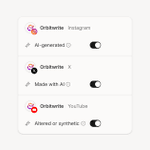
Each network's AI label is now a switch in the post's options: AI-generated on Instagram and TikTok, Made with AI on X, and Altered or synthetic on YouTube.
ALT A post's options for Instagram, X and YouTube, each with its network's AI label switched on: AI-generated, Made with AI, and Altered or synthetic
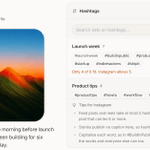
Save the hashtags you reuse as a set and drop them into any post from the composer. Orbitwrite skips the ones already there and stops at each network's limit, so Instagram never gets six.
ALT The composer's Hashtags panel open on an Instagram post, with saved sets, Insert and Copy on the first, and Instagram's hashtag tips underneath
Every Monday morning, Orbitwrite now emails you how last week went: posts, impressions, engagements, link clicks and followers, your top post, and what's coming up this week.
ALT The Monday weekly digest email: last week's posts, impressions, engagements, link clicks and followers against the week before, the top post, what's working, and the week ahead
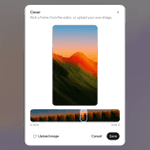
Pick the cover for your Instagram Reels and TikTok videos. Drag along the frames to choose the one people see before they press play, or upload your own image for Instagram.
ALT The Cover dialog for an Instagram Reel: a 9:16 preview of the picked frame, the strip of frames with that one selected, and Upload image beside Cancel and Save
You can now plan a post before you've written it. Hold Thursday's slot on the calendar, fill it in when the draft is ready, and nothing publishes until you schedule it.
ALT The next two weeks on the calendar, with dashed planned posts holding slots beside scheduled ones and the open slots still free
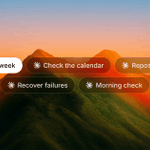
Five prompts for running Orbitwrite from Claude:
1. Plan a week
2. Check the calendar
3. Repost a winner
4. Recover failed posts
5. Morning check
What to type for each, what Claude reads or changes, and where it waits for you.
ALT Five prompt pills with Claude's logo: Plan a week, Check the calendar, Repost a winner, Recover failures and Morning check
Every draft in Orbitwrite now gets a post score. Open it in the composer and it lists what's working and what to fix, with a one-click fix where there is one. It's a nudge and never blocks a post.
ALT A post graded Good on the post score gauge, beside its checks as pills: posting time in red, link placement and link tracking in amber, and the checks it passed in green
Every draft in Orbitwrite now gets a post score. Open it in the composer and it lists what's working and what to fix, with a one-click fix where there is one. It's a nudge and never blocks a post.
ALT A post graded Good on the post score gauge, beside its checks as pills: posting time in red, link placement and link tracking in amber, and the checks it passed in green