

The React Framework – created and maintained by @vercel.
Joined December 2021
- Tweets399
- Following15
- Followers298K
- Likes215








Next.js retweeted
We're the Next.js team. Ask us anything!
We recently shipped Next.js 16.3, and we’re excited to talk about what’s new, how we approached the release, where we are going, and what we’ve learned while building and maintaining Next.
Ask us anything about Next 16.3, App Router, React Server Components, performance, caching, upgrading your applications, contributing to the framework, or what it’s like to work on Next.js.

Next.js retweeted

Building SPA-like experiences with Next.js
With Instant Navigations, you can click around and the next page is there right away, the way a single-page app feels.
The pages render on the server. Turning on 𝚌𝚊𝚌𝚑𝚎𝙲𝚘𝚖𝚙𝚘𝚗𝚎𝚗𝚝𝚜 gives you an instant shell to prefetch, and 𝚙𝚊𝚛𝚝𝚒𝚊𝚕𝙿𝚛𝚎𝚏𝚎𝚝𝚌𝚑𝚒𝚗𝚐 prefetches that reusable shell per route before you click, with the dynamic parts streaming in after.
Live demo, source code, and docs below ↓
Next.js retweeted
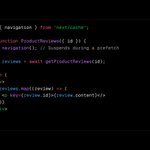
My React Summit talk is up: What RSCs Can Do in Next.js Today. To show it, I built a music player, open source and deployed on an early preview of Next.js 16.3.
🎵 next-beats.dev
Watch the talk for the full walkthrough, and check the key patterns in code below ↓
gitnation.com/contents/what-…
Next.js retweeted
The Next.js team is coming to San Francisco, Amsterdam, and London.
• Instant Navigations with Next.js 16.3
• How we’re improving Next.js for AI Agents
• Community hangout!
nextjs.org/nights




Next.js retweeted

Two things all fast websites have:
1. Fast initial page load
2. Fast transitions between pages
There's two concepts you need to understand for this:
1. Prerendering
2. Prefetching
I’ll briefly explain both and how Next.js handles them under the hood.
Prerendering
To have a consistently fast initial page load, ideally you do some work ahead of time. If you need to create the page from scratch on every request, it is more likely some users will have a slow experience.
Prerendering is where you take the inputs to your page (like a CMS or a database) and produce an output that can be cached. Data in, HTML out.
Critically, this work happens *before* the user makes a request. You might have heard this called SSG (Static Site Generation). You can prerender all of the pages for your site. Then, take the outputs and put them behind a CDN. Consistent, predictable, fast initial page loads.
But what happens when your content changes? For a simple website, you might just regenerate all of the pages again from scratch. For slightly larger websites, you can selectively update a *single page* in the background.
This is called ISR (Incremental Static Regeneration). But the acronym isn't the important part. It's still prerendering — it's just happening in the background.
Bonus: What if most of the page can be prerendered, but there's one section which shows content that is unique to the visitor? Can you combine prerendering *and* fresh user data? This is called PPR (Partial Prerendering), and is an experimental feature of Next.js.
Prefetching
Let's say you have a web application with 100 pages. When navigating between different pages, you want it to feel instant.
At some point, you need to load the data for the next page. There’s no getting around that. The question then becomes — when does the new page load?
You know how mobile apps can feel really fast moving between tabs? Well, that's because you had to watch the App Store loading spinner while downloading a gigantic blob of code to your phone. You paid the cost upfront.
Similarly on the web, you can pay the cost upfront. Bundle all of the code into a JavaScript file, and load it when you boot the app. This is the traditional SPA (Single-Page Application) approach.
Because you did the work ahead of time, subsequent navigations between pages are really fast. But, can we have both? Can we navigate quickly between pages *and* have a fast initial page load?
Next.js splits your application into smaller chunks of code, which load based on the page you are navigating to. Rather than downloading all the code at once, you load it incrementally.
Next.js also understands which pages you are likely going to navigate to, so it's able to *prefetch* the new page in the background. By the time you go to click the link, the new page has already been loaded. It's a magic trick.
You click and there's no browser loading spinner. Instead, the client quickly switches to the newly loaded page. This is nice because it scales as you add more pages in your application, without inversely affecting the initial page load time.
Next.js tries to do the right prefetching by default (more improvements coming here shortly...) and power users can tweak the knobs to do more/less prefetching based on their needs. You have the control between performance and resource consumption.
Summary
The web has many rendering acronyms to explain how pages can be created: SSR, CSR, SSG, ISR, PPR, and more.
But I've found it helpful to instead think about it as:
1. When is content being prerendered? Ahead of time? In the background? Or are we getting fresh data on every request?
2. When are we paying the cost to load the next page? Ahead of time? In the background? Or are we loading a new page from scratch on every request?
I'm still workshopping this framing, so open to feedback.
Next.js retweeted

We've published our postmortem on Next.js CVE-2025-29927.
This includes the detailed timeline, analysis, and next steps for our LTS policy, new CVE process, and partner mailing list.
vercel.com/blog/postmortem-o…


Next.js retweeted
Open-source Next.js codebases related to AI:
• AI Chatbot: git.new/ai-chatbot
• MiniPerplx (AI Search Engine): git.new/miniperplx
• Supabase (Vector Database): git.new/database
• Langline (AI Translations): git.new/langline
• Shortest (E2E Tests with AI): git.new/shortest
• Hume (AI Voice Chat): git.new/voice-chat
• Morphic (Answer Engine): git.new/morphic
• Emoji Generator: git.new/emoji-generator
• RAG (AI SDK): git.new/rag-ai-sdk
• Midday: git.new/midday
• AI Slackbot: git.new/slackbot
• Stockbot git.new/stockbot
• Cal AI: git.new/cal
• Google Gemini Chatbot: git.new/gemini-chatbot
• Semantic Image Search: git.new/semantic-search
• Fact Checker: git.new/fact-checker
• Avatar Generator: git.new/avatar-gen
I'm sure I missed some – please respond with others!
Next.js retweeted
A developer reached out after enabling Turbopack in Next.js 15:
"The results have been spectacular"
Initial compile: 85% faster
Opening their heaviest page: 97% faster
Fast Refresh on that page: 98% faster
"We use fairly old Windows machines, and honestly, this change for local development has been transformative."
Exciting to see these results while persistent caching (i.e. Disk Caching) is coming that will make it even faster!
Next.js retweeted

Introducing NextMaster
An open-source ecommerce @nextjs template inspired by McMaster-Carr, optimized for performance with over 1 million products.
A thread on how I built this with @rhyssullivan and @ksw_arman 🧵
(video is not sped up)

Next.js retweeted
📹 Self-Hosting Next.js
Learn how to deploy Next.js, Postgres, and Nginx to a $4 VPS with Docker.
I'll explain how to use and configure Next.js features like image optimization, caching & ISR, streaming, middleware, server components, and more.
Demo app is open source!

Next.js retweeted
How should you search, filter, and paginate data with Next.js? This demo has 50,000 books in a Postgres database.
• Page Load: When the page loads, we see the React Suspense fallback. This loading skeleton is displayed until the first page of books is retrieved from the database.
• Searching: The search input has a 200ms debounce. After 200ms of inactivity, the form submits, updating the URL state with `?q={search}`. The Server Component reads `searchParams` and queries the database. On form submission, a React transition starts, allowing us to read the pending status with `useFormStatus` to display an inline loading state.
• State Preservation: Navigating to an individual book page retains the search input state. Reloading the page or sharing the link preserves the search results.
• Client-side Filtering: Filtering authors in the left sidebar is done client-side. Authors are fetched by a Server Component and passed as props to the sidebar. Changing the input value updates React state and re-renders the sidebar.
• Optimistic Updates: The sidebar’s selected authors are optimistically updated with `useOptimistic`. Checkbox selections update instantly without waiting for the URL to change.
• State Preservation: Navigating to an individual book page retains the sidebar filter input and selected author state across navigations, giving it an app-like feel.
• Pagination: Navigating between pages updates the URL state, triggering the Server Component to query the database for the specific page of books. We also fetch the total book count to show the total number of pages.
This demo isn't perfect yet (still working on it) but it's been a fun playground for some of these patterns. You can imagine a similar experience for thousands of movies, cars, products, or any other very large dataset.
Demo → next-books-search.vercel.app
Code → github.com/vercel-labs/book-…
Next.js retweeted

Excited to share our recent achievement with the broader community! We successfully migrated Faire's largest Frontend codebase (over 1 million lines of code and 100+ contributors) from a legacy React Router setup to Next.js App Router with RSCs!
craft.faire.com/boosting-per…
