

...when you gaze long into the abyss the abyss also gazes into you...
Shanghai
Joined February 2007
- Tweets51.2K
- Following607
- Followers1.9K
- Likes750






Congrats!

We’re incredibly excited that Things has been named a finalist for the Mac App of the Year Award!
Thanks @AppStore, and congrats to all the other nominees 🙌 #AppStoreAwards
apple.com/newsroom/2026/11/m…
55
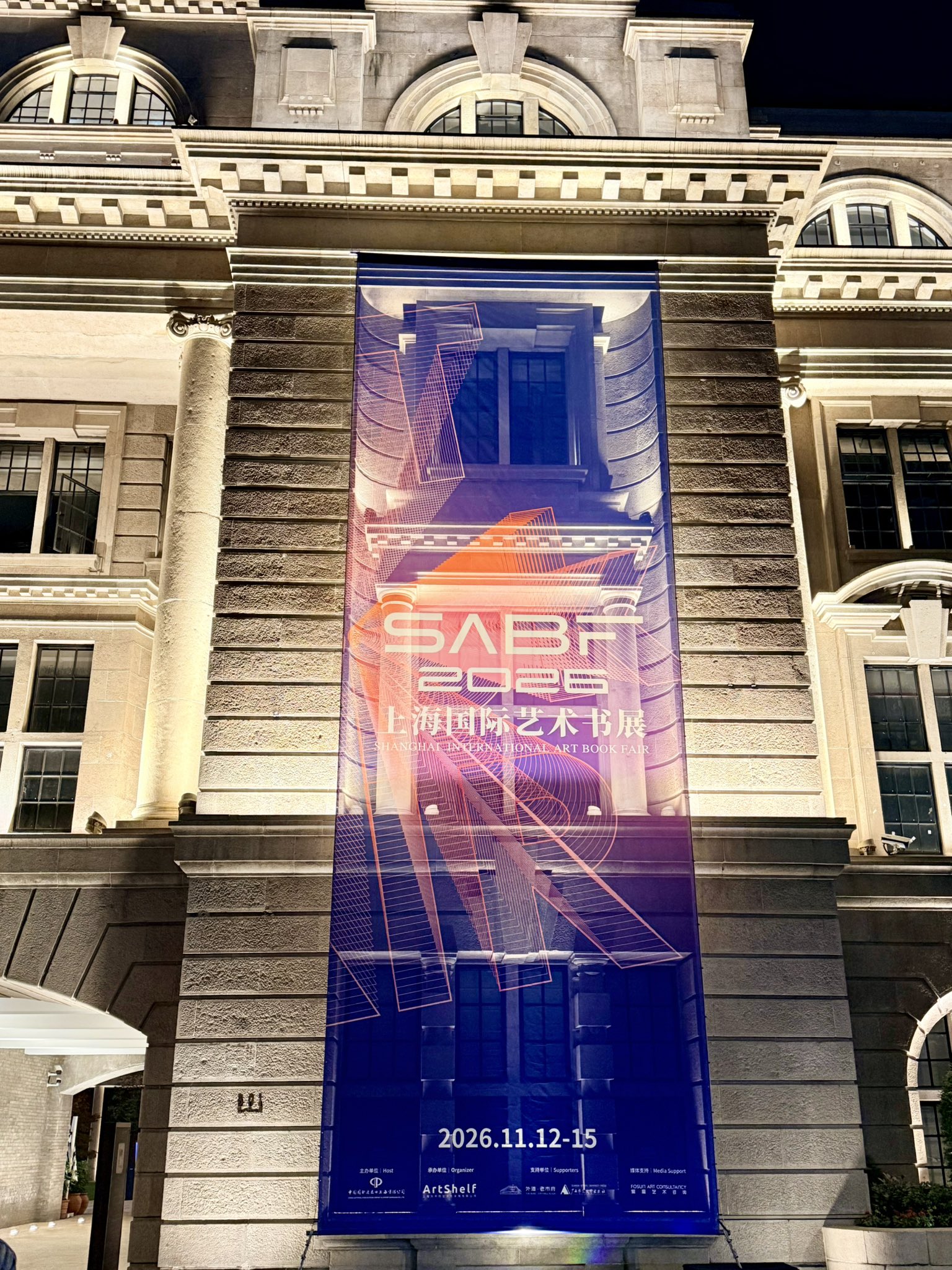
高级货来了。
SABF 的海报挂出来了。晚上建筑的景观灯从后面透出来,效果绝了。完全把我想要表现的那种递归的感觉,涌现的感觉给展现出来了。
最后一张让 AI 拉了拉,看着很满足,建筑的质感太好了。



1
109
最近帮着搭档正在做一件蛮酷的事:11月12日~15日,上海国际艺术书展在外滩·老市府见!欢迎来玩!也托大家帮忙转发🎉
我构想的是更接近博览会的一个 Fair。所以并没有手工书、实验装帧、独立书刊这类更多探索形式趣味的元素。
那么她是什么? 先来看看上海发布的相关提示: mp.weixin.qq.com/s/KDFwPhhFg…
123


用了两天,Surge 6 很不错。
新的 Home Tab,各种信息一目了然。
是有明显感知的新一代😂,钉子用户也值得订阅一发升级下了。
有个(严重)问题是,没有为 Surge 6 做新的 App Icon🤷♀️。


Surge iOS 6 Beta Is Now on TestFlight
Full introduction and release notes: nssurge.com/surge-ios-6
Surge iOS 6 is rebuilt for iOS 26: a new Home screen, Liquid Glass throughout, a faster request list, versioned profiles, and an MCP server for AI agents.
A Free Update
Surge iOS 6.0 is a free update with a huge number of improvements to the interface and the core engine. Only a few new features need an active update subscription: the new Home screen, Profile History, and the MCP server.
If your update subscription has expired, you can now try every feature free for 7 days. Explore what’s new first, then decide whether to renew.
Surge 6 also removes the update-subscription requirement from proxy protocols, every protocol is now available to every Surge user. (WireGuard, Tailscale, and SSH are excluded because they are not proxy protocols.)
About the Design
When you first see the new colors, you might think “this looks like AI slop.” Well, it’s not.
We’ve used this blue-purple palette since Surge v3 in 2018, long before the AI era. Surge iOS 6 builds on it and brings in the design language of Surge Mac 6 and Liquid Glass. We spent a lot of time refining the result.
We redesigned and reorganized almost every screen.
What’s New
- Home: Your network at a glance. Activity, Network, External IP, Bandwidth, DNS, Usage, Top Traffic, Policy Latency, and Events all live on one dashboard.
- Liquid Glass: Configure, policy group cards, and menus use the new iOS 26 material. Menus open right where you tap.
- Requests: Every row shows a site icon, status color, and protocol badge. A filter bar stays pinned to the top of the list.
- Profile History: Every save is a version. Review changes before saving, compare any two versions, and roll back in one tap.
- iPad and iPhone Duo: When there’s room, Surge switches to two panes, so the dashboard stays next to your settings.
- MCP Server: Agents like Claude Code get the same control as surge-cli. MCP apps on the iPhone itself, such as FlowDown and Minis, can drive Surge directly.
- Engine: Tailscale exit node and subnet routes, WireGuard listen port, adaptive QUIC blocking, UDP over SOCKS5 Wi-Fi Access, and no more rule set size limit. All of these are shared with Surge Mac 6.11.
How to join the TestFlight beta: kb.nssurge.com/surge-knowled…
4
5
6,344
⛩️nAODI (脑袋) retweeted

Surge iOS 6 Beta Is Now on TestFlight
Full introduction and release notes: nssurge.com/surge-ios-6
Surge iOS 6 is rebuilt for iOS 26: a new Home screen, Liquid Glass throughout, a faster request list, versioned profiles, and an MCP server for AI agents.
A Free Update
Surge iOS 6.0 is a free update with a huge number of improvements to the interface and the core engine. Only a few new features need an active update subscription: the new Home screen, Profile History, and the MCP server.
If your update subscription has expired, you can now try every feature free for 7 days. Explore what’s new first, then decide whether to renew.
Surge 6 also removes the update-subscription requirement from proxy protocols, every protocol is now available to every Surge user. (WireGuard, Tailscale, and SSH are excluded because they are not proxy protocols.)
About the Design
When you first see the new colors, you might think “this looks like AI slop.” Well, it’s not.
We’ve used this blue-purple palette since Surge v3 in 2018, long before the AI era. Surge iOS 6 builds on it and brings in the design language of Surge Mac 6 and Liquid Glass. We spent a lot of time refining the result.
We redesigned and reorganized almost every screen.
What’s New
- Home: Your network at a glance. Activity, Network, External IP, Bandwidth, DNS, Usage, Top Traffic, Policy Latency, and Events all live on one dashboard.
- Liquid Glass: Configure, policy group cards, and menus use the new iOS 26 material. Menus open right where you tap.
- Requests: Every row shows a site icon, status color, and protocol badge. A filter bar stays pinned to the top of the list.
- Profile History: Every save is a version. Review changes before saving, compare any two versions, and roll back in one tap.
- iPad and iPhone Duo: When there’s room, Surge switches to two panes, so the dashboard stays next to your settings.
- MCP Server: Agents like Claude Code get the same control as surge-cli. MCP apps on the iPhone itself, such as FlowDown and Minis, can drive Surge directly.
- Engine: Tailscale exit node and subnet routes, WireGuard listen port, adaptive QUIC blocking, UDP over SOCKS5 Wi-Fi Access, and no more rule set size limit. All of these are shared with Surge Mac 6.11.
How to join the TestFlight beta: kb.nssurge.com/surge-knowled…


⛩️nAODI (脑袋) retweeted

There are people who leave a mark on the world, and then there are people who change it entirely. Steve changed the world and so many lives in the process. He certainly changed my life forever. His spirit lives on in everything he created and everyone he inspired.

ALT A photo of Steve looking at the camera wearing glasses and a black turtleneck.
⛩️nAODI (脑袋) retweeted

IINA 1.5.0 is released. I have also redesigned our website at iina.io, please check it out! iina.io/blog/150-release/


