

Joined September 2016
- Tweets1.9K
- Following1.4K
- Followers815
- Likes5.4K

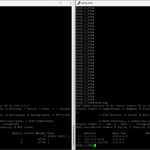



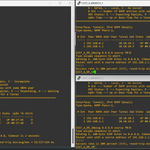
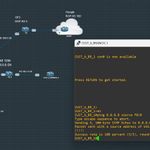
Just labbed up MPLS L2VPN between DC and DR, having the SP core acts as a giant transparent switch, so both sites share the same 172.16.0.0/24 like nothing's between them. #networkengineering #networking #MPLS
@akintunero @lanceeihoda


Barikuma retweeted

I just blocked 1hr of Mr Lance’s time tomorrow for 6 people. 10mins each. Send me a dm



Barikuma retweeted
Emails sent out.
Mr Lance also said he will be creating a program for people going from Basic to intermediate and Intermediate to advanced Network Engineering covering Design, Implementation, Troubleshooting and Documentation. update regarding that will be shared soon

As promised yesterday for the Networking class with The Maestro @lanceeihoda
tinyurl.com/networking-with-…
If you have questions or require more info, reach out to @MoonBoyMubarak or @mondelo__
Barikuma retweeted
We should work on more my bro! 🫂

Thinking of uploading the major lab I and @mondelo__ were playing with on Git hub. We covered all the major concepts. If i get some responses, I might just😆😁😁. @lanceeihoda , You can help us touch on it too. It would be a great session this weekend...

Barikuma retweeted
As promised yesterday for the Networking class with The Maestro @lanceeihoda
tinyurl.com/networking-with-…
If you have questions or require more info, reach out to @MoonBoyMubarak or @mondelo__
Senior Maestro @lanceeihoda is holding a class from now till December on Network Engineering. In his words “I’ve been finding it hard recruiting Jr Network Engineers and I need to build some”
I’ll drop an update tomorrow
Barikuma retweeted
Senior Maestro @lanceeihoda is holding a class from now till December on Network Engineering. In his words “I’ve been finding it hard recruiting Jr Network Engineers and I need to build some”
I’ll drop an update tomorrow
Barikuma retweeted
For the network engineering labs I mentioned earlier, I’ve updated and refreshed the old repository.
You can find it here: github.com/akintunero/ccnain…
Have fun guys!


Barikuma retweeted
W’ssssss in chattttt
1st cohort of CCNA in 90 for the year starts next month
Signup: ccnain90.techpeaklab.com

My CCNA learning journey with @TechPeakLab has come to an end, and it concluded with an offer as an IT/Network Specialist. The learning doesn’t stop here, it only continues.
I want to use this opportunity to thank @akintunero for giving me the chance to join. Before now, I didn’t know what STP was or how DHCP is configured, and so much more. I can still remember the reason I wrote in my application form the day I applied, and today it is becoming a reality in just a little over 100 days.
Thank you @lanceeihoda for all the support and for preparing me for the first stage of the interview. I still remember what you told me that night after asking me the first question: “Iheanyichukwu, if I were on the panel, you would fail.” You then took your time to guide me on what to expect, and it felt like you were the one who gave them the exact questions I was asked that day.
Thank you @mondelo__ and other mentors for your mentorship, and thank you @EhistheGreat and @bren131424 for always picking my late-night calls and walking me through so many things.
This journey wouldn’t have been successful without the advice of @ireteeh. That 2-hours-a-day study plan truly shaped my learning. Before now, I couldn’t finish a module or even a YouTube video, but I was able to complete the Cybersecurity Career Path on Cisco NetAcad and The CCNA course.
I won’t forget @segoslavia thank you for the XCybersecurity class and for constantly pushing us every week, I can now pickup a course and finish it up. I still remember the first day I joined the space when you were advising someone, and today I have found my direction.
Thank you to everyone involved in helping my career take a meaningful and positive shape.

Barikuma retweeted

My CCNA learning journey with @TechPeakLab has come to an end, and it concluded with an offer as an IT/Network Specialist. The learning doesn’t stop here, it only continues.
I want to use this opportunity to thank @akintunero for giving me the chance to join. Before now, I didn’t know what STP was or how DHCP is configured, and so much more. I can still remember the reason I wrote in my application form the day I applied, and today it is becoming a reality in just a little over 100 days.
Thank you @lanceeihoda for all the support and for preparing me for the first stage of the interview. I still remember what you told me that night after asking me the first question: “Iheanyichukwu, if I were on the panel, you would fail.” You then took your time to guide me on what to expect, and it felt like you were the one who gave them the exact questions I was asked that day.
Thank you @mondelo__ and other mentors for your mentorship, and thank you @EhistheGreat and @bren131424 for always picking my late-night calls and walking me through so many things.
This journey wouldn’t have been successful without the advice of @ireteeh. That 2-hours-a-day study plan truly shaped my learning. Before now, I couldn’t finish a module or even a YouTube video, but I was able to complete the Cybersecurity Career Path on Cisco NetAcad and The CCNA course.
I won’t forget @segoslavia thank you for the XCybersecurity class and for constantly pushing us every week, I can now pickup a course and finish it up. I still remember the first day I joined the space when you were advising someone, and today I have found my direction.
Thank you to everyone involved in helping my career take a meaningful and positive shape.
In this design, AS65000 advertises the aggregate prefix (100.0.0.0/24) to both upstream ISPs. This ensures consistent reachability from the internet.
More-specific prefixes (100.0.0.64/26 for web, 100.0.0.128/26 for email) are advertised only from the preferred edge router. #BGP


Only @lanceeihoda can tell you about a hidden command to load balance BGP, like the command is actually hidden FGS! 😂🔥


Barikuma retweeted

Maturing is realizing that although you hated Novak Djokovic for most of your life, you admit he's the best tennis player ever.
Barikuma retweeted

Now, from a Layer 3 perspective…
The first thing that comes to my mind is this simple question:
Is the traffic staying on the same network, or is it going to a different network?
From the Layer 2 angle, we already know that ARP plays a role
The ARP table maps Layer 3 IP addresses to Layer 2 MAC addresses by storing a host’s IP and its corresponding MAC.
allowing the device to build the correct Layer 2 headers for frame delivery.
Now at Layer 3, my thinking shifts.
If traffic is on the same network, ARP resolves the MAC and communication stays local.
If it’s on a different network, things change right, and this is where routing really comes in.
I start asking myself :
Does this involve data encapsulation and de-encapsulation?
How is the next hop identified?
Who decides where the packet goes next?
That naturally leads me to the default gateway—the entry and exit point between networks.
And yes, my brain likes analogies 😄
Whenever I think of a gateway, I imagine a club security checkpoint:
•The gateway is the entrance
• The firewall is the bouncer 😂
•If Access is allowed or denied based on who you are, where you’re coming from, and what kind of connection you have
(Okay, back to networking before I drift 😅)
From there, I think about:
•IP addressing – is it going to be IPv4 or IPv6
•Subnetting – determining network vs host portions ( gist for another day to tell you struggle 😂)
Routing decisions – how the router selects the best path, Routing methods:if it’s going to be Static routing or Dynamic routing protocols.
Inter-VLAN routing: Router-on-a-stick (routing with subinterfaces)
Layer 3 switches using SVIs
Routing table
Next-hop mapping the route to an outgoing interface
Express Forwarding– how routers achieve fast, efficient forwarding using
FIB (Forwarding Information Base)
Adjacency tables
This is where packets stop being “guessed” and start being express-forwarded at scale.
Layer 3, to me, is all about decision-making:
•Where is the destination?
•What’s the best path?
•What’s the next hop?
•How fast and efficiently can we get there?
Do you know the CPU on a router is in charge of packet Switching?
If I missed anything important from a Layer 3 perspective, please jump in and add to it.
We’re all learning—and revisiting the basics is how everything starts to finally click

At some point, I used to think networking—and the science behind it—was really hard.
Even after earning my CCNA, I still struggled with fully understanding some concepts… and honestly, I still do sometimes.
If you’ve ever felt this way, you’re not alone.
One thing that has helped me (and I’ll be sharing more of this going forward) is constant revision and going back to the basics.
I always start by asking a simple question:
How are packets forwarded?
To answer that, you need to think of the OSI model and TCP/IP as the standard framework for network communication.
If packets are forwarded, how exactly does that process work?
Let’s break it down step by step—starting from a Layer 2 and Layer 3 perspective.
From a Layer 2 perspective, it’s about understanding how frames are transmitted and distributed while avoiding collisions.
This takes me from collision detection, to switches, and eventually to multilayer switches (MLS) that help manage collision domains efficiently.
Think about this:
How does a packet move from one host to another within the same segment?
Is the frame tagged or untagged?
Key things to consider at Layer 2 include:
•VLANs and Native VLANs
•Access ports and Trunk ports
•Collision domains
•MAC addresses
•MAC address tables
•Broadcast and Unicast traffic
•ARP (which bridges Layer 2 and Layer 3)
Understanding these concepts makes troubleshooting much easier—like identifying source and destination device ports by examining the MAC address table.
How often do you actually do this in real troubleshooting?
Let’s take it one step at a time before moving fully into Layer 3 packet forwarding.
Quick question for you:
Can you explain a VLAN table format?