
Vim tips + tricks Want to support this page AND learn Vim? Check out https://xitter.cf/t.co/2oJQx5huwf OR https://xitter.cf/t.co/bcssgcdD4q Owned by @iggredible

Joined November 2019
Learn Vim retweeted
DHH
@dhh27 Feb 2024
Replying to @tobi
As much as I love TextMate, I've come to realize the folly of being tied to one commercial OS on the basis of an editor. I considered going all-in on VSCode, but if I'm going to switch editor after 20 years, I'd like it to be my last change. Vim will be here and free in 100 years
28
6
4
185
17,821
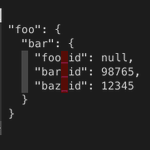
If you have the jq command github.com/jqlang/jq installed, you can use it to format JSON in Vim! On the line where you have a large JSON object: { "foo": { "bar": { "foo_id": null, "bar_id": 98765, "baz_id": 12345 } } } Run: :.!jq . Vim bang operator/cmd: :h ! #vim
4
34
3,746
The vim-yoink plugin lets you to yank multiple times and quickly choose which yanked text to paste (with Ctrl-n/Ctrl-p). If you use copy/paste often, check it out! github.com/svermeulen/vim-yo… #vim
3
10
2,148
If you want to resize, swap, and move windows, the winresizer plugin (github.com/simeji/winresizer) can quickly resize your vim window with its resize mode. Check it out! #vim
5
20
3,811
If you have one large window and one small window, you can make them equal size with Ctrl-w + = :h CTRL-W_= #vim
10
2,028
You can "swap" windows with Ctrl-w + r (technically it's down/right-ward rotation, but works like a swap with only 2 windows) :h CTRL-W_r #vim
1
10
2,004
To roll a dice 5 times: :for i in range(1,5) | put='Dice roll: ' . (rand() % 6 + 1) | endfor #vim
2
2
20
2,706
There are 5 different history commands in Vim: :his c or : - command-line history (q:) :his s or / or ? - search history (q/ or q?) :his e or = - expression history :his i or @ - input history :his d or > - debug history #vim
19
1,710
= is the filter operator (by default it indents). If you want to indent the entire buffer, run: gg=G - gg goes to the top - =G indent operator + all the way to the bottom Use `` to go back to the original location. Try: gg=G`` More: stackoverflow.com/questions/… :h = #vim
3
1
25
1,987
Press Ctrl-W o`` to zoom the current window and close other open windows (You can also run `:on`) #vim
1
9
2,258
If you want to close the current window, you can press Ctrl-w + c More: :h CTRL-W_c #vim
12
1,957
If you use fugitive.vim, you can use git grep to use a keyword in a specific branch / SHA :Ggrep MY_FOO some-branch :Ggrep MY_FOO some-sha Useful if you want to see if / how a text looks like in a different branch :h :Ggrep github.com/tpope/vim-fugitiv… #vim
6
28
5,056
To reverse two words, you can use this substitution: :s/\(\w\+\) \(\w\+\)/\2 \1/g This will reverse "strawberry chocolate" into "chocolate strawberry" If you think there's too many backslash, you can use \v: :s/\v(\w+) (\w+)/\2 \1/g #vim
3
9
2
70
6,808
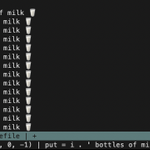
To generate 100 lines of "100 bottles of milk", you can run: :for i in range(100, 0, -1) | put = i . ' bottles of milk 🥛' | endfor #vim
3
12
2
155
13,438
Let's say you have: apples oranges apples bananas To search for apples FOLLOWED BY bananas (and not apples followed by oranges), you can use a multi-line search /apples\_.bananas :h \_x #vim
1
8
77
8,184
Last time we looked at :vimgrep to search for keywords. :vimgrep /Waffles/ app/**/*.rb To add more results into your last search, you can use :vimgrepa. To also search for Pancakes: :vimgrepa /Pancakes/ app/**/*.rb Now you have a list of Waffles AND Pancakes. #vim
2
1
14
2,819
Vim has an internal grep to search for texts in files, :vimgrep. If I want to search "Waffles" inside ruby files inside app/ directory: :vimgrep /Waffles/ app/**/*.rb To display the quickfix list result: :copen Try it! #vim
1
3
36
3,950
When you pass multiple file names when you run Vim from the terminal (vim bar.rb foobar.lua), Vim stores those files inside the argument lists, which you can access with :args You can navigate through the argument lists with :next, :prev, :first, :last. :h arglist #vim
1
6
1,617