

Katy ISD Secondary Instructional Technology #TeachingWithTech #eVolve
Katy, TX
Joined May 2017
- Tweets2K
- Following267
- Followers462
- Likes1.6K





KISD Secondary Tech retweeted
Boost student reading and writing confidence! 🎒✨ Join our next tech webinar, Unpack Accessibility: Read&Write for Google Chrome, offered on September 15 & 16.
️Register here for Webinars: katyisd.instructure.com/cour…

Boost student reading and writing confidence! 🎒✨ Join our next tech webinar, Unpack Accessibility: Read&Write for Google Chrome, offered on September 15 & 16.
️Register here for Webinars: katyisd.instructure.com/cour…
Check out the September 2026 edition of Tech Talk! 💡 Stay up to date with the latest secondary instructional technology updates, tips, and resources. 🔗 app.smore.com/n/0snz4

🌼 Spring Clean Your Chromebook!
Students, try this today:
🧹 Delete old downloads
🗂️ Organize your Drive
🔄 Restart your device
🧠 Clear your browser tabs
A clean device = a clear mind.

Happy St. Patrick’s Day @katyisd ! 🍀
May your Wi-Fi be strong, your tabs be few, and your battery last all day! 🔋💻 Here’s to smart tech habits and a little extra luck in learning! 🌈✨
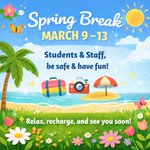
🌸 Spring Break is March 9–13! 🌴☀️
We hope our amazing @katyisd staff and students take time to rest, recharge, and have some FUN!
Travel safe, unplug when you can, and come back refreshed for the final stretch 💻✨
You’ve earned it! 💛

🗂️Help students stay organized by creating Google Drive folders for each subject/class period! bit.ly/4n6ndht Thx @jayfaye281
Encourage them to:
1️⃣ Use consistent naming.
2️⃣ Color-code folders for easy identification.
3️⃣ Regularly clean up and archive old files.


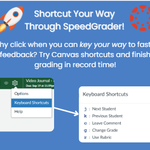
Use these super easy keyboard shortcuts in @Canvas_by_Inst SpeedGrader:
J- Next student
K- Previous student
C- Comment
G- Change Grade
R- Use Rubric


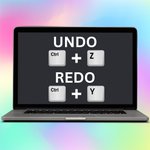
Ever accidentally closed a Chrome tab or wished you could see what a student just closed? 🙄 Use Ctrl + Shift + T to bring back closed tabs. 🚀 #TeachingWithTech

✨ Just discovered how easy it is to drop a PDF straight into a @CanvaEdu Whiteboard = instant interactive lesson! 💡
Drag ➜ place ➜ annotate ➜ collaborate.
Perfect for breaking down content, adding visuals, and engaging students in real time.

🔐 Chromebook Safety Tips:
💻Keep your passwords private.
💻Use a strong password that’s hard to guess.
💻Only use your school‑approved apps and extensions.
💻 Don’t type your password on sites or links you don’t recognize.
This month, we’re diving into an exciting Creative Challenge on @AdobeExpress! Your mission? Design a captivating poster that effectively conveys one powerful idea through stunning visual elements. Get ready to unleash your creativity!

Students are off, but teachers are still logged in! 💻☕
📅 Feb 16 = Teacher Workday
Planning lessons, learning new tech, and prepping for what’s next 🚀

💖 Love is in the (Wi-Fi) air! This Valentine’s Day, let’s celebrate the tech tools that make teaching even sweeter. 💻💕 From interactive lessons to AI-powered feedback, technology helps us connect, engage, and inspire!

KISD Secondary Tech retweeted

Join the Canva Student Design Challenge to commemorate 100 years of Black history celebrations!
Winners will score a special Canva swag pack and have their work showcased for the world to see.
Learn more & enter here:
bit.ly/4bTwqIh

🗂️Help students stay organized by creating Google Drive folders for each subject/class period! bit.ly/4n6ndht
Encourage them to:
1️⃣ Use consistent naming.
2️⃣ Color-code folders for easy identification.
3️⃣ Regularly clean up and archive old files.

💖💻✨ XOXO Lumio: Formative Assessment strategies teachers will fall in love with!
Join us LIVE with Lumio to explore powerful formative assessment strategies that drive engagement and real-time feedback.
🔗 Register now: app.smore.com/n/b7x3e
