

founder https://xitter.cf/t.co/pWNHvM4lIV - Your on screen AI buddy for your Mac
Joined May 2024
- Tweets1.1K
- Following307
- Followers728
- Likes5K





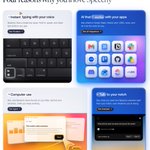

Steve Jobs said the best interface is the one you're born with.
He meant your fingers. 19 years on, we still type every email, message and prompt with all ten.
He was one step short.
Speechy: your AI buddy, right on your Mac screen, directed by your voice.
Try it free on your Mac: speechy.tech
2
123
I have an Antarctica user !!!
A penguin is using my app ????
I launched this app called Speechy.tech which is an AI agent that lives on your cursor. Point at anything on your Mac, say what you want, and it gets done.
Like every morning, I was checking the analytics and was shocked to view that i got a user from Antarctica...
What... How.... ????? Penguins can use internet ????? Wait... Do they still have TikTok ???

20
19
532
speechy.tech
thank me later


2
43

Introducing Speechy
Hold fn and talk. Speechy writes it into any app on your Mac, cleaned up and ready to send.
speechy.tech
Runs on your Mac. Free to start.
1
105
Jay Patel retweeted
this founder got tired of typing all day, so he built a Mac you just talk to 🎙️
- hold fn and talk, it types in any app. even with Wi-Fi off.
- ask it about your Gmail, Slack and calendar right from the notch.
- give it a job and it clicks and types for you.
- and nothing sends until you say so.
built by @jaypatel1_, a solo founder who wanted his own Mac to keep up with him 🛠️
here is the link: speechy.tech
#macapps #productivity #ai #buildinpublic -#indiehacker #mac #dictation #aitools
this founder got tired of typing all day, so he built a Mac you just talk to 🎙️
- hold fn and talk, it types in any app. even with Wi-Fi off.
- ask it about your Gmail, Slack and calendar right from the notch.
- give it a job and it clicks and types for you.
- and nothing sends until you say so.
built by @jaypatel1_, a solo founder who wanted his own Mac to keep up with him 🛠️
here is the link: speechy.tech
#macapps #productivity #ai #buildinpublic -#indiehacker #mac #dictation #aitools
Introducing Speechy. Three keys that let you run your Mac by voice.
> Dictation: hold fn, talk, it types in any app
> Assistant: ask Gmail, Slack and 1,000+ apps from the notch
> Agent: give it a job, it clicks and types on your screen
> Your voice is transcribed on your Mac
> Only My Voice leaves out other voices nearby
> Build a small app just by asking
> Free plan, unlimited dictation
Most voice apps stop at typing. Speechy keeps going: it answers from your apps and gets the work done.
Three keys. That's the whole manual.
Try it free: speechy.tech
5
5
248
Jay Patel retweeted
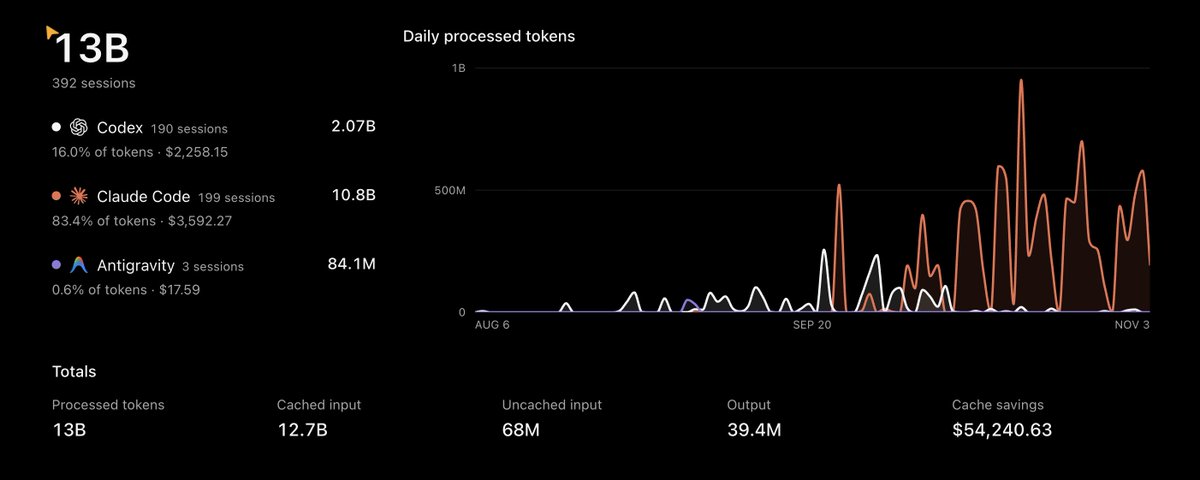
As a solo dev, i spent around 13 billion tokens and here's everything @t3dotcodes taught me about building with AI agents
Jay Patel retweeted
I got my first customer for speechy.tech after building it for 18 months 🥹
What is it?
It started as a local dictation tool so I could type with my voice. But let's be real, there are already a lot of slop dictation apps out there. So I turned it into an AI buddy that lives on your Mac, sees what you see and actually helps.
Why I built itI used to dictate everything, then paste it into ChatGPT to clean it up for whoever I was sending it to. Now Speechy does that for me, right where I'm typing.
The bigger problem was being a beginner. Learning Xcode, Blender or DaVinci Resolve, trying to edit a decent video, hunting for where anything lives. It's overwhelming. Now I just ask Speechy. It draws on my screen to show me where to click, walks me through whatever I'm stuck on and teaches me the app as I go.
I also added 1,000+ integrations so I can talk to all my apps. I write emails, set up routines, update people, send things and keep track of everything, all by voice. I'm terrible at organizing, so the agent tidies my Finder files too. When I need a small tool, like a Pomodoro timer, an alarm or a tiny notes app, Speechy builds it as a real Mac app. I designed 40 custom UI styles for it, so what it makes looks good instead of generic.
The best part is that it's all one shortcut. There are no modes and no key combos to remember. You press one key and talk, and Speechy works out what you want. That could be solving a math problem, guiding you through complex software or building you a small app.
If you're stuck in a complex app, it walks you through it and draws right on your screen. If you need something built, it builds it. And it works across the 1,000+ apps you already use.
Try it at speechy.tech

I got my first customer for speechy.tech after building it for 18 months 🥹
What is it?
It started as a local dictation tool so I could type with my voice. But let's be real, there are already a lot of slop dictation apps out there. So I turned it into an AI buddy that lives on your Mac, sees what you see and actually helps.
Why I built itI used to dictate everything, then paste it into ChatGPT to clean it up for whoever I was sending it to. Now Speechy does that for me, right where I'm typing.
The bigger problem was being a beginner. Learning Xcode, Blender or DaVinci Resolve, trying to edit a decent video, hunting for where anything lives. It's overwhelming. Now I just ask Speechy. It draws on my screen to show me where to click, walks me through whatever I'm stuck on and teaches me the app as I go.
I also added 1,000+ integrations so I can talk to all my apps. I write emails, set up routines, update people, send things and keep track of everything, all by voice. I'm terrible at organizing, so the agent tidies my Finder files too. When I need a small tool, like a Pomodoro timer, an alarm or a tiny notes app, Speechy builds it as a real Mac app. I designed 40 custom UI styles for it, so what it makes looks good instead of generic.
The best part is that it's all one shortcut. There are no modes and no key combos to remember. You press one key and talk, and Speechy works out what you want. That could be solving a math problem, guiding you through complex software or building you a small app.
If you're stuck in a complex app, it walks you through it and draws right on your screen. If you need something built, it builds it. And it works across the 1,000+ apps you already use.
Try it at speechy.tech
As a solo dev, i spent around 13 billion tokens and here's everything @t3dotcodes taught me about building with AI agents


