

The leading task manager for teams on Google Workspace
Boulder, CO
Joined April 2009
- Tweets944
- Following275
- Followers816
- Likes602
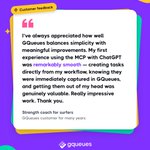
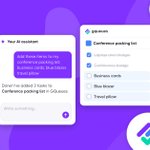




Here's what one of our users said about being able to add, update, and organize tasks from an AI assistant with the new GQueues MCP.
We love hearing your feedback — reach out anytime with the chat feature inside your account.

✨ Introducing the GQueues MCP: connect your project manager to the next frontier of productivity tools.
With your permission, GQueues can connect to your AI tools like Claude or ChatGPT. You can update and organize tasks with AI & plan projects together. gqueues.com/mcp?utm_source=x…

Add a task in seconds, before it slips your mind. Share a link or file from any app straight into GQueues. No signal? Keep going. It syncs the moment you're back.
iPhone: gqueues.com/iphone-to-do-lis…
Android: gqueues.com/android-task-man…
👍 Faster navigation, 👎 less stretching and reaching with your thumbs.
In the redesigned app, moving between queues feels familiar, and it takes fewer taps to reach the task you're looking for.
iPhone: gqueues.com/iphone-to-do-lis…
Android: gqueues.com/android-task-man…
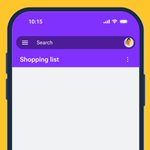
From shopping lists to interplanetary voyages, the redesigned GQueues app keeps you organized anywhere. It keeps your team projects in sync, and it's now on every plan, including free GQueues Lite.
🍎 iOS: apps.apple.com/us/app/gqueue…🤖 Android: play.google.com/store/apps/d…
The mobile app is redesigned, and now included in every GQueues plan, including the free GQueues Lite plan. Capture tasks the moment they pop into your head and check things off from anywhere.
iPhone: gqueues.com/iphone-to-do-lis…
Android: gqueues.com/android-task-man…
All-new: The GQueues app for iOS and Android is totally redesigned.
Fewer taps to get around, more task details in view, and subtasks right where you need them. It's also now included in every plan, including free GQueues Lite.
Discover what's new: gqueues.com/blog/gqueues-mob…
Board view makes task updates faster so you can focus more on your work and less on project admin. Move cards with drag and drop, menu actions, or keyboard shortcuts — whatever's quickest for your workflow.
Now you can view any queue in either List view or Board view, including your Inbox. Two views for every queue, one click to switch.
Customize Board view with colors for cards and columns. Flag blockers in red, mark quick wins in green, or give each teammate their own color from our 32 options — it's your board.
Want a head start on your team’s next project? Copy our templates to skip setting up your workspace so you can get down to business.
gqueues.com/templates

Board view transforms any queue from a list of tasks into an interactive project landscape.
The left-to-right column structure intuitively matches your workflow, making status obvious without extra effort. Drag-and-drop accelerates project tracking.
Less admin, more doing.
Board view in GQueues is the kanban board that’s been missing from your Google Workspace apps.
Organize tasks in columns. Drag and drop cards to move them as your project progresses. Integrate with Gmail, Google Calendar, Drive, Docs, and other apps you already use every day.

See your team’s whole project at a glance in Board view: every task, every status, every owner.
When tasks stack up in a column, or a column appears empty, the bottlenecks reveal themselves — no meeting required.

ALT Screenshot of the Board view interface in GQueues. Five columns appear side by side with tasks in them. A magnifying loupe focuses on the Needs review column, with two tasks inside it.
GQueues retweeted

Check out my new favorite #AI domain name generator:
domainnamewire.com/2023/05/2…

Our journey to Python 3 - we made it! Thanks @wescpy and @googledevs for supporting App Engine apps with migrating.
gqueues.com/blog/how-to-migr…

We just launched a new #GTD template. It gives folks a starter set of lists and tips to get up and running with Getting Things Done and GQueues faster.
Check it out! gqueues.com/templates/gettin…
#gettingthingsdone
#FreedomFocusGTD
#mindlikewater
@gtdtimes
@gtdguy
If you want to add some laughter and fun to your remote meetings, we guarantee this will do the trick :) Watch first: youtu.be/o7Vi8kGczRc then play: get.hijinx.app
