

GhostBSD is a simple, elegant, and friendly BSD operating system for desktops and laptops based on the latest FreeBSD STABLE.
Joined November 2012
- Tweets1.5K
- Following83
- Followers4.4K
- Likes3.6K


GhostBSD Project retweeted

This change to Update Station might make some people happy. We'll also do a minor version upgrade in a BE.
Also, 26.2 ISO for final testing will be available soon.


GhostBSD Project retweeted
26.2-R15.1p4 is being built. Some ISO will be available for testing. Available when all packages are built.


GhostBSD Project retweeted
I have been working on BluetoothMgr for a few weeks. I hope to get something working soon.
github.com/ghostbsd/bluetoot…

GhostBSD Project retweeted
Mocka Dock 0.0.2 second alpha is out!
mocka-desktop.org/news/mocka…

GhostBSD Project retweeted
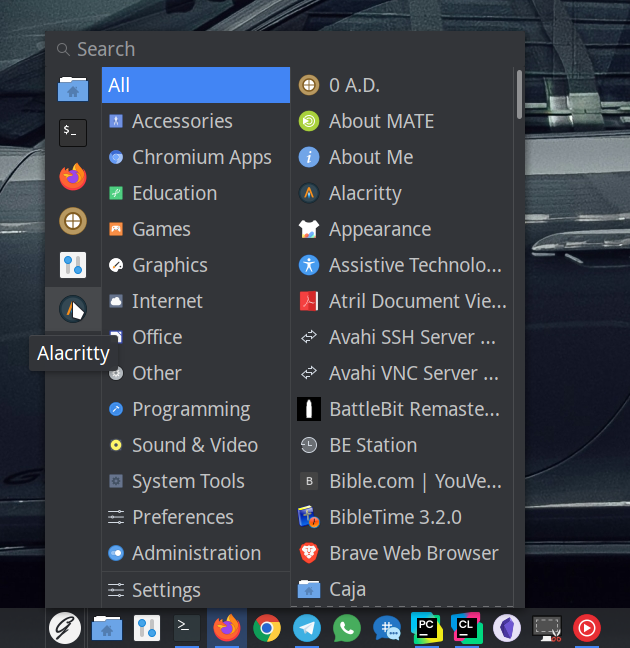
I am not sure if I want the session controls in the bottom-left corner. What do you all think?

GhostBSD Project retweeted

GhostBSD has always pushed the boundaries of what FreeBSD can do, and they are still at it - the creation of the Mocka Desktop; a gradual replacement of the Mate Desktop
GhostBSD: Mocka Dock | The Start of the Mocka Desktop youtu.be/WM2P7o9H-G8?si=Onj1… via @YouTube #FreeBSD #Linux



GhostBSD Project retweeted
The Mocka desktop website is live.
mocka-desktop.org/about/
I still have some work to do.
GhostBSD Project retweeted
I am working on a new desktop named Mocka. The name came from a typo I made while checking whether any projects were already named Mocha. Mocka will replace MATE one component at a time until every part has been replaced. Every component is written from scratch, reverse engineered from how the existing tools behave, and stays compatible with MATE so you can mix both while the transition happens.
The first component is Mocka Dock, now in alpha. It's a taskbar-style dock applet for the MATE panel with pinned and running apps, drag-and-drop pinning, per-app right-click menus with desktop actions and recent files, and minimize animations to the app's button. Window thumbnails are the next milestone.
Mocka Dock will be available in the next GhostBSD package update and will come preinstalled, but it won't be set as the default yet. Once the update lands, add it to your panel with Add to Panel. If you want to try it sooner, the release notes have build instructions.
Release notes and source: github.com/mocka-desktop/moc…
Please report bugs on GitHub issues.

GhostBSD Project retweeted
Finally renamed Backup Station to BE Station.
github.com/ghostbsd/be-stati…

GhostBSD Project retweeted
👀* New Video *👀
In this quick video you will learn how to see the status of your ZFS Autotrim and how to enable it.
How to Enable ZFS Autotrim on GhostBSD youtu.be/PVh0buX_Fjc?si=VtPX… via @YouTube #GhostBSD #Linux #FreeBSD

GhostBSD Project retweeted
*New Video*
Sweet Home 3D is a free and open source architectural design software that helps users create a 2D plan of a house. In this video we will have a look, and attempt to make something...blimey.A Look at SweetHome3D on
GhostBSD youtu.be/U7r-6Lgdq6E?si=xr4p… via @YouTube

GhostBSD Project retweeted
* New Video *
GhostBSD is a FreeBSD-based operating system created to provide a secure, user-friendly desktop experience. In this short video, here are 5 quick FAQ taken from the GhostBSD website.
5 GhostBSD FAQ youtu.be/87vIaARGpY4?si=yFyc… via @YouTube #GhostBSD #Linux #FreeBSD
GhostBSD Project retweeted
** New Video **
It may surprise some people that GhostBSD has an out-of-the-box firewall - and very good it is too....in this video we will show you what options there for configuration using the terminal.
GhostBSD Firewall youtu.be/ld-1cUxpTp8?si=HJsL… via @YouTube #Linux #GhostBSD

GhostBSD Project retweeted
* New Video *
It's never too late to try something new - why not try GhostBSD? In this video we will show you three ways to try one of the best OS's you can use.
3 Ways to try GhostBSD | Spectare Trifariam! youtu.be/WdYSE0F9vPk?si=Kdj6… via @YouTube #FreeBSD #Linux #GhostBSD