

A practical guide to becoming a confident Linux user and sysadmin. Linux tips, insights, and lessons from the book. Get the book at https://xitter.cf/t.co/TLT5Yk16Vc
📚 See what’s inside →
Joined June 2026
- Tweets132
- Following2
- Followers2.4K
- Likes122




Pinned Tweet
👀 Look what’s here…
First Steps With Linux is now available in paperback. 📚
firststepswithlinux.com/pape…


First Steps With Linux retweeted

I turned this book into an interactive learning experience 🐧
📖 Learn Linux from the ground up
💻 Practise commands as you go
🧠 Test yourself with knowledge checks
📊 Track your progress
🔖 Continue where you left off
🏅 Earn completion certificates
🛤️ Follow a guided learning path
📝 Prepare for the RHCSA exam with mock exams
Same book. More ways to learn.
Start learning for free → sysxplore.com


Another great day to pick up a Linux book and read.
firststepswithlinux.com/pape…

Quick Linux tip:
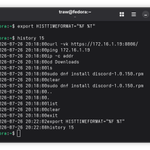
You can enable timestamps in your bash command history to see when you ran previous commands. This can be useful for tracing what you were working on and when.
To add timestamps to your history, just set the HISTTIMEFORMAT environment variable like so:
$ export HISTTIMEFORMAT="%F %T "
Now when you view your history or grep through it, you'll see a timestamp next to each command indicating when it was run:
$ history | tail -n 5
Or to save a couple of keystrokes:
$ history 5
The format "%F %T" shows the date and time, but you can customize it to your liking.
Note: This does not put historical timestamps on commands you executed before setting HISTTIMEFORMAT.

P.S. Learning Linux doesn’t have to be overwhelming.
I wrote First Steps With Linux, a 700+ page guide designed to take you from beginner to confident Linux user and sysadmin.
Everything you need to build real Linux skills in one place.
Get your copy:
read.sysxplore.com/l/first-s…


First Steps With Linux retweeted

my copy of it arrived today, and it looks great. Well done @sysxplore 📕
#Linux #book #training #documentation
It’s out! 📚
First Steps With Linux is finally available in paperback.
And I have to admit…
Turns out I accidentally wrote a bible.
Holding the finished book in my hands for the first time was a surreal feeling.
If you’ve been waiting for a physical copy, it’s here:
firststepswithlinux.com/pape…


Another great day to pick up a Linux book and read. 🐧
Sharing is caring:
firststepswithlinux.com/pape…


Primeros Pasos con Linux
La guía práctica que te lleva de cero experiencia en Linux a administrar sistemas, redes y almacenamiento con total confianza, con ejemplos prácticos en cada paso.
es.firststepswithlinux.com


We just crossed 2.3K followers!
Thank you all, and a huge thank you to everyone who has purchased the book. 🤝

First Steps With Linux retweeted
Tools and stack I used to write and self-publish my 700+ page book, First Steps with Linux:
Writing
• AsciiDoc — writing and structuring the book
• VS Code / AsciiDocFX — writing and editing
• Applivre — a custom VS Code extension I built for chapter ordering, automatic includes, code line highlighting, build profiles, and theme management
Design & book tooling
• Inkscape — designing the visuals and book cover
• Ruby — custom Asciidoctor extensions and layouts
• YAML + CSS — PDF and EPUB themes
• Rouge — syntax highlighting for code blocks
Labs
• Vagrant — provisioning the hands-on Linux labs used throughout the book
Building
• Asciidoctor PDF + EPUB3 — generating the PDF and EPUB
• Shell scripts — automated build workflows
• Docker — reproducible build environment
Version control & automation
• Git + GitHub — version control
• GitHub Actions — automated builds
Proofreading
• Grammarly — proofreading
Publishing
• Gumroad — PDF + EPUB
• Amazon KDP — paperback + Kindle
A lot goes into making a book beyond just writing it.


Linux filesystem and directory structure🐧
📁 /
├── 📁 bin
│ ├── ⚙️ ls
│ └── ⚙️ bash
├── 📁 boot
│ ├── 💾 vmlinuz
│ └── 💾 initrd.img
├── 📁 dev
│ ├── 💿 sda1
│ └── 💿 sdb
├── 📁 etc
│ ├── 🛠️ passwd
│ └── 🛠️ fstab
├── 📁 home
│ ├── 📁 james
│ │ ├── 🛠️ .bashrc
│ │ ├── 📁 documents
│ │ └── 📁 .ssh
│ │ ├── 🔐 id_rsa
│ │ └── 🔑 authorized_keys
│ └── 📁 traw
│ ├── 🛠️ .profile
│ ├── 📁 pictures
│ └── 📁 .ssh
│ ├── 🔐 id_rsa
│ └── 🔑 authorized_keys
├── 📁 lib
│ ├── ⚙️ libc.so
│ └── ⚙️ libm.so
├── 📁 media
│ ├── 📁 cdrom
│ └── 📁 usb
├── 📁 mnt
│ └── 📁 mymount
├── 📁 opt
│ └── 📁 myapp
├── 📁 proc
│ ├── 📄 cpuinfo
│ └── 📄 meminfo
├── 📁 root
│ ├── 🛠️ .bash_history
│ └── 📁 .ssh
│ ├── 🔐 id_rsa
│ └── 🔑 authorized_keys
├── 📁 run
│ ├── 📄 utmp
│ └── 📄 systemd
├── 📁 sbin
│ ├── ⚙️ init
│ └── ⚙️ reboot
├── 📁 srv
│ └── 📁 myservice
├── 📁 sys
│ ├── 📄 devices
│ └── 📄 firmware
├── 📁 tmp
│ ├── 📄 temp1
│ └── 📄 temp2
├── 📁 usr
│ ├── 📁 bin
│ │ ├── ⚙️ perl
│ │ └── ⚙️ python
│ ├── 📁 lib
│ │ ├── ⚙️ libssl.so
│ │ └── ⚙️ libcrypto.so
│ └── 📁 local
│ ├── 📁 bin
│ ├── 📁 lib
│ └── 📁 share
└── 📁 var
├── 📁 log
│ ├── 📄 syslog
└── 📄 auth.log
├── 📁 mail
├── 📁 run
├── 📁 spool
└── 📁 www
If you’ve been struggling with Linux and everything still feels confusing, look no further.
I wrote this Linux BIBLE specifically for you.
It takes you from knowing absolutely nothing about Linux to becoming a confident Linux user and sysadmin.
Available in both paperback and Kindle.
firststepswithlinux.com/pape…

