

We're Edovia. Makers of @screensvnc for iOS, macOS & Vision Pro, which lets you control your computer from anywhere. @edovia@mastodon.cloud
On your devices
Joined September 2008
- Tweets4.8K
- Following4
- Followers2.6K
- Likes44







Motorist is now completely free. 🚗
After four years, we’re putting it into maintenance mode. Subscriptions won’t renew, but we’ll keep the app working for as long as reasonably possible.
More details:
blog.edovia.com/en/motorist-…
Screens 5.9 is here! 🎉
Built for Apple OS 27, with Siri, Shortcuts & Spotlight integration, Quick Connect widgets, improved controls, AirPlay support, and much more.
We also have a few things to say about iPhone Duo — and what’s next for Screens.
blog.edovia.com/en/screens-5…
⚠️A macOS Screen Sharing vulnerability (CVE-2026-65400) is being actively exploited.
If you use Screens or another VNC client to remotely access a Mac, update macOS as soon as possible.
blog.edovia.com/CVE-2026-654…
support.apple.com/en-us/1481…
Screens users can also take this a step further by preventing direct connections to macOS Screen Sharing and tunneling them through SSH instead.
Here’s how:
help.edovia.com/screens-5/ho…
🔧 We’re continuously improving the Screens Connect service to enhance reliability, compatibility, and performance.
To get the best experience, we recommend keeping Screens and Screens Connect up to date.
Learn more: blog.edovia.com/en/improving…
Remote access is now built right into Screens.
Starting with Screens 5.8.8, there’s no need to install Screens Connect separately on Macs running macOS 14 or later. Sign in, enable remote access, and connect to your Mac from anywhere.
Learn more: blog.edovia.com/en/remote-ac…

ALT The Screens Library window showing Macs available through Screens Connect for remote access.
Initial Notes on Screens, iOS 27, iPadOS 27, macOS 27, and visionOS 27:
help.edovia.com/screens-5/fa…
Working on bringing Screens Connect directly into Screens for Mac, making the standalone Screens Connect app optional.
Want to help test? TestFlight (limited spots): testflight.apple.com/join/KW…
*macOS 14 or later.

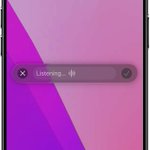
Dictation is here in Screens 5.8.6.
Speak, and Screens types on your remote Mac, Windows, or Linux machine—commands, prompts, anything.
Faster input. Less friction.
blog.edovia.com/en/screens-5…

ALT An iPhone showing Screens 5.8.6 with the Dictation interface active, displaying a “Listening…” prompt ready to capture speech input.
If you bought a Mac mini to run AI agents, Screens is basically your new best friend 😄
screens.app
Make Screens work the way you do 🚀
Screens 5.8 introduces toolbar customization, giving you full control over which actions appear in the toolbar, so your most-used tools are always within reach.
Learn what’s new and how to customize it: blog.edovia.com/en/screens-5…

ALT Image of the toolbar customization settings.
🚨 Black Friday Deal! 🚨
Save 40% on your first year of a Screens 5 Annual Plan 🎉
Our only sale of the year is live!
⏳ Ends soon — redeem here:
r.edovia.com/bf25 🚀
For new annual subscribers only.
#BlackFridaySale #CyberMonday

Honored to have @screensvnc featured on @stephenrobles’ “30+ Apps I NEED on My Mac” — alongside so many other great apps! 🙌
📺 Watch the clip: youtu.be/xFAiUavskYI?si=q3yN…
Screens 5.7 is here! 🚀
Now optimized for iOS, iPadOS, macOS & visionOS 26 with Liquid Glass, background file transfers (iOS/iPadOS), and plenty more.
👉 blog.edovia.com/en/screens-5…
The toolbar currently appears on the left when using Screens in landscape on your iPhone. Would you prefer it:
60%On the left side (as it i
20%Always at the bottom (lik
20%No preference
5 votes • Final resultsWhen using Screens on your iPhone, do you usually hold your device in:
45%Portrait
55%Landscape
11 votes • Final resultsPSA: Tailscale recently changed their JSON format without notice, which is causing Screens to fail when fetching device data for some users.
We’ve submitted Screens 5.6.11 to Apple with a fix. It should be available soon — stay tuned!