

• Freelance web developer with 14+ years of experience • Sharing practical web dev tips regularly • Access 250+ tips → https://xitter.cf/t.co/hmdRmv0cV5
- Tweets9.5K
- Following311
- Followers9.6K
- Likes14K




ALT To avoid penalty, don't show intrusive interstitials and dialog as soon as a mobile user lands on a page from search results. Such dialogs obstruct users from reading actual content and so should not be shown to avoid penalty. Mandatory interstitials/dialogs needed for legal purposes such as age verification or cookie notifications are exempted from such a penalty.

ALT When <caption> is set as the first element inside <table>, screen readers read it first. This helps screen reader users quickly understand the purpose of the table rather than going through many cells of the table to understand it! By default, the caption is rendered above the table but we can change the caption position using caption-side property in CSS. HTML Code: ``` <table> <caption>Employee Details</caption> <tr> ... </tr> </table> ``` CSS Code: ``` table { caption-side: bottom; /* to render the caption after the table.*/ } ```

ALT We can highlight a part of the text using <mark> element to bring it to the reader's attention. HTML Code: <p>Here, the <mark>searched term</mark> is highlighted.</p> Use Cases: - We can use it to highlight part of the relevant text based on the user's activity, such as search. - We can also use it to highlight a part of the text written by another author. E.g. highlighting a part of a quotation.

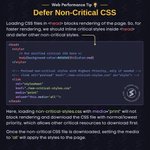
ALT Loading CSS files in <head> blocks rendering of the page. So, for faster rendering, we should inline critical styles inside <head> and defer other non-critical styles. HTML Code: <!DOCTYPE html> <html lang="en"> <head> <style> /* Put minified critical CSS here */ body{background-color:#d3d3d3}h1{color:red} </style> <!-- Preload non-critical styles with Highest Priority, only if needed --> <!-- <link rel="preload" href="./non-critical-styles.css" as="style"> --> <link rel="stylesheet" href="./non-critical-styles.css" media="print" onload="this.media='all'"> </head> <body> <!-- Main Content --> </body> </html> Here, loading non-critical-styles.css with media=”print” will not block rendering and download the CSS file with normal/lowest priority, which allows other critical resources to download first. Once the non-critical CSS file is downloaded, setting the media to ‘all’ will apply the styles to the page.

ALT For tel/sms numbers, create a link with tel: / sms: URL scheme, which opens a supported phone/message application to dial the number or send SMS on click. Sample HTML Code: <a href="tel:+1-202-555-0194">+1-202-555-0194</a> <a href="sms:+1-202-555-0194">+1-202-555-0194</a> <!-- SMS with pre-filled body (For Android) --> <a href="sms:+1-202-555-0194?body=CODE2026"> +1-202-555-0194 </a> <!-- SMS with pre-filled body (for MacOS/iOS) --> <a href="sms:+1-202-555-0194&body=CODE2026"> +1-202-555-0194 </a>

ALT :where() selects elements based on the list of selectors given in its argument. Sample CSS Code: /* ❌ More code, Less readable, Hard to maintain */ section h2, section h3, article h2, article h3, aside h2, aside h3 { color: red; } /* ✅ Lesser Code, More Readable, Easy to maintain */ :where(section, article, aside) :where(h2, h3) { color: red; } :where() has 0 specificity and it ignores incorrect selectors. Use :is() instead of :where(), when you want the specificity of the most specific selector in the argument to be considered in the overall selector.

![Javascript code showing the use of setting cause:
db.js
let connectionPool = {
connect: () => Promise.reject(new Error('Connection refused!')),
};
export async function getConnection() {
try {
return await connectionPool.connect();
} catch (e) {
throw new Error('Get DB connection failed', { cause: e });
}
}
// user.js
async function getUserDetails(userId) {
try {
const conn = await getConnection();
await conn.executeQuery(/* Query */);
} catch (e) {
throw new Error('Get user details failed', { cause: e });
}
}
//index.js
async function getPostsForUser(userId) {
try {
const { createdDate } = await getUserDetails(userId);
await getPostsTillDate(userId, createdDate);
} catch (e) {
console.error('Get posts failed', e);
}
}
getPostsForUser();
Result:
Get posts failed Error: Get user details failed (+ stacktrace)
[cause]: Error: Get DB connection failed (+ stacktrace)
[cause]: Error: Connection refused! (+ stacktrace)](https://pbs.twimg.com/media/HDnmVX7aoAAVh-u.jpg?name=orig)
ALT Javascript code showing the use of setting cause: db.js let connectionPool = { connect: () => Promise.reject(new Error('Connection refused!')), }; export async function getConnection() { try { return await connectionPool.connect(); } catch (e) { throw new Error('Get DB connection failed', { cause: e }); } } // user.js async function getUserDetails(userId) { try { const conn = await getConnection(); await conn.executeQuery(/* Query */); } catch (e) { throw new Error('Get user details failed', { cause: e }); } } //index.js async function getPostsForUser(userId) { try { const { createdDate } = await getUserDetails(userId); await getPostsTillDate(userId, createdDate); } catch (e) { console.error('Get posts failed', e); } } getPostsForUser(); Result: Get posts failed Error: Get user details failed (+ stacktrace) [cause]: Error: Get DB connection failed (+ stacktrace) [cause]: Error: Connection refused! (+ stacktrace)

ALT We can easily change the thickness of the text underline using text-decoration-thickness property. CSS Code: h1 { text-decoration: underline; text-decoration-color: #fac133; text-decoration-thickness: 10px; } As compared to the border, it does not take up any space! By default, the underline gets broken when it passes over the glyph. We can avoid that by text-decoration-skip-ink: none.