

I help design agencies stop bleeding money on wasted time. Custom Notion Systems for Design Agencies Calculate your monthly loss ➡️ https://xitter.cf/t.co/4n7BUcitop

Joined August 2014
One of the most exciting recent discoveries in neuroscience: the brain’s own cleaning system (the glymphatic system). Research on this system is still in its early stages, but it may help prevent neurodegenerative diseases such as Alzheimer’s & promote long-term brain health. My Medium article explains this system in more detail and shares ways to support it: medium.com/write-a-catalyst/…
1
2
15
691
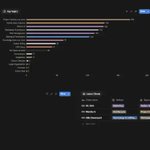
After 403 consulting sessions, I stopped guessing what people struggle with in Notion. The data told me. Here's what surprised me: 1. Nobody's problem is formulas. Out of 403 sessions, formulas came up twice. Automations, 11 times. Integrations, 11. Meanwhile "how do I track my projects" came up 254 times, 63% of every conversation I've had. The internet sells advanced Notion. People need structural Notion. 2. The bottleneck is architecture, not features. Basic features (154), workspace architecture (142), task management (134), sharing & permissions (126). Four of my top six topics are the same underlying question asked differently: where does information live, and who touches it? Nobody books a call because they can't build a database. They book because they built nine of them and now nothing connects. 3. Notion AI arrived faster than I expected. 152 sessions. Third most-discussed topic overall. Two years ago this wasn't on anyone's list. Now it outranks task management. But notice the pairing: people ask about AI while asking about basic features. They want AI to compensate for structure they haven't built yet. It won't. AI on a messy workspace just gives you confident answers about the wrong data. 4. The problem isn't your industry. 32 industries. Architecture studios, marketing agencies, software teams, real estate, education, finance. Roughly 77% of everyone I speak with is at beginner level. An architect and a SaaS founder describe their problem in completely different language and then need the exact same thing: one source of truth, clear ownership, and a way to see status without asking anyone. The tools are generic. The workflows are specific. That gap is the whole job. What I'd tell anyone starting out: Don't learn Notion. Design your operation, then use Notion to hold it. Spend your first week on what your projects actually move through, not on rollups. 403 conversations, and the highest-leverage change is almost always the least impressive one: fewer databases, clearer relations, obvious next step. What's the one thing you'd want fixed in your workspace this week?
1
1
2
164
It's been a while since I recommended a launch on PH. You have to check this out 🤩
This quoted post is unavailable.
1
1
48
100 Notion Pro Tips #79. Automate Follow-Up Reminders Set an automation that notifies you when a Lead's status hasn't changed in 7 days. Never let a prospect slip through the cracks.
4
52
100 Notion Pro Tips #78. Separate Sensitive Data Into Its Own Database Don't put pricing, margins, or sensitive notes in a shared database. Create a private database with Relations to the shared one. Show clients only what they need to see.
2
50
100 Notion Pro Tips #77. Use Rollups to See Revenue Per Client If your Projects database has a "Revenue" number property, use a Rollup on the Client page to sum all project revenue. Instant client lifetime value.
5
68
100 Notion Pro Tips #76. Relate Proposals to Clients Keep a Proposals database related to your Clients database. When an agent generates a proposal from a session transcript, it's automatically linked to the right client.
2
27
100 Notion Pro Tips #75. Client Portal = Shared Page + Subpages Create a page per client with deliverables, contracts, and updates as subpages. Share only that page. The client gets a polished experience; you maintain control.
2
32
100 Notion Pro Tips #74. Forms for Lead Collection Create a Notion form connected to your CRM database. Embed it on your website or share the link. New submissions appear as database entries automatically.
3
32
100 Notion Pro Tips #73. Use Board View as a Sales Pipeline Group your Clients or Deals database by a Status property (Lead → Contacted → Proposal → Won → Lost) and you have an instant visual pipeline.
2
46
100 Notion Pro Tips #72. Track Client Interactions With a Meetings Database Every client call, email, or touchpoint gets a page in your Meetings database, related to the Client. Now you have a full interaction history per client.
1
26
100 Notion Pro Tips #71. Build a Simple CRM With 3 Databases Clients, Projects, Tasks, connected via Relations. That's it. You don't need Salesforce if you're a freelancer, agency, or small business.
2
31
100 Notion Pro Tips #70. Use the "Save to Notion" Chrome Extension Capture web pages, articles, and bookmarks directly into a Notion database from your browser. Perfect for building a research or content library.
1
2
74
100 Notion Pro Tips #69. Use Notion Calendar as Your Hub Notion Calendar (the separate app) connects to Gmail, Apple Calendar, and iCloud. Use it to view your tasks alongside meetings in one timeline.
1
29
100 Notion Pro Tips #68. Embed Google Drive Files Directly With the Google Drive integration enabled, you can browse and embed files, documents, and images from Drive directly into Notion pages.
19
100 Notion Pro Tips #67. Sync Outlook Calendar via Zapier (Workaround) Native Outlook sync isn't available for most plans. Use Zapier to push Outlook events into a Notion database, then use Calendar view to display them.
1
37
100 Notion Pro Tips #66. Use Formulas for Automatic Date Calculations The `dateAdd` and `dateSubtract` functions let you auto-calculate deadlines relative to a trigger date. "7 days before launch," "3 days after signing," all automatic.
1
8
100 Notion Pro Tips #65. Connect Notion to ChatGPT via MCP Notion's MCP (Model Context Protocol) connections let ChatGPT read and write directly to your Notion workspace. Great for power users who live in multiple AI tools.
1
34
100 Notion Pro Tips #64. Automate Google Drive Folder Creation Use Zapier or Make to automatically create a Google Drive folder when a new project is added to Notion. Keep your file structure in sync without manual work.
2
40