

Sharing .env files is so 2019.
Vancouver
Joined March 2026
- Tweets60
- Following17
- Followers227
- Likes30



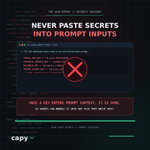

things .gitignore protects you from:
- git
things .gitignore does not protect you from:
- cursor
- claude code
- copilot
- your own screen share
- the intern
Secrets management tools make a simple mistake: they try to reinvent developer workflows with complex web dashboards.
You should not have to leave your terminal or learn a new paradigm just to share environment variables.
Capy treats secrets the way you already treat code:
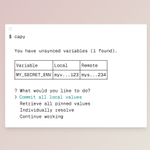
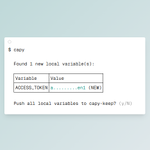
👉 capy push to publish updates
👉 capy pull to grab team changes
👉 capy checkout to switch branch environments
No new mental model required.

You open your laptop at a coffee shop, pull down your repository, and immediately hit:
Missing environment variable: DATABASE_URL
Now you are spending 20 minutes texting teammates or remoting into your home desktop just to copy over API keys.
Capy lets you access project secrets securely across every device you own.
capy.sc

A quiet way AI-built apps leak secrets in production:
When an API route fails, default error handlers often dump the entire stack trace straight back to the browser.
Anyone triggering a 500 error can see your database connection string, internal paths, and environment variables sitting right in the response.
Always return generic error messages in production.
Introducing Capy, the world's first secrets manager.
AI changed how software gets built. SecretOps is next.
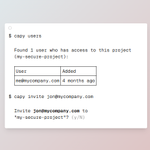
OAuth based authentication grants your agents and collaborators temporary access to locally encrypted secrets, making them revocable at any time.
Capy is all you need to sync, push, and pull variables for a project.
Comment for an invite at capy [dot] sc.

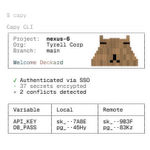
4/ Capy is a git-native secrets manager with end-to-end encryption, branch-aware syncs, and reviewable metadata.
5/ Why teams pick Capy
- Works through environment variables. Your code keeps reading process.env, os.environ, ENV, or the equivalent in your runtime.
- Secret branches. Capy branches are separate from Git branches. Switch them with capy checkout .
- Reviewable metadata. Commit keep.lock; it records the project and encrypted-value hashes, not values or keys.
- Local or browser-assisted interaction. Most commands run in the terminal. --web renders supported interactive setup and conflict screens on a local browser page.
Your AI coding agent is great at writing components, but terrible at keeping secrets out of Git.
That is why we added capy agents to the Capy CLI.
We tested it across 200+ evals on Claude, Cursor, and Codex to teach AI tools how to safely request, inject, and scope credentials without dumping raw tokens into prompt context or .env files.
Zero-trust secrets built for both humans and AI agents.

100+ commits later and 0.9.7 is live!
We decided 0.9.2 wasn't good enough.
- *capy agents*, which teaches agents how to use capy now can be driven by agents
- *capy edit* and *capy add* can now have values piped
- And there's one more big thing in the release that teases the future of Capy ;)
These are likely the last few releases of 0.9
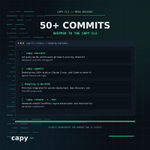
The Capy CLI just got a massive update with 50+ commits 👇
What is new:
capy secrets 1️⃣ list every secret across every git repo in your org, where it is deployed, and who changed it .
capy agents 2️⃣ tested across 200+ evals on Claude, Cursor, and Codex to teach AI agents how to manage credentials safely.
Dokploy support for secrets retrieval and repo discovery.
First-class WorkOS support with ClientID-aware secrets retrieval.
Hardened capy rotate and .env file layout preservation.
Secrets management for humans and AI agents .

A launch checklist can start small:
1. Identify your secret keys.
2. Check they aren't in browser code.
3. Know where to revoke them.
This is a starting point, not a security audit.
"I'll sort out security when people start using it."
You don't need to solve everything before launch.
Start with one question: Which of my keys can access real data or spend real money?

Frontend = code running in your visitor's browser.
Backend = code running on your server.
Your OpenAI secret key belongs on the backend, not in the browser. That's the distinction to understand before connecting your first AI feature.