

✨ Everything you wished a digital notebook could do - built by real teachers. Live editing, monitoring, and auto-grading magic
Joined June 2024
- Tweets35
- Following18
- Followers9
- Likes7
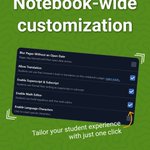


New: notebook-level settings for more teacher control. ⚙️
🗓️ Blur pages until their open date arrives
🌎 Choose whether students can translate pages
🧮 Enable math tools, special characters and more
👉 Try it today at brainraider.com
#EdTech #DigitalNotebooks

New: build notebook pages by chatting with Brain Raider. ✨
💬 Tell the AI Builder what you want students to do
📓 Turn ideas into editable notebook pages faster
🧑🏫 Keep control, tweak anything, and make it your own
👉 Try it today at brainraider.com
#EdTech

Extra time just got easier to manage. ✨
👆 Click once to extend the deadlines for a student, page, or assignment
📅 Set accommodations once, they can apply all year
Build your notebook today at brainraider.com
#TeacherTools #EdTech #ClassroomManagement

New: assignment times that actually match your class schedule. ⏰
🏫 Set your class start/end times once
👆 Click “Use class times” on any assignment
📅 Brain Raider adjusts the deadline to match when class actually ends
👉 Try it today at brainraider.com
#EdTech

New shortcut: freeze the whole class to one page. 🔒
📍 Keep every student focused on today’s activity
⏱️ Lock expires automatically after 60 minutes
🧑🏫 Great for warm-ups, guided practice, labs, and more
👉 Try it today at brainraider.com
#DigitalNotebooks #EdTech

Not every drawing task needs the same amount of work 🎯
So we added a simple setting for drawing inputs: required pen strokes.
🧠 Quick annotation? Use a small number.
🧪 Science diagram? Ask for more.
👉 Try free today at brainraider.com
#EdTech #DigitalNotebooks

By popular demand: student annotation inputs are here.
📝 Add text for students to mark up directly
🖍️ Highlight, underline, circle, strikethrough, and more
🤖 Fully compatible with the Brain Raider autograder
Build your notebook at brainraider.com
#EdTech

For teachers with a growing notebook collection…
🗂️ The new notebook shelf keeps everything tidy
✨ Less sidebar clutter, more room to work
👉 brainraider.com
#DigitalNotebooks #EdTech #TeacherTools

New: one-click word art for notebook headers. 🎉
🖌️ Choose from 16 built-in styles
📚 Dress up unit titles, page headers, and section breaks
✨ Make student notebooks look better in seconds
👉 brainraider.com
#TeacherTools #CreativeClassrooms #EdTech

Your best notebooks deserve a second life. 📓
🔁 Copy an entire notebook with one button
⏱️ No time spent rebuilding what already worked
👉 Life is easy at brainraider.com
#DigitalNotebooks #TeacherHacks #EdTech

Drag-and-drop just got a glow-up. ✨
✅ Generate clean Venn diagrams, T-charts, and more
✅ No more clipping screenshots or hunting for templates
Make your next lesson interactive at brainraider.com
#TeacherLife #EdTech #DigitalNotebooks

New gradebook filter: only show work completed after a specific date.
🔓 Keep notebooks open for students; take grades on your own schedule
⏱️ A perfect compromise for student-friendly late policies
Try it free today at brainraider.com
#TeacherLife #EdTech

Unveiling two highly-requested adds from Crew Appreciation Week:
💬 Type live feedback as students work
⏱️ Reveal student scores when the time is right
Try it free at 👉 brainraider.com
#TeacherHacks #EdTech #FormativeAssessment

Ready to toss your Chromebooks out the window? 💻🪟
🔧 Try this first: disable copy & paste to stop AI use in its tracks
👂 Hear students' real voices again in this brave new world
Get started today at brainraider.com
#EdTech #Chromebooks

(Beta) feature: smart content import for your PDFs.
📥 Upload a PDF → we convert it into editable elements
✂️ Text, images, multiple-choice fall in seamlessly
🆓 Free for everyone while we add polish
Raising the bar for digital notebooking at brainraider.com
#EdTech

Every question type you need, including multi-select.
✅ Create check-all-that-apply items with configurable scoring
✅ Better alignment for real-world questions and standards
Easy to build. Easy to share.
📈 Try it free at brainraider.com
#EdTech

Neon yellow? Pastel pink? Your set, your rules. ✨
✅ Custom palettes for drawing inputs (highlighters included)
✅ Pick the right colors for every job
👉 brainraider.com
#CreativeClassrooms #EdTech

Top-requested feature: native student tables for student input
🎨 Easily customize with just a few clicks
🤖 Autograder-compatible — no hand grading (unless you want to)
You told us what would help. We built it.
👉Try it today. brainraider.com
#TeacherTools #EdTech

Share the load without sharing passwords.
✅ Automatically share student work with co-teachers or paraprofessionals
✅ Control what’s shared and when — view-only options available
Better collaboration, less hassle at brainraider.com
#EdTech #DigitalNotebooks #CoTeaching

Big notebook? No problem.
🗃️ Add chapters, collapse units, and jump to sections instantly
⏱️ Students pend less time searching, more time learning
👉 Try it free at brainraider.com
#TeacherHacks #EdTech #DigitalNotebooks
