
COO of a B2B SaaS selling into the kind of enterprise that sends 300-question security questionnaires Building agents to do the boring half of the job at night
🇪🇺
Joined March 2007
- Tweets48
- Following579
- Followers1.7K
- Likes266




I was looking at the voices available on @FishAudio in French, and it’s clear their platform is being used to generate fishing campaigns. Most of the top voices are meant to sound like real phone calls or audio messages: fish.audio/discovery/?sort=t…


copied to your clipboard is real. I made a script that automatically clicks on "Try another way", then "Google Authenticator", and with the magic of 1Password, the code is pasted automatically and you are logged in within milliseconds compared to before🙌 gist.github.com/bjonathan/6c…

I think I can honestly say that I made a life-changing userscript 😅... If you are like me and use Google+1Password, the pain of logging in through Google 200x per day and being asked to validate a notification on your phone while you already have your 2FA code automatically
Please 👏 do 👏 something 👏 like 👏 that 👏 but 👏 for 👏 knowledge 👏 workers 👏
(Every dev working on 50 flavors of the same issue while ignoring than a better "cowork" must exist with 100x TAM)


OpenAI is known for timing its announcements to coincide with its competitors’ big events. I imagine they’re all ready to give OpenAI a taste of its own medicine today 😅 (starting with the "leaked" s1 from Anthropic)
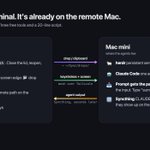
Added bonus: I added a line to my CLAUDE.md file so that any file created by Claude on minibrain is saved on ~/Sync/drops/ that way I can directly access any files created on minibrain thx to Syncthing.
I’ve been using it for over a month, and it has been flawless!
The script is 20 lines of zsh
It scp's the file into ~/Sync/drops/ on the mini, adds a timestamp if the name is taken, puts the remote path on the clipboard, brings the terminal to the front and presses ⌘V
The path lands in the prompt without any action on my end. That's it!🪄

On 📂, enable drops and attach a "Run Real JavaScript" action. The JS reads the dropped paths with get_menu_item_value and passes them to a shell script.
📋 runs the same script on whatever is in the clipboard: a file copied in Finder, a path as text, or image data.
Step 2: I use BetterTouchTool floating menu for the UI.
Basically I made a rule that if the window is named a certain way 2 buttons are pinned to the left edge of the screen, 📂 and 📋.

Step 1: Syncthing on both Macs.
One folder, ~/Sync, mirrored both ways. I turned off relays and global discovery so the two machines talk directly over Tailscale. Leave the filesystem watcher on. A file written on one side shows up on the other a few seconds later.
The base: the Mac mini runs herdr with one Claude Code agent per space. My laptop attaches with mosh over Tailscale:
alias hw='mosh minibrain -- bash -c "herdr; exec $SHELL -l"'
On my phone, on my laptop... wherever I am, the session is live.

~/Downloads/x.pdf. A path on the wrong machine. If I wanna paste a screenshot, likewise nothing arrives.
So I HAD to fixed it.
Four pieces: herdr, mosh, Syncthing, BetterTouchTool. Here's the setup.
