

AI Software Engineer | Teaching devs how to become AI devs on YouTube +50k subscribers | Download +30 Fullstack AI Projects for free: https://xitter.cf/t.co/WfMn8OE8Id
brandonhancock.io
Joined October 2021
- Tweets1.8K
- Following826
- Followers1.9K
- Likes2.5K



Pinned Tweet
Google's new Agent Development Kit (ADK) is exploding in popularity and I've created the ultimate crash course to take you from beginner to pro!
youtu.be/P4VFL9nIaIA
In this brand-new ADK Masterclass, we'll cover 12 hands-on examples to teach you everything from creating your first AI agent to building complex, multi-agent workflows that automate tasks, interact with tools, and manage memory seamlessly.
Here's a sneak peek of what you'll master:
✅ Basic to advanced agent creation, step-by-step
✅ How to integrate external tools like Google Search
✅ Using LiteLLM to bring your own AI models (GPT-4.1, Claude 3.7, and more!)
✅ Structured outputs for consistent, reliable data
✅ Sessions, memory management, and persistent storage for smarter agents
✅ Multi-agent systems for specialized tasks
✅ Sequential, parallel, and loop workflows for optimized performance
💡 Bonus:
I'm giving you ALL the example source code for FREE! Check out the first link in the YouTube description to download all the source code!
My favorite AI dev setup right now:
- T3 Code running parallel coding tasks.
- Dot on a call while I work.
I explain where we’re going, talk through problems, and ask it to check GitHub when I need context.
It files issues, updates them as we work things out, and helps me decide what matters next.
Feels like having a coworker I can think out loud with all day.
AI developers are about to run into a very human limit: how much work we can keep in our heads.
I can run 15 things in parallel in T3 Code. Keeping the decisions, issues, and priorities straight is another job.
My favorite unlock: keep a call with dot open while I work.
I talk through the big picture. It checks GitHub, files issues, updates existing ones, and helps me think through what matters next.
More agents means I need more help thinking, too.
5
735
On Wednesday, I'll be dropping a new tutorial showing you how to generate AI videos and I'll be giving away the entire system for free.
This AI Video Generation System is crazy, all you have to do is type in the name of a Pokemon and the system generates the story, visuals, voice, video, and background sound effects.
If you want to see this system in action, check out the Charmeleon video attached!
Here is the tech stack for creating AI videos:
- Nano banana pro for creating images
- Kling 2.5 on kie.ai for video generation
- ElevenLabs for voice and sound effect generation
And my favorite part is that you can run the entire AI Video Generation System on your local computer using Claude Code or Cursor because everything is prompt driven.
If you have any questions, please let me know!
I've gone deep down the rabbit hole on this and I'm happy to share!
1
3
464

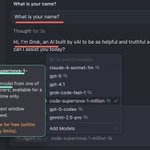
Cursor just released a super secret stealth model: code-supernova-1-million
Unfortunately for @cursor_ai , @grok was built to be so truthful that it couldn't lie to protect it's secret identity 😅
On a more serious note, this model is an absolute beast!
Usually when working with larger 1m context window models, you tend to give up speed so that you can cram more info into the context window.
So far, code-supernova-1-million has been insanely fast and has been able to handle medium sized coding tasks very well!
Now that Grok is cheap, fast, smart, and has a large context window, I could easily see this new model to go to model for every day development tasks.
Please keep up the amazing work xAI! Y'all are crushing it!

Make sure to try out grok-code-fast-1 if you haven't already!
Claude-4 is incredible! I’ll keep recommending it as the #1 model because the reasoning and depth it brings to coding projects is hard to beat.
However, the challenge is that I’m building 9 projects at once right now for shipkit.ai. When you are coding daily at that scale, even the best models start to add up in cost.
So I went hunting for a lighter option I could lean on in Cursor. I tried Gemini-2.5-Pro. I tried GPT-5. Both solid.
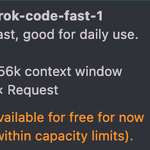
Then I tested grok-code-fast-1.
Here is what I found:
• Way faster than Grok-4 (they were not kidding with “fast” in the name)
• Free right now in Cursor
• For raw speed and responsiveness, I have been enjoying it more than Gemini-2.5-Pro and GPT-5
• If you are coding on a budget or just tired of waiting around for long completions, this is worth trying.
I will keep sharing how it holds up as I push it across my projects.
If you try out the model, I'd love to hear what you think about it!

Cursor just went down 😭
You don't realize how addicted you are to something until they take it away!
8
635
Brandon Hancock retweeted

🚨 Just dropped a no-BS deep dive with Brandon on AI agents, CrewAI’s architecture, and what it really takes to run agents in production.
Link in the next tweet.
Agents aren’t toys anymore.
Here’s what we covered — and why it matters 👇

Google just released the Agent2Agent A2A protocol, making it easier than ever to connect your AI agents with agents built by other developers and companies—no matter which framework you're using.
Here's a link to the video:
👉 youtu.be/mFkw3p5qSuA
If you're serious about building powerful, connected AI agents, mastering A2A is essential.
Here's exactly what you'll learn in my brand-new A2A crash course:
✅ The basics of A2A: what it is, how it works, and why it's a must-know.
✅ Build your first simple agent workflow using A2A.
✅ Advanced workflow step-by-step: connecting an ADK agent seamlessly with CrewAI, LangGraph, and another ADK agent.
Plus, I've included timestamps throughout the video, so you can quickly jump to any specific topic whenever you need.
And to make things even easier, I'm giving away all the example code from the video completely free! Check out the description in the video to access all the code for free!
This tutorial is the comprehensive, practical resource I wish I had when starting with A2A. If you’re looking to level up your AI skills, don’t miss this video!
Cheers,
Brandon Hancock 🧑💻
If you're serious about becoming an AI developer, mastering MCP (Multi-Channel Protocol) integrations is a must. That’s why I made this brand-new tutorial just for you.
youtu.be/HkzOrj2qeXI
In this step-by-step crash course, you’ll learn exactly how to level up your ADK (Agent Development Kit) agents with MCP integrations. You'll create agents that connect seamlessly with powerful remote tools and even build your own local MCP server.
Here’s what you’ll master:
✅ What MCP is and why it’s crucial for robust ADK agents
✅ How to create your first MCP-powered ADK agent
✅ How to set up a local MCP server and connect it to your agents
✅ Practical, real-world insights for quick implementation
BONUS:
You’ll get the full example source code for FREE, so you can easily follow along and build your own. Just check out the first link in the YouTube video.
This is hands-down the simplest way to get started with real-world MCP + ADK agent integration. I'll walk you through every step so even beginners can follow along.
Cheers,
Brandon Hancock 🧑💻
P.S.
Want direct support on your AI projects? Join my free Skool community, AI Developer Accelerator, and connect with thousands of developers (including me!).
👉 skool.com/ai-developer-accel…
Brandon Hancock retweeted

I learned about Google Agent Development Kit from @bhancock_ai's tutorial, fascinated by a manager agent delegating tasks to subagents.
#AI #AIAgents #ADK

If you're serious about becoming an AI developer, mastering Retrieval-Augmented Generation (RAG) is a must. That’s why I made this brand-new tutorial just for you.
youtu.be/TvW4A0a75mw
In this step-by-step crash course, you’ll learn how to build your very first RAG agent using Google’s Agent Development Kit. This RAG agent can search your entire Google Drive and instantly answer questions based on the documents it finds. It even gets smarter as you add more files!
Here’s what you’ll master:
✅ How to set up Google Cloud + ADK from scratch
✅ How to connect your agent to a knowledge base (like your Google Drive)
✅ How to upload documents and get accurate, citation-backed answers
✅ How to test and expand your RAG agent in minutes
BONUS:
You’ll get the full source code for FREE so you can follow along and build your own. Just check out the first link in the YouTube video.
This is hands-down the easiest way to learn how real-world RAG apps work. I’ll walk you through every step so even beginners can follow along.
Cheers,
Brandon Hancock 🧑💻
P.S.
Want direct support on your AI projects? Join my free Skool community, AI Developer Accelerator, and connect with 7,000+ developers (including me!).
Here's the best link to ask questions about this tutorial:
👉 skool.com/ai-developer-accel…
4
571
You can now clone any YouTube channel’s thumbnail style and automate the process of generating thumbnails in that same style using AI.
In this brand-new video, I walk you through a complete Agent Development Kit (ADK) workflow that:
✅ Scrapes thumbnails from a target YouTube channel
✅ Analyzes the visuals to build a detailed style guide
✅ Generates prompts using your video description
✅ Creates branded thumbnails using OpenAI’s new gpt-image-1 model
I built this agent to replicate Alex Hormozi’s exact minimalist thumbnail style—and it nailed it. All I had to do was:
• Upload a picture of me
• Drop in two logos (OpenAI + ADK)
• Write two quick sentences about the video
The agent handled the rest.
This is the perfect intro project if you want to start using ADK + gpt-image-1 for creative automation.
Ready to learn how it works (and get inspired for what you can build next)? Click the link below to watch the full tutorial now and make sure you subscribe so you don’t miss future drops.
👉 youtu.be/HoXyGnPcEzA
Cheers,
Brandon Hancock 🧑💻

1
321
You can now clone any YouTube channel’s thumbnail style—and automate the process of generating thumbnails for your own videos in that same style.
In this sneak peek, I show how I used the Agent Development Kit (ADK) to replicate Alex Hormozi’s exact thumbnail look using OpenAI’s new image model, gpt-image-1.
Here’s how it works:
• Scrapes thumbnails from a target channel
• Analyzes key visual elements and creates a style guide
• Generates prompts based on your content idea
• Produces thumbnails that match the brand using gpt-image-1
All I had to do was:
• Upload a picture of me
• Include two logos (OpenAI + ADK)
• Write a 2 sentences about the video I wanted to create
The agent handled the rest.
This is just a teaser. The full tutorial drops later this week. Make sure you’re subscribed on YouTube so you don’t miss it.
What other ADK workflows or use cases would you love to see?
Brandon Hancock retweeted
Just finished following @dabit3's NFT Marketplace tutorial. Here is a screenshot of the final result!

Brandon Hancock retweeted
What is your go-to language for cloud development?
Python or JavaScript?
Why?
Brandon Hancock retweeted
How committed are you to Twitter?
I created a bot that will automatically send you a picture that shows how often you've tweeted each day for the past year.
It's basically your GitHub commit history except for Twitter!
Here's how you can see your Tweet history in 2 steps 👇

Brandon Hancock retweeted
Google's new Agent Development Kit (ADK) is exploding in popularity and I've created the ultimate crash course to take you from beginner to pro!
youtu.be/P4VFL9nIaIA
In this brand-new ADK Masterclass, we'll cover 12 hands-on examples to teach you everything from creating your first AI agent to building complex, multi-agent workflows that automate tasks, interact with tools, and manage memory seamlessly.
Here's a sneak peek of what you'll master:
✅ Basic to advanced agent creation, step-by-step
✅ How to integrate external tools like Google Search
✅ Using LiteLLM to bring your own AI models (GPT-4.1, Claude 3.7, and more!)
✅ Structured outputs for consistent, reliable data
✅ Sessions, memory management, and persistent storage for smarter agents
✅ Multi-agent systems for specialized tasks
✅ Sequential, parallel, and loop workflows for optimized performance
💡 Bonus:
I'm giving you ALL the example source code for FREE! Check out the first link in the YouTube description to download all the source code!
Brandon Hancock retweeted
I’m excited to announce my latest tutorial: Build a Fullstack AI App with CrewAI Enterprise is now live on YouTube!
youtu.be/JtEljsVY0iE
In this step-by-step guide, you’ll discover how to build a powerful full-stack application that connects directly to CrewAI Enterprise, the platform that makes deploying and monitoring AI workflows incredibly easy.
✨ Why You Should Dive Into This Fullstack AI Tutorial:
First, you’ll get hands-on learning with modern tools. This tutorial shows you how to build a full-stack app from the ground up using NextJS, Drizzle, Neon, and TypeScript. Whether you’re new to full-stack development or looking to sharpen your skills, this tutorial has something for everyone.
Next, you’ll learn how to integrate CrewAI Enterprise. This app will teach you how to connect your project to CrewAI, enabling AI-powered workflows that process YouTube comments, generate video ideas, research trends, and score potential content ideas automatically.
You’ll also benefit from clear, step-by-step guidance. The tutorial is broken into three manageable phases:
1️⃣ Project setup with modern web technologies.
2️⃣ Building and deploying the NextJS app.
3️⃣ Creating and integrating your Crew for seamless automation.
And the best part? I’m giving away the source code for free! 🎁 You can follow along, customize the project, and make it your own.
You can find a link to the source code in the description of the YouTube video.
I can’t wait to see the amazing applications you’ll create!