

Founder of AI Pro Solutions. I build AI assistants that help Austin small businesses answer every call, follow up fast and win more reviews.
United States
Joined July 2016
- Tweets3.5K
- Following326
- Followers277
- Likes1.6K



Pinned Tweet
@LibmanCompany is working with #BREC agency of Baton Rouge area, to get the brooms in the hands of flood victims.

Do your bots talk to each other, or only to you?
Mine report to a Chief of Staff bot. Curious how others set it up.
1
One bot, one clear job, shared with everyone who needs it.
That's the pattern that works for me too. Narrow jobs beat bots that try to do it all.
Narrow jobs are easier to check, too. If something breaks, you know which bot to look at.

Our team built a Team Bot that gives everyone at the company on-demand access to a data scientist.
PMs use Data Bot to investigate product usage, marketers use it to measure campaign results, and teams across the company use it to build dashboards and track key metrics.

3
A real mistake from my bot team.
My Chief of Staff bot once said a batch of messages was approved. It wasn't.
Another one of my bots caught it and pushed back. The Chief of Staff corrected it.
Now the rule is written down for every bot. Only my own yes counts. A yes from another bot is not a yes.
1
1
4
Usage limits made me choosy.
I cut my routines back and kept the ones that earn their spot.
If your bots run out of room every week, that's a sign to cut, not to add.
1
Grok Bot can now reach MCP servers that never touch the public internet.
@mattyp covered it in this week's What's new: Tailscale support for MCP servers on your tailnet.
What the official setup notes say:
> Connect apps, then Your plugins, then Tailscale, and Authenticate your tailnet
> Add each private MCP server by its tailnet address, like server.yourtailnet.ts.net
> Personal tailnet: you must own or run it, and only you, linked teammates and your routines can use it
> Company tailnet: a team admin turns it on first (Tailscale Premium or Enterprise)
> It asks before it removes a device, adds a tailnet or changes the default
Why this matters to me as a small business builder: the tools you would never put on the open web, like an internal database or a home server, can now plug into your bot.
Same update also covered flight and hotel booking, connector tool permissions and image markup.
What private tool would you connect first?

5
Busy is not the same as done.
A review of my bot team showed me something I didn't love. Lots of checks, drafts and handoffs. Not enough real next steps.
Now I ask every bot the same thing. What is the next step, and who does it?
If there's no answer, the work isn't done yet.
5
What do you want to see more of here?
Bot setups, honest mistakes, or quick tips?
Tell me and I'll write more of it.
2
Sunday tip.
Look at every routine you have and ask one question. Did this help me last week?
If not, pause it.
3
AI Steve retweeted

Some treasure chests need a different kind of key 🗝️
H.older E.xclusive R.elease O.ffering

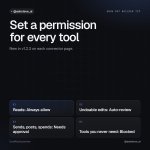
The most useful Grok Bot update this month isn't a new connector. It's the permission dial on every tool.
Since v1.2.3, each tool on a connector's page can be set to Always allow, Auto-review, Needs approval, or Blocked.
Here's the split that makes sense for my bot team:
> Reads like calendar, inbox search and analytics: Always allow
> Small edits you can undo: Auto-review
> Anything that sends, posts, deletes or spends: Needs approval
> Tools a bot never needs: Blocked
Why it matters: bots can work all day on the boring reads, while the risky moves still wait for a yes from me. That's what makes handing real accounts to a bot team feel safe.
Also in the same release: when a routine needs you to reconnect an account, the reconnect card now shows up as a notification too.
How are you setting yours, wide open or locked down? @bot

2
Things I wish I knew before I set up my first Grok Bot:
1. One bot, one job.
2. Write the rules in plain words.
3. Make it ask before it sends anything.
4. Use slow schedules first. Speed up later if you need to.
5. Read what it did every day for the first week.
That's it. Start small and fix things as you go.
2

Short and clear is how I set up my bots.
They write to me in short steps. One link per line. No walls of text.
Clear beats clever, every time.
2
Weekend tip.
Write your bot's rules in plain words. Short lines. One rule per line.
My bots follow rules better when I write them the way I'd say them out loud.
3

AI Steve retweeted

Grok Bot is giving small businesses free credits to see how far it can go as an employee
Eric says DM him if you want in
@mattyp @ericzakariasson

Grok Bot Q&A - Travel, 1.0, meetings & more! xitter.cf/i/broadcasts/2aWQllRAK…

AI Steve retweeted

See you all next Saturday ….
Childhood dreams are always in play
I’m Hyped to see you all next week!
Tune in live 11/28, 2pm ET on QVC.com. Click here to set a reminder: garyvee.com/qvcgaryvee
@veefriends @qvc #LoveQVC
My bots were pinging me all morning with updates that could wait. So I gave them office hours.
The rule I set this week:
> Bots keep working all morning
> Anything that pings me waits until 1 PM
> Updates get batched into one message
> Only something truly urgent breaks the rule
What changed: I start the day on my own priorities instead of reacting to a stack of notifications. The work still gets done. I just see it in one clean batch.
Lesson for anyone running @bot or any AI assistant: automation should save your attention, not spend it. Decide when it is allowed to interrupt you.
When do you let your AI tools ping you?

6