
building fast local inference @usemagnitude
San Francisco
Joined April 2014
- Tweets813
- Following220
- Followers493
- Likes2.5K








Pinned Tweet
We've been working hard to make it easy to run fully-local agents that are actually solid. If you've been meaning to try local models but want an optimized experience that works out of the box, give magnitude a shot!

Introducing Magnitude: your actually local agent
100% private and offline. No token costs, no API keys. Open source.
Today's agents are local. The model isn't. Every prompt, every file, every secret gets sent straight to Anthropic and OpenAI.
Magnitude is built around local models and runs the whole stack itself. The inference engine is part of the agent, so the models run inside it, right on your computer.
It lives in your terminal, and setup is one command. Magnitude profiles your hardware and shows you which models fit, with the trade-offs between quality, speed, and memory. Pick one and start working. No painful config or server to babysit.
Out of the box, it can use your shell, edit files, and run scripts. Add skills and it can work with Excel, PowerPoint, PDFs or Chrome.
Use it for everyday work:
- Analyze sensitive data
- Manage private notes
- Review code and logs
- Search and organize files
- Build docs or slides
npm i -g @magnitudedev/cli
GitHub: github.com/magnitudedev/magn…
Many long nights went into making these kernels as fast as possible across different hardware.
A lot of cool techniques under the hood that make this work:
- Autotuning system that fits each kernel to specific hardware -> fast on any hardware
- Using hardware acceleration to the fullest extent where available (e.g. M5 tensor cores) -> faster everything
- Decode kernels that unpack quantized weights just-in-time to reduce bandwidth needs -> faster decode
- Quantized KV cache with fast decode kernels that compute with quantized values in-place -> less memory, faster decode
- Operation packing that fits two 8-bit multiplies inside one 32-bit multiply on Macs that don't have tensor cores -> faster prefill
- Filter unwinnable token candidates during unembedding by using top 4 bits as a bound -> faster decode
...and many more.
This all adds up to making Magnitude the fastest engine for local AI across all models and hardware we support.
And yet even more ideas for performance are in the pipeline, as well as ways to run bigger models on less hardware. Stay tuned!
We made open models run over 2x faster than Ollama, without any new hardware
Introducing Magnitude, an open source inference engine that runs open models as fast as your hardware allows. It tunes its kernels on your machine to find the fastest way to run each model
Works on Apple Silicon, NVIDIA, AMD, or just a CPU
On average across 11 popular local models:
Mac M4 Pro vs Ollama (MLX) 1.32x faster prefill, 2.19x faster decode
DGX Spark vs Ollama (llama.cpp) 1.34x faster prefill, 2.17x faster decode
Ollama, LM Studio, and llama.cpp ship one-size-fits-all kernels, because tuning each model for each chip by hand would take forever
Magnitude tunes them automatically. When you download a model, it spends up to a minute on your actual chip trying different ways to split up the math (how many GPU threads team up, how big a chunk each one takes, how far ahead to load data) and keeps the fastest combination that doesn't change the model's output
Each model also comes paired with the best speculative decoding drafter, for even more speed
One click connects Magnitude to the agent you already use (Pi, OpenCode, Hermes, Codex, and more). It's also built specifically for agents:
• Each agent uses about half the memory, thanks to a quantized KV cache
• Memory grows and shrinks with your sessions, so your computer stays usable
• Agents share prefix caches, so several can run at once without slowing down
Next, we're working on getting even more out of your hardware:
• Expert streaming from RAM or disk, to run models bigger than your GPU allows
• Splitting one model across all your GPUs and CPU so nothing sits idle
• Attention pruning that skips low-impact math, for much faster prefill
Ships as a desktop app on Mac, Windows, and Linux
100% free and open source
Download → magnitude.dev/download
GitHub → github.com/magnitudedev/magn…

Cool trick for faster decode: read half the bytes during unembedding.
How? Store unembedding weights in "planes" so you can read a 4-bit approximation first.
Use this approximation to filter for the highest logits.
Store the 5th bit in another plane, use it to eliminate more candidates.
Use the last 3 bits for the final 8-bit precision logits.
Even though a 4-bit representation was used to filter the logits, it's lossless because it only drops tokens that provably can't win.
Fewer bytes read here generally corresponds to faster decode (tested on an M4 Pro with Qwen 3.6 35B A3B, +6.5% tok/s).
Anders Lie retweeted

Magnitude has hit #1 on HN! Lots of great discussion from the community so far
TLDR is that Magnitude runs open models as fast as possible on your hardware. Up to 2x faster than llama.cpp in our benchmarking
It works on Mac, Linux, and Windows, on any hardware. Macbooks, NVIDIA and AMD GPUs, DGX Sparks, Strix Halos, or just a laptop CPU
Our kernels are tuned on your actual device for maximum performance. And it's built for agents, where sessions are long, several run at once, and you still want to use your computer for other things
Feel free to read more and join the discussion on HN :)


The latest generation of models is good at designing abstractions if you can point out when its needed.
Previous generation needed more help designing the abstractions. Now if you can smell the bad code, you can point it out and give general guidance to redesign.
Detecting these smells doesn't necessarily involve reading the code, and if the criteria for the abstraction is clear enough, it's implementation doesn't necessarily need to be read. As a result I've read much less code recently.
However, no model is good at consistently identifying bad abstractions or the lack of abstractions. Maybe that's next.


Anders Lie retweeted

The easiest way to find out which models you can run on your computer:
Magnitude is a 100% free, open-source desktop app that profiles your machine and ranks the models across:
- Speed
- Accuracy
- Intelligence
- Memory required
Then it downloads the one you pick and tunes it for your machine.
Finally, connect your favorite harness (Pi, OpenCode, Claude Code, Codex, etc.) in one click.
Get started here: github.com/magnitudedev/magn…
(don't forget to star 🌟)
My co-founder wrote a detailed article on running your favorite harnesses with local models.
The article is quoted below.


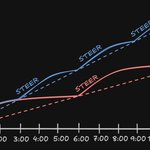
I've been running long-horizon agents on verifiable tasks all week (kernel optimization), and found that frequent steering still multiplies their productive output.
The value of work performed by agents feels logarithmic, even with a clear goal, until you check in and steer again.
The agent's work pattern often "converges" after a couple hours. Usually this is not what you want.
Example: it gets caught up solving small issues and recompiling, not realizing a wider architectural fix would eliminate the class of issues completely.
Taking bigger leaps or identifying wider refactors often needs an explicit push. Identifying that and re-steering resets the curve.
This has accidentally trained me into a polyphasic sleep schedule, so that I can re-steer long running work when it's most valuable after 2-3 hr periods..
Wonder if anyone else has had a different experience with these kinds of tasks


New Magnitude release!
- Brand new desktop experience
- Added Windows support
- Easily connect to other harnesses
- Track your local model usage over time
Next up: Full inference engine rewrite - the fastest and most memory-efficient local models on Metal/CUDA/AMD
Which models can your machine actually run?
Magnitude is a 100% free, open source desktop app that:
- profiles your hardware and runs sample calculations
- predicts tok/s for every model before you download
- recommends the best models, from fast to smart
Pick your models and it handles the rest:
- downloads and tunes the models for your hardware
- connects agents like pi, opencode, hermes in one click
- runs models on demand as your agent works
Works on whatever hardware you already own: MacBook (Intel or Apple Silicon), Mac Mini, Mac Studio, DGX Spark, Strix Halo, any NVIDIA/AMD GPU, or just a CPU
Download it on macOS, Windows, or Linux: magnitude.dev
Open source: github.com/magnitudedev/magn…
How is Jev so much faster than an LLM?
It's not about how the model is trained - it's the inference technique.
In fact, you can modify an inference engine to provide a performant Jev-like API with any open-weight LLM.
Say you are trying to ask N multiple choice questions in parallel.
In standard text generation, you decode tokens one at a time to generate a JSON representing those properties, and then parse the JSON.
In a Jev-like system, what you can do is:
- Label choices for each property 1,2,3,...
- Prefill the shared information (output shape and other context)
- Fork this inference context for each property, re-using that cached prefill
- Add an individual question to each parallel context
- Look at the logits (token probabilities) for each one, constrained to the valid choice labels
- Map the labels back to the choice values. Include the softmax of the logit itself to get a combined choice+confidence score
This means you decode one time in parallel across all questions, instead of one at a time - so the efficiency gains roughly scale with the number of questions per request (until compute is saturated).
So what makes Jev's model unique? It's because they train a small model to perform well in this specific inference setting - improving both cost and capability compared to a non-specialized model.
Ultimately though, if you have a use case Jev would be good for, you could do it with open-weight models too!
(Some speculation made here about how Jev's engine might work, but this is one way you could get similar performance)

After co-inventing ChatGPT, I kept asking myself: why have superhuman chat models not led to AGI?
I’ve spent the last 2 years in stealth building a new way to train models (RLCD), and a new type of frontier AI model that we are releasing today: Jev
• 20-200x faster
• 40-400x cheaper (w/ output tokens free)
• Frontier composable intelligence optimized for decisions
AFAICT the shortest path to AI-based economic revolution
Anders Lie retweeted

The easiest way to run your agent harnesses using local models:
Whether you're using Claude Code, Codex, OpenCode, or Pi, the local setup itself isn't really the hard part.
The harder problem is figuring out which local model your machine can actually handle well.
You have to think about RAM, model size, quantization, context length, KV cache, speed, accuracy, and a bunch of other trade-offs before you even start.
Magnitude is an open-source solution that removes all of that guesswork for you.
It profiles your machine, benchmarks what it can realistically run, recommends the best models for your hardware, and then lets you connect them to your preferred agent harness.
The entire setup takes just two commands.
In this video, I walk through the full process from hardware profiling to running a harness on a local model.
Chapters:
00:00 Intro
00:17 What Magnitude is
00:45 Setup in two commands
01:29 Why picking a local model gets confusing fast
02:11 Hardware profiling + model recommendations
02:59 Choosing your harness
03:22 Connecting a harness that's already running
04:18 Outro
Get started: github.com/magnitudedev/magn…
(don't forget to star 🌟)
what is bro on
"It removes another 30 dispatches??"
never seen the clankers throw in a double question mark


Harness builders - plz either make the context window visible or make compaction invisible
I don't want to be surprised in the middle of a conversation by a compaction that takes 2 full minutes
So either tell me what the context window is, or make the compaction happen quickly (don't smash the prefix cache) and ideally in the background..
Inference engines pick between making one agent as fast as possible vs making concurrent agents faster and more memory efficient.
But what if you could have both?
llama.cpp prioritizes single session decode by using a fixed KV slot for each session. All the memory is always adjacent and fast -> maximizes memory-bound decode speed.
vLLM and SGLang care about batch inference, so they store KV in paged blocks that aren't necessarily adjacent, but different sessions can re-use identical ones.
What if instead, you allocated long contiguous "slabs" and placed smaller pages in it, maximizing adjacency?
This means:
- Single agent running is not slower than with fixed slots
- Less total memory usage with multiple agents running
- Free prefill when sharing a common prompt between agents
- Faster batched decode since it can use the same memory across agents
One of many improvements coming to the next version of the Magnitude inference engine
Give us a star to keep up as we evolve (we're on GitHub trending!) -> github.com/magnitudedev/magn…
Got a lot of questions during our last launch about which harnesses Magnitude can run local models in.
Now you can connect to any harness easily, and run offline workloads without babysitting an inference server.
Your existing agent can use the Magnitude CLI to browse curated recommendations based on analysis of how your specific hardware will work with different models.
Once its connected to a harness, you can access your local models at any time. They'll spin up and down automatically based on activity.
If you have privacy-critical use cases, high volume mechanical workloads, or want an agent running 24/7 for free, give it a try and see what it feels like to run the best models for your machine.
I switched my Hermes agent to 100% free local models with Magnitude
It’s running Qwen 3.6 35B-A3B at ~60 tok/s on my DGX Spark. It’s free, private, and always on running background tasks
Hermes set Magnitude up itself. With the CLI it:
- Profiled my hardware and found the best models for it
- Walked me through the options and let me decide
- Switched itself over
From there, models load just in time as the agent works and unload when idle
Works with Pi, OpenCode, Hermes, OpenClaw, Codex, Claude Code, Oh My Pi, and Cline
Copy this prompt and send it to your agent:
“Set up local models for me with the Magnitude CLI. Install it with `npm i -g @magnitudedev/cli` (or my package manager), then run `magnitude docs onboarding` and follow the instructions”
GitHub: github.com/magnitudedev/magn…
Prediction: we will have frontier AI (today's fable/sol) running efficiently on consumer hardware (<$2000) in <1 yr
Previously you'd need a DGX station to run something truly frontier (GLM or better), or strapping together many GPUs. The M5 Ultra will run this at a fraction of the price.
Simultaneously, we get smaller models every day that feel increasingly capable. Given that both trends continue, it will not be long before ordinary modern hardware will run frontier-level AI.
Cloud-based inference may maintain an edge in capability - but if the difference is marginal and the cost is privacy/data - most AI usage will shift local, quickly.
We compared the M5 Ultra Mac Studio 512GB with 4x DGX Spark and 4x AMD Ryzen AI Halo
The prices are relatively the same ($15-20k), but the trade-offs are noticeable
Compute (prompt processing speed)
- Mac: one chip, all the compute is always usable. Quick on normal prompts, will feel slower on long ones
- Sparks: boxes link over 200GbE, which is fast enough to combine their compute. Fastest of the three, and native FP4 speeds up quantized models even more
- Halos: boxes link over 10GbE, too slow to share work properly. Ends up close to the Mac but somewhat worse
Bandwidth (token generation speed)
- Mac: 512GB on a single bus, faster than a 4090, ~4x the tokens/sec of Spark or Halos
- Sparks: the model splits across boxes and tokens pass through them in sequence, so 4 boxes still generate at 1 box's speed
- Halos: same ceiling as Spark, same reason
Power
- Mac: less than a gaming PC, silent
- Sparks: nearly maxes out a wall circuit, will be hot
- Halos: about half the Sparks, but somewhat hot
The real gap is bandwidth. The Studio will feel noticeably faster. Spark 2 is rumored soon, but it won't matter unless the bandwidth goes way up. Same for AMD, plus better interconnect speeds

I have an itch that can only be scratched by acquiring more AI-capable hardware
Consumer Hardware Tiers for Local AI Coding (August 2026)
TLDR: $1k buys the smartest model most people can run. The next $9k buys speed, context, and concurrency. The next intelligence jump starts at $10k
Tier 1 ($1,000-1,500)
- Used RTX 3090 running Qwen 3.8 27B at 4-bit (73 on Terminal Bench 2.1) is the best value in local AI
- Mac mini 32GB: the same 27B but very slowly, or Qwen 3.6 35B-A3B (45 on TB 2.1) faster
- MacBook Air 16GB: only fits Qwen 3.5 9B (29 on TB) and 4B (27 on TB), a big step down in intelligence
Tier 2 ($2,000-3,000)
- Dual RTX 3090s: the 27B at 8-bit, higher quality, plus headroom for context or parallel work
- Mac mini 48GB: the 27B with long context but very slowly, or the 35B MoE fast
- MacBook Pro 48GB: the portable version, and the 27B goes from very slow to just slow
Tier 3 ($4,000-6,500)
- RTX 5090: the fastest way to run the 27B
- Mac Studio 96GB, MacBook Pro Max 128GB, DGX Spark 128GB: fit Laguna S 2.1 (70.2 on TB), an MoE with 8B active that's barely behind the 27B in intelligence but much faster
Tier 4 ($10,000+)
- 2x DGX Spark (256GB): DeepSeek V4 Flash (82.7 on TB) at 4-bit. This is the intelligence jump
- RTX 6000 Pro (96GB): the speed play instead. The 27B and Laguna very fast with long context and parallel work, but V4 Flash doesn't fit
