


Dimvp retweeted

Websites for designers
1. prompt-motion.com
2. shotreel.app
3. evilbuttons.com
4. drawably.dev
5. tryalcove.com
6. appllama.io
7. designbookmark.com
8. amicons.design
9. graphicalui.com
What did I miss?
Dimvp retweeted

Here are 8 design resources worth bookmarking:
1. jiro.build — 1,200+ design prompts
2. navbar.gallery — navbar inspiration
3. footer.design — better footers
4. cta.gallery — CTA inspiration
5. 404s.design — 404 pages worth seeing
6. unsection.com — ready-made sections
7. bentogrids.com — bento grid ideas
8. 60fps.design — premium motion details
Save this list. You’ll need it. 🔖
Dimvp retweeted

We'll be spending a lot more time trying to understand the outputs of language models. A few thoughts, tips & tricks:
Writing. Something I've had success with: Ask your LLM to explain something in ASD-STE100, it's a controlled language specification originally developed for aerospace maintenance documentation. LLMs well-versed in this language and it comes with heavy constraints on clean writing style that I often find a lot more readable. Sometimes I've tried to soften it a bit e.g. ask for "80% of the way to ASD-STE100" because the spec is quite stringent. But even better:
Diagrams / images. Instead of writing, ask your LLM to create a diagram. These can be a lot easier to process, parse, and understand. But even better:
Web pages. Ask for output "in HTML" to get a beautiful, interactive webpage. LLMs are getting really good at frontend and can create beautiful experiences, animations, etc. But even better:
Explainer videos. The output format I am most bullish on is fully custom / bespoke explainer videos generated on any arbitrary topic. Experiment with things like "Create a 3b1b style video explainer on X. Use my ElevenLabs API key for audio narration". (you'd need an API key for the latter or you can ask your LLM to find you decent free alternatives that use your local compute). This is actually starting to work!
In summary:
- As LLMs get better, they will do more and more of the legwork autonomously, and a lot more of our work will rise up the abstractions into oversight and understanding.
- Luckily, LLMs can help here too because as intelligence and code are increasingly abundant, you can ask for large, custom, discardable software artifacts (e.g. web apps, video explainers) that would have never made sense to create before. Push the boundaries here and you'll be surprised.


Dimvp retweeted

介绍比Jev快50倍,在你设备上跑的laya-mlx!
只在你的设备上占用最高1G内存
Laya是一个开源的类似于Jev的,基于文本输出概率的分类系统
我将其移植到MLX,并且做了一些性能优化!
视频中就是这个模型在我的本地M3Max上玩贪吃蛇
这个模型能够以每秒决策60次的速度玩贪吃蛇!
github.com/mizorewww/laya-ml…


Dimvp retweeted

how i write viral articles on X
i've written a little over 43 articles. by my count, they've generated roughly 20–30 million views directly and indirectly.
give this to your agent.
here's my 7-step process for finding ideas, researching, writing, and designing titles + thumbnails people want to click and save.
[the full workflow, tools, and prompts are in the article below.]
1. find the intersection of attention and experience
start with:
→ what people are currently talking about
→ something you've personally built, tested, read deeply, or figured out
that gives you a timely topic and a reason people should listen.
i use Perplexity and Grok Bot to find questions, research papers, and existing explanations. then i read the sources and develop my own argument.
research prompt:
“what questions remain unanswered about [topic]? show me the best sources, conflicting evidence, and gaps i can explore using my experience in [area].”
2. design the title, thumbnail, and outline together
i do this before polishing the article.
→ the title sells the outcome
→ the thumbnail makes the value visible
→ the content delivers the substance
if i can't communicate the value in one line and one visual, the idea needs more work.
the title should explain what the reader can achieve or make a bold claim the article fully supports.
“How to Build X” gives readers an outcome they can pursue.
“I Built This” asks them to care about your project.
i generally use the broader framing to reach more people, then bring my specific experience into the piece.
how-tos, blueprints, resources, and guides make the value easy to understand.
a title can be a single-line question or summary. either way, make the payoff clear.
you cannot LARP through the title.
3. normie-max the packaging
make the title and thumbnail broadly understandable, then bring the depth as people read.
give people a familiar outcome before introducing the technical details.
i call the visual side the cocomelon effect:
→ brighter colors
→ no more than three dominant elements
→ consistent typography
the goal is instant recognition.
a diagram can contain several steps while remaining one dominant visual element.
4. make the thumbnail deliver value before the click
i use Pinterest for inspiration.
useful searches:
→ technical editorial diagram
→ serif poster typography
→ minimal workflow infographic
pick references for specific properties: typography, color, and layout.
then build the thumbnail around the article:
→ use a large diagram that visually summarizes the idea
→ keep annotations to around four or five words
→ use GPT or another image-generation tool for a clean workflow diagram
→ choose a background with enough contrast to keep everything readable
→ make the subject feel detailed and approachable
thumbnail prompt:
“turn this article into one clear visual. show [workflow] with short labels. use these references for typography and color. keep the composition simple, readable at thumbnail size, and in [aspect ratio].”
when revising, name the exact change:
→ keep the diagram
→ shrink the title
→ fix the connector
→ preserve the aspect ratio
protect what already works.
the thumbnail should make someone think, “this is useful enough to save.”
the title gives them the conviction to click and learn how to do it.
5. give the payoff early
i use Typeless and Whisperflow to talk through my ideas quickly, then organize the material into a clear argument.
the first five to seven lines should explain:
→ what the reader gets
→ why it matters
→ what experience supports it
put a strong tldr near the top. someone who doesn't have time to read everything should still leave with something useful.
then bring the authenticity through your actual experience:
→ what you tried
→ what happened
→ what you changed
→ what you learned
give readers the prompts, steps, screenshots, and expected results they need to follow along.
each paragraph should help explain or deliver the promise.
6. give readers something they can reuse
for technical articles, i like a public GitHub repo containing:
→ the full article
→ the prompts
→ the diagrams
→ the relevant project files
it gives the work a searchable home outside X.
people can download it, inspect it, and give it to their own agents without depending on those agents being able to retrieve an X article.
7. check the promise before publishing
ask:
→ where would a beginner get stuck?
→ which claims need evidence?
→ is the thumbnail readable at its intended size?
→ does the article deliver what the title promises?
giving value upfront shows readers their time is respected.
the deeper explanation gives them a reason to keep reading.
Dimvp retweeted

Paul Graham on picking what to work on: follow what pulls you before it makes sense
early curiosity predicts long term advantage better than planning does


613 startup accelerators across 310 cities, mapped 🗺️
Every program in the US, UK, EU, Canada, Africa, Latin America and Asia Pacific sits in one interactive map.
For each one:
▫️ Funding terms and equity taken
▫️ Program duration
▫️ Direct application link
▫️ Filter by city or sector, then export your shortlist to CSV
Want it?
👉 Let me know below/dm and I'll send the full map over for free

Dimvp retweeted

this is pure f*cking treasure
how to build your first ai agent (full walkthrough)
if this had landed in front of me a year ago, my first agent would've shipped in an afternoon instead of eating two weeks of my life
in the right hands it resets what one person can ship alone:


Dimvp retweeted

Don't waste 2 years learning to become an AI agentic engineer in 2026.
Andrew Ng, the godfather of AI, gave the complete playbook to become one from scratch.
1 hour course. Free:
• 00:00 - AI agent basics
• 12:12 - AI Agentic workflows & design patterns
• 53:27 - Practical tips for building AI agents
• 1:20:30 - self-improving AI agent loops
• 1:30:19 - multi-agent AI systems
I watched it last night.
Halfway through, I realized I could get into Anthropic in weeks, not years.
Bookmark now. Watch it. Then build your own AI agent
Dimvp retweeted

真的很感慨,斯坦福的课程更新速度太快了。
CS329Z 已经在教 AI Agent:RAG、Tool Use、MCP、Memory、Multi-Agent、Eval、Coding Agent……
再看看很多大学生还在学习上一个时代、甚至已经被淘汰的东西。
强烈建议身边的大学生都去学学这门课,真的很值得。
cs329z.stanford.edu/
Dimvp retweeted

This guy literally broke down why some people make it big while others just stay average.
The reason is honestly a bit uncomfortable. Game Theory
Check out the video below:


Dimvp retweeted

Head of Claude Code:
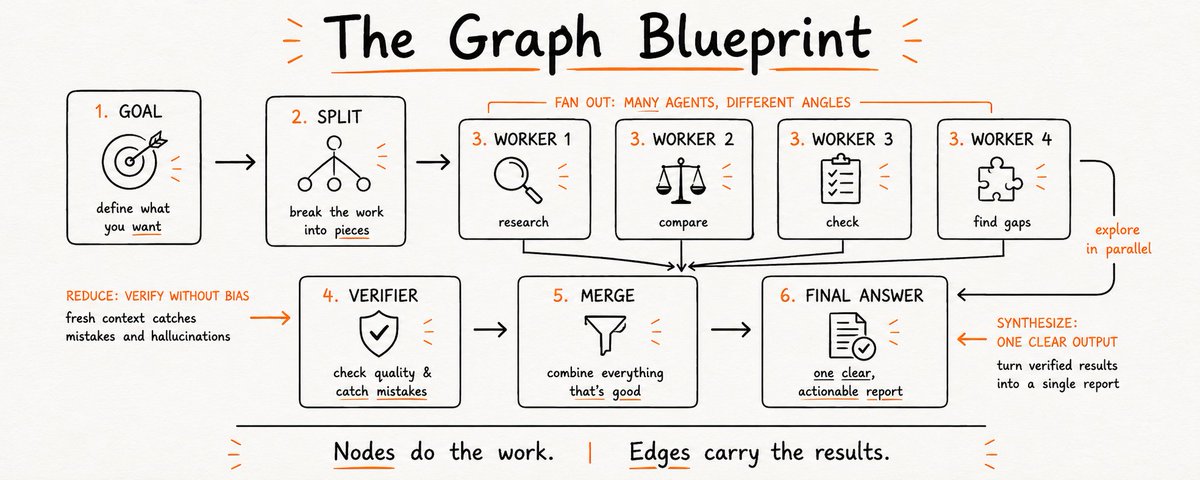
"85% of our engineers are running dozens or hundreds of agents. The way you do it is graph engineering."
In 40 minutes he explains how a single engineer now does the work of a whole team, how far this has gone inside Anthropic and where it goes next.
This is something you can't skip if you don't want to be left behind.
Watch it, then read the full guide on graph engineering below.

Dimvp retweeted

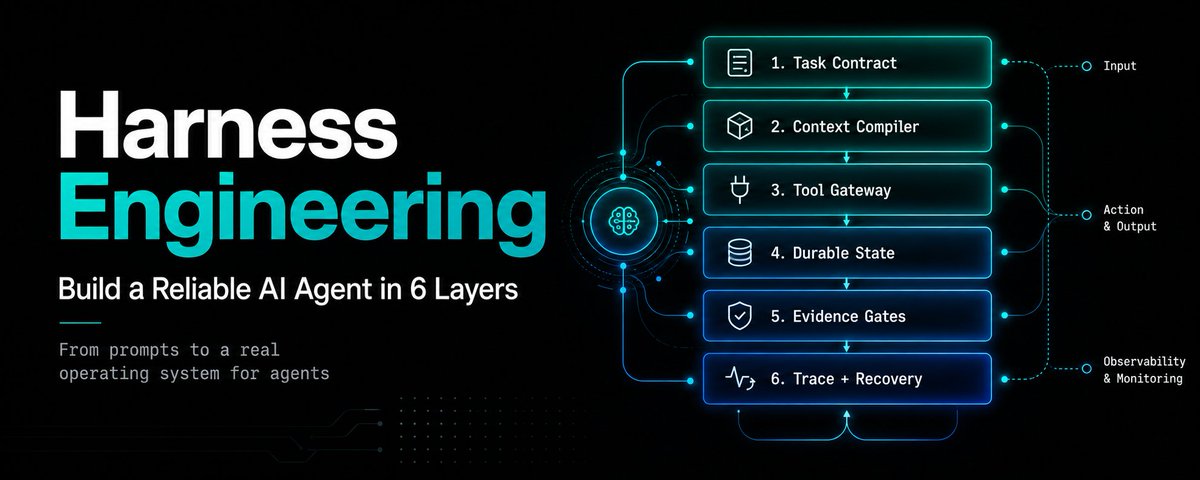
Andrew Ng just released a free 2-hour course on complete Harness Engineering
How to go from one prompt to a reliable system of agents that can run, test, and improve themselves:
09:14 - Build your first agent from scratch
33:11 - Master agent loops
1:02:46 - Turn loops into reliable workflows
1:30:15 - Build agents that improve their own work
1:49:05 - Run the complete system without supervision
Model → Harness → Reliable Software
Most agent tutorials stop once the model can call a tool
This one shows you how to build the infrastructure around it within the first 20 minutes
Most people are still prompting one agent at a time
Andrew Ng is already teaching the layer above:
Harnesses that give agents context, tools, tests, and feedback
Watch this brilliant course and build the harness
Then read the full architecture below ↓



Dimvp retweeted

Anthropic senior engineer just released a 1-hour course on building a team of agents with loops & graphs:
• 00:27 - introduction to CLAUDE.md & Plan mode
• 11:24 - building "skills" & "hooks" for Claude agents
• 37:02 - building agents & subagents with Claude
• 52:47 - self-improving loops & graphs for Claude agents
this 1-hour watch will replace a $500 agentic engineering course
watch today, then read how to build a team of self-improving agents that work together


Dimvp retweeted

“If you have multiple interests, do not waste the next 2-3 years”
article summary in 4k dark & light