
Virtual Audio Devices & Audio Production Tools for everyone: Voicemeeter Virtual Audio Mixer, VB-Cables, MacroButtons, MT128 MultiTrack Recording...
France
Joined September 2014
- Tweets4.7K
- Following75
- Followers4K
- Likes715





NEW GUIDE: How to improve your mic with Voicemeeter Standard ? One of the most original built in Fx in Voicemeeter is the VOICE COLOR PANEL of the INTELLIPAN. Just move the cursor to adjust your mic as you want! Find the right color in less than a minute: forum.vb-audio.com/viewtopic…

Build your private high-quality audio network at home with VoiceMeeter's built-in VBAN!
Send and receive high resolution, uncompressed audio via LAN/WIFI from your PC to other PCs, Macs, iPad, iPhone, Android phones and Apple TV. voicemeeter.com
vb-audio.com/Voicemeeter/vba…

How to playback into 2x Output Devices in the same time with Voicemeeter ? Very simple:
1- Just select your first audio output device as A1
2- select your second audio output Device as A2 !
Full guide: forum.vb-audio.com/viewtopic…
download: voicemeeter.com

How to start With Voicemeeter ? By understanding how to manage physical devices and Virtual Audio I/O (VAIO). Setting Voicemeeter input as your default playback device is the key to turn Voicemeeter into your Audio Control Center for Windows: forum.vb-audio.com/viewtopic…

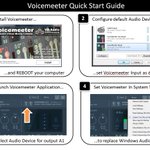
Voicemeeter Quick Startup guide:
1- Install it (Restart your computer).
2- Select Voicemeeter virtual input as your default playback device.
3- Select your main output device (BUS A1).
4- Set option to set it in SysTray and run it on windows startup.
youtu.be/ZXKDzYXS60o

VoiceMeeter 2026. Managing Windows Audio!
With all the new features, bug fixes and improvements, the September 2026 update is becoming the central hub for Windows audio management with the new Windows Audio Map, the essential tool for the daily audio life. voicemeeter.com/voicemeeter-…

Voicemeeter Windows Audio Map can be useful to understand what's happening on all audio. Some audio parameters cannot be given by Windows system, but Voicemeeter knows if loopback pin or exclusive mode is actually used on its own VAIO or connected devices: voicemeeter.com

VM-XCtrl v2.0 is now in Beta!- Voicemeeter ↔ Behringer X-Touch Bridge. VM-XCtrl is a native Windows application that connects VoiceMeeter Potato / Banana with the Behringer X-Touch over LAN, MIDI, and USB.
Github: github.com/vchaudio/VM-Xctrl
Video: youtu.be/OcrzrS9EKOE
Voicemeeter version x.1.3.0 is now available with the new Windows Audio Map, showing all devices and connected applications in a single view. It also shows the Listen option (red 'L') and the Spatial sound option (blue 'S') on related devices. More info: voicemeeter.com/voicemeeter-…

VB-Audio Software retweeted

VB-Audio Updates Voicemeeter With New Audio Map
* Windows Audio Map displays all devices and routing in real time
* Two new limiter effects (Yellow, Green) added to all versions
* VBAN-Frame protocol enables network screen sharing
#Voicemeeter #AudioMixer #VBAudio

The new Voicemeeter version x.1.3.0 is now available! Ok, but what is new? The Windows Audio Map to show entire audio system settings and paths, more limiter algorithm to make your productions sound more professional, multichannel mode on virtual inputs... voicemeeter.com/voicemeeter-…

The new Voicemeeter version x.1.3.0 now offers new MIDI-Mapping options to be compatible with more controllers. The Control-Change message can be configured by a simple contextual menu (right click) to set the MIDI message mode (Linear, Coder, Mackie): voicemeeter.com

VB-Audio Software retweeted

[News|Broadcast] @VB_Audio introduces Voicemeeter Version x.1.3.0
proaudio.tech/news/broadcast…
The new version x.1.3.0 of Voicemeeter now offers the Windows Audio Map, offering a complete overview of the audio system! While Windows audio settings are typically scattered across various dialog boxes, the Audio Map gathers them all into a single view: voicemeeter.com

New Voicemeeter Potato 3.1.3.0 is also offering the sub-mix view by turning BUS assignation button in sub-mix value (Right Click to Swap view). Then you can edit sub-mix (by wheel or CTRL+Click) directly on this global view (or with the Streamer View). voicemeeter.com

VB-Audio Software retweeted

VB Audio’s Voicemeeter updated with Windows Audio Map for complete system visibility rekkerd.org/vb-audios-voicem…

New Voicemeeter x.1.3.0 is now offering two types of limiters (Yellow and Green), on STRIP and on BUS. For more professional audio productions, the Green Limiter ensures crackle-free sound, regardless of the nature or the effects applied to it. voicemeeter.com

New Voicemeeter x.1.3.0 is offering multichannel mode also on Inputs! Then you can set your music in 6.1 on first input, keep the second input in normal mode, for example for 5.1 game or 7.1 movies and set the third virtual input in another mode if needed! voicemeeter.com

New Voicemeeter x.1.3.0 is introducing a new dialog box: the Windows Audio Map for a full visibility of the Audio System! Then you can see all connected audio applications to all devices, with audio path and different windows settings... all around voicemeeter.com

Imagine a VBAN-KEY: your custom keyboard interface to send VBAN-TEXT or VBAN-MIDI request through WIFI to Voicemeeter, Matrix or the MT128 solution!
Thanks to Benoit Quiniou, the VBAN-Key open-source project that can give you too much ideas, is here: github.com/BQuiniou/VBAN-Key…
