

Clean Roblox UI from Figma to Studio, fast. Free import, AI when you need it.
Joined May 2026
- Tweets17
- Following1
- Followers104
- Likes72




Importing Roblox UI is now one message.
Tell your AI agent "import my Home Screen into Roblox Studio."
UILint does the rest:
Our AI names every layer.
Every image goes to Roblox.
Studio builds it by itself.
It fits every screen.
Works with Claude, ChatGPT, Grok and any MCP agent.
7-day free trial: uilint.dev
#Roblox | #RobloxDev | #RobloxUI
Rebuilding Figma UI in Roblox Studio takes hours.
UILint does it in under a minute.
Here's what happens when you hit import:
Lint finds the bugs. One click fixes them.
Our AI names every layer for you.
Live Sync sends it to Studio, images and all.
Hyper Import builds it like a real Roblox dev would.
Smart Scale makes it fit every screen.
And the more you use it, the better it learns how you build.
7-day free trial: uilint.dev
#Roblox | #RobloxDev | #RobloxUI
Your Figma UI to Roblox Studio, with one message to your AI agent.
UILint MCP gives your agent the keys to the whole UILint pipeline. You ask, it runs UILint:
Smart Sync: UILint's own AI renames every Figma layer (Group 12 → Rebirth_Button)
Snapshot: uploads all your images to Roblox automatically
Smart Scale: makes your UI responsive on every device
Studio import + lint: lands in StarterGui with 0 errors, 0 warnings
you design. your agent asks. UILint does the work.
works with Claude, Cursor, Codex and any MCP agent
Included in UILint Solo:
uilint.dev
#Roblox | #RobloxDev | #RobloxUI
Your UI probably breaks on half your players' screens.
UILint catches it and fixes it in one click.
bad scaling, overlap, text overflow, ZIndex issues, invisible frames… and way more UI bugs you don't even notice
scaling tools built in
Now with UILint Solo:
AI renames every Figma layer
images upload to Roblox automatically
UI lands in Studio already scaled for all devices
lint it after? 0 errors.
Try it free:
uilint.dev
Install the plugin:
create.roblox.com/store/asse…
#Roblox | #RobloxDev | #RobloxUI
Rebuilding your Figma UI by hand in Roblox Studio is over.
UILint syncs it in one click, and AI names every layer for you.
Free to try: uilint.dev
#Roblox | #RobloxUI | #RobloxDev
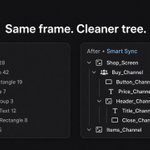
Left: Frame_47 hell.
Right: names you’d actually ship.
Smart Sync cleans your Figma → Studio tree so you’re not renaming for an hour.
Try Free. Live Sync + 5 Smart Sync/mo
uilint.dev
#Roblox | #RobloxStudio | #RobloxUI

UILint’s AI imports and scales your Figma UI into Roblox Studio, detects repeated components, and helps you optimize game performance faster.
Get started at UILint.dev.
#Roblox | #RobloxDevs | #RobloxUI
You built it in Figma. Why rebuild it in Roblox Studio?
UILint v2 imports it as structured, responsive Roblox UI.
Smart Sync removes manual naming.
Smart Scale handles responsiveness.
Live Sync sends it to Studio.
Manual importing stays free.
Here is the plugin showcase.
Website : uilint.dev
#RobloxDev | #RobloxUI | #Roblox