

We help to get your digital files organized with ease with https://xitter.cf/t.co/VmfZ6322s2 storage or on top of #GoogleDrive #AmazonS3. #DAM. https://xitter.cf/t.co/1FrtqjV9lG
Joined September 2011
- Tweets3K
- Following348
- Followers1.7K
- Likes3.2K




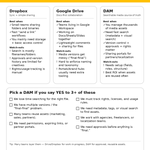





If your team stores photos across Drive + desktops + camera rolls, the risk is simple: wrong versions, duplicates, lost originals.
Here’s a practical system that scales: bit.ly/4aRmAFR


Tagging is unpaid labor. Fine at 50 files; at 20,000, it’s a project. Better: auto metadata on ingest (visual/OCR/transcripts) + a short list of human fields applied in bulk. What triggered your last metadata catch-up: migration, agency upload, or cleanup?

New in Pics.io: AI Video Search 🎬🔎
Search inside any video and jump straight to the exact moment you need — no manual tagging, no endless scrubbing.
See it in action: bit.ly/4b3MzK2

Demos & customer calls are gold… until the knowledge gets stuck in 30–45 min videos.
We shared how we turn recordings into searchable, reusable knowledge with transcription.
Read here: bit.ly/4aAaQan

E-commerce teams lose time because assets are messy: wrong versions, missing rights, “where’s the approved one?”, endless re-uploads.
Here are 6 must-have DAM features that make product content faster to ship — and easier to keep consistent 👇

Why “final” is never the final 😅
7 reasons:
1. Feedback everywhere → 1 review hub + “Approved”
2. No source of truth → “Current/Approved” collection
3. Copies as versions → real versioning
4. Brief changes → pin brief + changelog

Holidays are over — back to real work.
🙂 If your Sales team starts the year with “Where’s the latest deck?” — you’re not alone. We made a quick reset:
📍 Sales Content Library — Setup in 6 Questions
Save it for later. Full guide: bit.ly/3YnfcLk


If you work in a creative or marketing team, this might hurt a little 😅
What would you actually ask Santa for this year (work-wise, not candles or socks)?


Spending 10+ min searching for a single image?
Pics.io's new AI Visual Search cuts that to seconds.
Just type "woman in red dress" or drop a reference image. AI finds matches even when metadata is... creative.
Free trial: pics.io/ai-visual-search
