

Using plain English to help you keep up with Microsoft 365 & Copilot news. Family man, then an adoption specialist, trainer, blogger, podcaster & YouTuber.
Solihull, England
Joined July 2017
- Tweets2.6K
- Following581
- Followers1.4K
- Likes2.6K




Pinned Tweet
Did you catch all the Microsoft 365 and Copilot updates for end users in August?
Highlights include sharing Copilot sessions and responses, a classic-style theme for the new Outlook, and the new 'hero link' for sharing files. The hero link is the one I'd bet most people end up using weekly without even realising it's new.
🔗 Read the blog: supersimple365.com/whats-new…
🎬 Watch and subscribe on YouTube: youtu.be/SgaxUsmF5m0?
🗓️ Join the free monthly webinar: theinformteam.com/microsoft-….
#M365 #Evergreen #Copilot

🔜 #Copilot Memory now uses insights from your work.
📢 Less context to type in every time you ask for something. If it feels a bit much, it's easy to control: ask what it knows, ask it to forget, or switch it off.
🤔 Have you asked Copilot what it knows about you yet?
📆 Due early to late October 2026.
🔗 Read more: supersimple365.com/copilot-m….

🔜 Create interactive slides in #PowerPoint with Copilot.
📢 Timelines, dashboards and comparisons people can actually click through, and viewers don't need a Copilot licence.
First impressions? Amazing! But the real test will come when I want consistent results with the content, look and feel that I need.
📆 Due mid to late October 2026.
🔗 Read more: supersimple365.com/create-in….

✅ Record a skill with Copilot in #PowerPoint.
📢 The easiest way yet to create a Copilot skill: do the task once, and Copilot writes it up for you.
📆 Rolled out early October 2026.
🔗 Read more: supersimple365.com/record-a-….

🔜 Customise the classic ribbon in new #Outlook and web.
📢 Outlook on the web and new Outlook continue to get better and better. Putting the commands you use most within easy reach saves a few clicks every day, and as it's tucked away behind a right-click, it's worth sharing with your colleagues.
📆 Due late September to mid-November 2026.
🔗 Read more: supersimple365.com/customise….

🔜 #Copilot in Edge gets a refreshed, simpler design.
📢 Seem familiar? It's the same refresh as Copilot in Outlook and Teams. Sure, it's another interface change, but it's part of standardising Copilot across Microsoft 365, and it's a nice, clean look.
📆 Due mid-October 2026.
🔗 Read more: supersimple365.com/copilot-i….

🔜 HTML pages are coming to #SharePoint.
📢 Describe the page you want and Copilot builds it, or upload HTML you've created elsewhere. That's a lot more design freedom than standard sections and web parts... so who's going to keep it all consistent and on brand?
📆 Due mid-November to late December 2026.
🔗 See what else is new in SharePoint: supersimple365.com/whats-new….

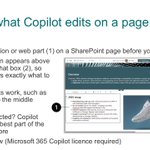
✅ Copilot in #SharePoint: select what you want to edit.
📢 Another good Copilot improvement! Select a single element on your page, such as the FAQ web part, and work on just that, rather than the page as a whole.
📆 Available now.
🔗 Read more: supersimple365.com/copilot-i….

🔜 Pin and organise resources in #MSTeams chats and channels.
📢 Includes tabs dropping onto their own line, with more space to read and get to them. The announcement needs more detail and images though, so I'll update the post when I have more!
📆 Due early to mid-October 2026.
🔗 Read more: supersimple365.com/pin-and-o….

🔜 #SharePoint FAQ web part AI features move to Copilot.
📢 Microsoft continues to consolidate the entry points for Copilot, and generally, that's a good thing. A more consistent way in across Microsoft 365, and creating FAQs will work like editing the rest of your SharePoint page with Copilot.
📆 Due late October to early November 2026.
🔗 Read more: supersimple365.com/sharepoin….

🌱 There's still time to sign up for today's free M365 Evergreen webinar!
Join me and The Inform Team for your monthly catch-up on what's new, what's late, and what's coming soon for Microsoft 365 and Copilot.
Today I'll be covering:
The new Copilot - a significant redesign with a new Home screen, Code tab, and Autopilot. I'll give a quick overview - would love to hear your views in the chat.
Pin and organise resources in Teams - pin the files, links and messages you use most in a chat or channel, grouped into folders, right below the header.
Pause Teams notifications for a set time - silence everything for a set period, with notifications switching back on automatically when the time is up.
Prompt Copilot from the button in Word, Excel, and PowerPoint - type a request without opening the full Copilot pane.
Copilot in SharePoint: select what you want to edit - select a section or web part first, so Copilot knows exactly which part of the page to change.
Plus plenty more - 2 to 3 minutes per topic, fast-paced and fun.
🗓️ Today - Wednesday 7th October, 12:00 - 13:00 (UK time).
🆓 Free and open to anyone using Microsoft 365.
👉 Sign up now: theinformteam.com/microsoft-…
#Microsoft365 #Copilot #M365

🌱 Don't forget - free M365 Evergreen webinar tomorrow!
Join me and The Inform Team for your monthly catch-up on what's new, what's late, and what's coming soon for Microsoft 365 and Copilot.
Tomorrow I'll be covering:
The new Copilot - a significant redesign bringing a new Home screen, a Code tab for building simple apps in plain English, and Autopilot, an always-on agent that works on your behalf. I'll give a quick overview - would love to hear your views in the chat.
Pin and organise resources in Teams - one place to pin the files, links and messages you use most in a chat or channel, grouped into folders, right below the header.
Pause Teams notifications for a set time - a quick way to silence everything for a set period from your profile menu, with notifications switching back on automatically when the time is up.
Prompt Copilot directly from the button in Word, Excel, and PowerPoint - a new prompt input attached to the Copilot button lets you type a request without opening the full Copilot pane, with contextual suggestions appearing when you select content.
Copilot in SharePoint: select what you want to edit - you can now select a specific section or web part before prompting Copilot, so it knows exactly which part of the page to change.
Plus plenty more - 2 to 3 minutes per topic, fast-paced and fun.
🗓️ Tomorrow - Wednesday 7th October, 12:00 - 13:00 (UK time).
🆓 Free and open to anyone using Microsoft 365.
👉 Sign up now: theinformteam.com/microsoft-…
#Microsoft365 #Copilot #M365

Mark Thompson retweeted

More fun with the Interactive Slide skill with Copilot in PowerPoint. These Heart slides took just a couple of minutes of rendering with two prompts. This skill is going to GA soon, get ready 🚀
🔜 Pause #MSTeams notifications for a set time.
📢 Essentially a slightly quicker way to set Do not disturb with a time limit. Pause for 30 minutes and you're in Do not disturb for 30 minutes.
📆 Due early to late October 2026.
🔗 Read more: supersimple365.com/pause-tea….

🔜 The new #Copilot: Home, Code, Autopilot and interface changes.
📢 More Copilot interface changes are being announced, while some of the last ones are still rolling out 😠, but lots of other great stuff is in here! Mainly 'Frontier' for now, but worth a read.
📆 From late September 2026.
🔗 Read more: supersimple365.com/the-new-c….

🔜 Brand managers add custom skills to Copilot in #PowerPoint.
📢 This one's for the brand managers to actually set up, but it may be worth the effort. Consistent, organisation-approved guidance beats hoping everyone writes good prompts.
📆 Due mid to late September 2026.
🔗 Read more: supersimple365.com/brand-man….

🔜 Settings, My Day, and Sync move to the #M365 suite header menu.
📢 A small tidy-up rather than a feature in its own right, but worth knowing about so Settings isn't a surprise the first time it moves.
📆 Due early September to early November 2026.
🔗 Read more: supersimple365.com/settings-….

🔜 Prompt #Copilot from the button in Word, Excel, PowerPoint.
📢 Small update, no big deal, but a nice one to have. Not opening the Copilot pane for a quick, one-line request is a small reduction in friction.
📆 Due September to December 2026.
🔗 Read more: supersimple365.com/prompt-co….

🔜 Turn #MSTeams messages into personal reminders.
📢 How many times have you meant to come back to a message and just... didn't? This should help with exactly that.
📆 Due early to late October 2026.
🔗 Read more: supersimple365.com/turn-team….

🔜 QR codes from external senders get blurred in #MSTeams.
📢 Quishing (QR code phishing) has been on the rise for a while now, so this is a sensible, low-friction safeguard.
📆 Due early to mid-October 2026.
🔗 Read more: supersimple365.com/qr-codes-….

🔜 A redesigned header and dashboard for #MSTeams on mobile.
📢 When looking at this update and comparing the new screenshots to what I see on my mobile version of Teams, I didn't realise there was a problem to solve until I saw this. It is actually so much better.
📆 Due late September to early October 2026.
🔗 Read more: supersimple365.com/a-redesig….
