
Simplify3D developers premium #3DPrinting software that streamlines the process and empowers users to achieve high-quality results.
Joined December 2012
- Tweets1.6K
- Following181
- Followers14.4K
- Likes3.8K



Version 5.1.2 is now available! This release includes improvements for support structure editing, expanded Klipper firmware support, high-speed settings profiles, and numerous UI enhancements. View a complete list of changes here: simplify3d.com/products/simp…

Version 5.1.1 was released today with several enhancements for WiFi and Ethernet connected printers, improved high DPI user interface scaling, and nearly a dozen important bug fixes. View the complete list of changes here: simplify3d.com/products/simp…

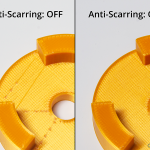
One of the features in Version 5.1 that keeps improving our prints is the new Anti-Scarring functionality. This feature combines intelligent retraction, ooze control, and motion planning to eliminate scars on the top surface of your prints! Instructions: ow.ly/yHYh50OuCsj

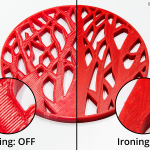
The new ironing feature in Version 5.1 is a huge help for parts with large flat surfaces. The software performs a second finishing pass extruding a small amount of extra material to fill in any gaps or imperfections. Enable this option on the Infill tab. ow.ly/fxRI50Orl0X

Need help enabling the new print quality features in Version 5.1? Try out our rapid settings search! Type "ironing", "monotonic", or "top layer" into the Process Settings search bar to jump to the exact input that controls that setting.

Version 5.1 is here! Ironing smoothing, intelligent anti-scarring, monotonic infill, Klipper/OctoPrint/Duet WiFi support, embedded thumbnails, real-time build previews, and many more popular requests! Learn more: ow.ly/Bw6a50Omzcz

Version 5.0.2 just released with improved machine communication, expanded printer compatibility, and several important bug fixes for user-reported issues. Read the full list of changes here: ow.ly/qIPA50N55gr

Have you ever encountered a problematic 3D model that had trouble during slicing? We just published an in-depth article explaining the new automatic repair options in Simplify3D V5 to save you time on your next print! ow.ly/ia2o50MJcEN

Version 5.0.1 added support for 10 highly requested printers including the Bambu Lab X1/X1C/P1P, FLSUN V400, Voron 2.4, and AnkerMake M5. Let us know which printers you want us to support next!
ow.ly/B7Ym50MCsAS

ALT Simplify3D Version 5.0.1 Supported Printers
Remove surface blemishes from your print by concealing start points. When 'Restrict start points to preferred regions' is enabled, Simplify3D Version 5 will hide start points in corners and crevices. This feature works with any of the three Start Point Selection methods.

Simplify3D Version 5.0.1 just released! This release includes several user-requested improvements, expanded printer compatibility, user interface tweaks, and bug fixes. Click to learn more or log in to download and start using Version 5.0.1 today!
simplify3d.com/products/simp…

Save time and material with more Prime Pillar options. Prime pillars can now be auto-stopped when no longer needed. Pillar infill percentage can also be reduced to allow for wider, more stable pillars without increasing material usage.
Model: ow.ly/freO50MkhH3

Accurate print time estimation helps optimize machine utilization. Each Version 5.0 profile has printer-specific Time Estimation values that can be fine-tuned based on your exact hardware configuration. You can also adjust based on personal experience.

Strengthen small features with the Solid Infill Threshold Area setting. Elements with an area less than the defined value will be automatically converted from the infill pattern to solid infill.
Model: ow.ly/z6wz50Mjp03

Version 5.0's new dense infill feature helps improve top surfaces and puts filament where you need it the most. Reducing the standard infill percentage and adjusting the Dense Internal Infill settings saved over 20% of time and material.
Learn more - ow.ly/UR7350MeQcw

Use your favorite CAD program to create custom supports with the perfect geometry placed exactly where you need them. After updating the model type to "Custom Support Structure," these objects will inherit all appropriate Support tab settings.

Dark mode can reduce eye strain. Easily switch to dark mode by updating the Simplify3D Version 5.0 display theme. While in the Main Options panel, take a moment to explore other features such as live reloading and custom grid line spacing.
Model: ow.ly/Eb3Y50MeuOU

Let Simplify3D Version 5.0 automatically adjust individual layer heights for the perfect balance of print quality and speed. Don't forget to change the preview coloring mode selector to visualize how your print has been optimized.

Simplify3D Version 5.0 has launched! Packed with over 120 new features and improvements, a streamlined user interface, and a powerful next-generation slicing engine, click to watch what makes this Our Biggest Release Ever!
simplify3d.com/products/simp…

Introducing a Performance, Automation and Intelligence breakthrough. With 120 unique features and improvements, 3x faster slicing and support for over 650 printers, Simplify3D Version 5.0's next-generation slicing engine is ready for something big!
ow.ly/1Wjc50M2Sbz
