

Lean Six Sigma Tools, Templates & Monte Carlo Simulation in Excel
Kitchener, Ontario
Joined July 2009
- Tweets2.1K
- Following117
- Followers1.4K
- Likes147




Did you know a cup of tea helped make statistical history?
In the 1920s, scientist Muriel Bristol claimed she could tell whether milk or tea had been poured into a cup first.
Statistician Ronald Fisher used this challenge to illustrate what became known as the famous "Lady Tasting Tea" experiment.
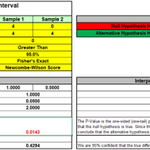
The experiment involved 8 cups: 4 prepared milk-first and 4 tea-first, presented in random order.
If someone were simply guessing, the probability of correctly identifying all 4 milk-first cups was just 1 in 70, or approximately 1.4%.
Fisher described the experiment in his 1935 book “The Design of Experiments”. The story later inspired David Salsburg's 2001 book “The Lady Tasting Tea: How Statistics Revolutionized Science in the Twentieth Century”, which explores the fascinating history of modern statistics.
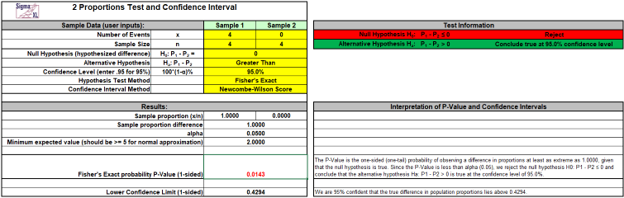
The same exact probability principles used in Fisher's experiment are also found in Fisher's Exact Test. Today, SigmaXL makes it easy to perform Fisher's Exact Test when comparing two proportions, particularly when sample sizes are small and traditional large-sample approximations may be unreliable.
Sometimes, even a simple cup of tea can teach us something about statistics!
Use the template in SigmaXL V11: sigmaxl.com/2PropTest.html
Wondering if SigmaXL or DiscoverSim are right for you? Download a free 30-day trial!
sigmaxl.com/downloads.html

Did you know the control chart started as a one-page memo?
On May 16, 1924, Walter Shewhart, working at Western Electric, sent his supervisor a short memorandum. About a third of the page was a simple diagram, now recognized as the first control chart.
Shewhart’s key insight was that every process varies, but not all variation is the same. Common-cause variation is the natural variation built into a process. Special-cause variation signals that something unusual has changed and may require investigation.
Reacting to common-cause variation as though it were a special cause often called tampering can actually increase variation and make a process worse.
More than 100 years later, control charts remain a foundation of Statistical Process Control (SPC) and Six Sigma.
SigmaXL makes it easy to create control charts directly in Excel, including Individuals, X-Bar & R/S, P, NP, C and U charts, with tests for special causes.
Try the charts in SigmaXL Version 11: sigmaxl.com/SigmaXLInformati…

Did you know the t-test has its roots in a brewery?
In the early 1900s, William Sealy Gosset was working at the Guinness brewery in Dublin, where he needed to make reliable decisions about things like barley and hops using very small samples.
The statistical methods available at the time weren’t well suited to that problem, so Gosset developed a new approach for analyzing small-sample data.
Because Guinness restricted employees from publishing work that could reveal company information, Gosset published his landmark 1908 paper under the pseudonym “Student.”
That’s why, more than a century later, we still call it Student’s t-distribution.
Today, SigmaXL makes it easy to run 1-sample, 2-sample, and paired t-tests directly in Excel, complete with assumption checks and useful graphical output.
A statistical method developed to solve a practical business problem is still helping people make better decisions today.
Learn more: sigmaxl.com/SigmaXLInformati…

You inspected 300 parts and found zero defects. Is your defect rate zero?
Not necessarily.
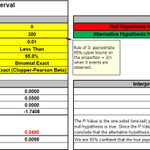
The Rule of Three says that when zero failures are observed in (n) samples, the approximate 95% upper confidence bound for the true failure rate is:
3/n
So, with 300 good parts:
3/300 = 1%
In other words, even though you observed zero defects, you can be about 95% confident that the true defect rate is below approximately 1%.
Want a more rigorous confidence interval? Use SigmaXL's 1 Proportion Test & Confidence Interval calculator. It includes Exact (Clopper-Pearson), Wilson Score, and Jeffreys confidence interval methods and works even when you observe zero defects.
Zero defects observed ≠ a zero defect rate.
Use the calculator in SigmaXL V11:
sigmaxl.com/1PropTest.html

Real-world experiments don’t always fit neatly into a standard design.
In this SigmaXL video, see how Constrained D-Optimal Design can help you create an efficient experiment when certain factor combinations are impractical or cannot be tested.
Using an Adhesive Bond Strength example, the video demonstrates how to define factors, apply constraints, and generate a D-Optimal design directly in Excel with SigmaXL.
Watch the video here:
youtube.com/watch?v=3wN7Ywpk…

Sometimes the best way to understand your data is to stop staring at the numbers.
A good graph can reveal patterns, shifts, outliers, clusters, relationships, and unusual variation that are easy to miss in a table.
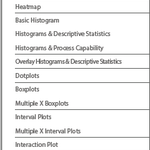
SigmaXL gives you a wide range of graphical tools directly in Excel, including:
• Histograms
• Boxplots
• Scatterplots
• Multi-Vari Charts
• Pareto Charts
• Probability Plots
• Interaction Plots
• Scatter Plot Matrix
The goal is not just to make a chart.
It is to make the data easier to understand.
Because when the pattern becomes visible, the next question often becomes much clearer.
Try the graphical tools in SigmaXL today: sigmaxlinc.atlassian.net/ser…

We are excited to announce that SigmaXL will be exhibiting at the ASQ Toronto Section and ASQ Inspection Division Joint Conference 2026: Beyond Change Leading Excellence in the Digital Age.
Join John Noguera, CTO, on September 19 from 10:30–10:45 AM for a sneak preview of the new features coming in SigmaXL Version 12.
Register here:
tinyurl.com/4hjdkbbn

A stable process does not always mean a flat process.
Sometimes a process is predictable, but the average is gradually increasing or decreasing over time. A traditional control chart may flag that movement as special-cause variation, even when the trend itself is consistent and predictable.
That’s where a Trend Control Chart can help.
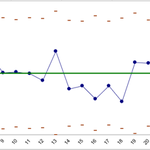
Trend Charts in SigmaXL are designed for processes where the expected value changes systematically over time. Instead of using a constant center line, the chart models the underlying trend and evaluates the variation of observations around that trend.
This can be useful for processes such as:
• Tool wear that gradually changes a dimension
• Equipment performance that changes with operating time
• Chemical concentration that increases or decreases during a batch
• Product characteristics affected by aging or deterioration
By accounting for the trend, you can distinguish between expected systematic change and unexpected process variation.
SigmaXL makes it easy to create a Trend Chart directly in Excel, helping you determine whether the process is behaving predictably around its changing expected value and identify observations that warrant investigation.
sigmaxl.com/Trend.html

ALT Trend Control Chart in SigmaXL
When the number of defects matters, but the opportunity for defects changes from sample to sample, a U Chart is the right tool for monitoring the process.
A U Chart is an attribute control chart used to track the number of defects per unit when sample sizes vary. Unlike a C Chart, which assumes a constant area of opportunity, the U Chart adjusts its control limits to reflect differences in sample size.
Examples include:
· Defects per manufactured part when daily production volumes vary
· Errors per invoice when the number of invoices reviewed changes
· Surface defects per square meter when inspection areas differ
· Customer complaints per shipment when shipment volumes fluctuate
SigmaXL makes it easy to create and interpret U Charts directly in Excel. The chart tracks the average number of defects per unit over time while calculating control limits appropriate for each sample size.
Use U Charts in SigmaXL to distinguish common-cause variation from unusual events, identify potential special causes, and determine whether process improvements are leading to greater stability and consistency:
sigmaxl.com/UCharts.html

In a process improvement project, teams often face dozens of possible inputs but have limited time and resources. How do you decide where to focus?
A Cause & Effect (XY) Matrix helps prioritize the process inputs most likely to influence critical customer requirements and business outcomes.
Begin by identifying the key outputs, the Ys, and assigning each an importance rating based on customer and business needs. Next, assess how strongly each potential input, the Xs, affects each output. The resulting weighted scores highlight the inputs that deserve the most attention for further investigation, data collection, process improvement, or Design of Experiments.
SigmaXL makes it easy to create and analyze a Cause & Effect Matrix directly in Excel and includes a Pareto Chart that helps you to focus your efforts on the vital few Xs with the greatest potential impact on your Ys.

Ordinal Logistic Regression models the relationship between predictor variables and an outcome with a natural order, such as satisfaction ratings from 1 to 5, low/medium/high, or poor/fair/good/excellent.
It helps identify which factors have a meaningful impact, quantify the direction and size of their effects, and estimate the probability of an observation falling into each outcome category.
SigmaXL brings this advanced statistical analysis directly into Excel, making Ordinal Logistic Regression accessible, practical, and easy to use.
Try it in SigmaXL Version 11:
sigmaxl.com/LogisticRegressi…

Named after Charles Spearman, Spearman correlation is a nonparametric measure used to assess the strength and direction of a monotonic relationship between two variables. It evaluates the statistical dependence between the ranked values of the variables, making it useful when the data do not meet the assumptions required for Pearson correlation. In SigmaXL, Spearman correlation is available through the Correlation Matrix.
sigmaxl.com/CorrelationMatri…

Bartlett’s Test is used to determine whether multiple normally distributed samples come from populations with equal variances. Because many statistical tests assume equal variances across groups, Bartlett’s Test can help determine whether this assumption is reasonable before proceeding with further analysis.
If the data are not normally distributed, Levene’s Test should be used instead to test for equal variances.
Learn more: sigmaxl.com/EqualVarianceTes…

One of SigmaXL’s distinctive features is the ANOM Slice Chart, available as part of its Two-Way Analysis of Means (ANOM) toolset. When two factors interact, the effect of one factor depends on the level of another. For example, machine performance may vary differently across shifts. In these situations, a single averaged comparison can be misleading.
The ANOM Slice Chart addresses this by breaking the analysis into clear visual “slices” for each factor-level combination, making it easier to see exactly where and how the interaction occurs. Each slice is compared to the overall mean and displayed with decision limits, helping users quickly identify statistically different groups and areas that may require further investigation.
Originally developed by Dr. Peter Wludyka for normally distributed data and later extended to Binomial and Poisson data through a collaboration between Dr. Wludyka and SigmaXL CTO John Noguera, the ANOM Slice Chart transforms a technically complex statistical question into a chart that is easy to understand and act on.

In our latest SigmaXL DOE tutorial, we introduce General Full Factorial Designs and demonstrate how they can be used to create and analyze a Randomized Complete Block Design for evaluating different drug treatments aimed at reducing blood pressure. The video walks through creating the design, analyzing the results, and interpreting key outputs, including ANOVA, parameter estimates, residual plots, and main effects plots. This is a valuable resource for anyone looking to build their DOE skills in SigmaXL.
youtu.be/VUbSGC8AARE
