





Rajat S. retweeted

PrismML's Bonsai 2 small models are out -- 2B, 4B and 9B, real ternary, GGUF + MLX. (configs below for all three)
a 9B in 2 GB, a 2B in 430 MB. with 32K context the 2B runs in under 1 GB of VRAM. that's on-device territory -- laptops, old cards, macs, fully offline.
9B on my RTX 3060 with PTQ1_0: ~114 tok/s decode, ~1,800 tok/s prefill, full 262K context + vision in ~7.5 GB.
PTQ1_0 is the smallest file and on my 3060 it's also the fastest, ~15-20% faster decode than PQ2_0. needs PrismML's llama.cpp fork, stock llama.cpp won't load it. day one config, expect it to move.
config:
llama-server
-m Ternary-Bonsai-2-9B-PTQ1_0.gguf
--mmproj Ternary-Bonsai-2-9B-mmproj-Q8_0.gguf
-ngl 999 -c 262144 -fa on --jinja
-np 1
--cache-type-k q8_0 --cache-type-v q8_0
--temp 1.0 --top-p 0.95 --top-k 20 --min-p 0.0
--presence-penalty 1.0 --repeat-penalty 1.0
--reasoning on

Today, we’re releasing Bonsai 2 2B, 4B, and 9B.
Based on Qwen3.5, these new ternary models bring stronger reasoning, visual understanding, and tool calling to compact footprints designed for everyday devices:
• 2B: 0.43GB
• 4B: 0.95GB
• 9B: 2.0GB
For this release, we focused on what makes small models useful as local assistants: following instructions, avoiding repetitive loops, calling tools on mobile devices, and giving useful answers without unnecessary output. The 9B model uses roughly 40% fewer tokens on standard instruction-following and everyday math tasks. Solving the Riemann hypothesis can wait.
These models are successors to our first-generation Bonsai 1.7B, 4B, and 8B, and provide a foundation for bringing practical agentic functionality to local applications on personal computers, phones, and wearables.
The Bonsai 2 family now includes four sizes spanning 2B to 27B parameters. Developers can choose the balance of capability, memory use, and responsiveness that fits their application and hardware.
Available today under Apache 2.0.

Rajat S. retweeted

Run Ternary Bonsai 2 locally in Atomic Chat 🪴
@PrismML shrank Qwen3.5 7x so the 9B goes from 17.9 GB to just 2.42 GB and it keeps up or outperforms the original model on benchmarks
Run AI models locally -> atomic.chat
Today, we’re releasing Bonsai 2 2B, 4B, and 9B.
Based on Qwen3.5, these new ternary models bring stronger reasoning, visual understanding, and tool calling to compact footprints designed for everyday devices:
• 2B: 0.43GB
• 4B: 0.95GB
• 9B: 2.0GB
For this release, we focused on what makes small models useful as local assistants: following instructions, avoiding repetitive loops, calling tools on mobile devices, and giving useful answers without unnecessary output. The 9B model uses roughly 40% fewer tokens on standard instruction-following and everyday math tasks. Solving the Riemann hypothesis can wait.
These models are successors to our first-generation Bonsai 1.7B, 4B, and 8B, and provide a foundation for bringing practical agentic functionality to local applications on personal computers, phones, and wearables.
The Bonsai 2 family now includes four sizes spanning 2B to 27B parameters. Developers can choose the balance of capability, memory use, and responsiveness that fits their application and hardware.
Available today under Apache 2.0.
Rajat S. retweeted

reminder: you can use css mix-blend-mode to create knockout text ↓ 🧑🍳
.sticker {
background: #000;
color: #fff;
mix-blend-mode: multiply;
}
Rajat S. retweeted

browserbase is dead
you can spawn 2k concurrent 24/7 VMs on boat.dev and spin up to 29M browser sessions 3 min long each, per month, for just 26k
vs 155k on them
used it to scrap 366 products & their funding for battleships.dev

the best browser-use tool for agents is not what you think
it's actually boat.dev, a sandbox provider
it's the only one that mixes the best features of cloud browser tools, and AI sandbox tools
so it lets agents not only scrap or act like humans on the web, while being resilient to anti-bot detection & supporting save & fork of chrome profiles
it also lets them generate artefacts, host them on the sandbox, do complex work in between browser sessions, keep persistent files, run code
here is how to scrap Airbnb with it:
$ boat new
// spawns a VM w/ a browser resilient to anti-bot measures by default
$ boat dashboard
// configure your AI subs so you can control an agent inside the VM
$ boat prompt "open chrome & find flats on Airbnb in Dogpatch & make me a hosted report with pictures"
// prompt any harness in the VM to use your AI sub to scrap stuff + can even do computer & hosting work
$ boat desktop
// see it live
want to orchestrate mass browser work easily?
a powerful pattern I've used to gather feature, pricing & funding data for >366 sandbox providers for battleships.dev is to ask claude code:
"use boat.dev VMs in parallel (100 of them) to spawn browsers and prompt subagents inside to go use smooth mouse movement to scrap each different subsets of undetected. then generate an aggregate CSV & website report"
if you have residential IPs provider sub you can even plug it, because it's a full VM you can edit nftables to plug any proxy
but soon we'll add it as a first-party feature, as well as excellent IP reputation. working hard!

Rajat S. retweeted

i built a skill to un-slop AI-looking apps
most AI-generated UIs still have the same problem:
they look polished, but they also look obviously AI-made
same cards
same gradients
same generic “modern app” layout
same zero-personality design
so this skill forces claude to actually think differently than it would normally do
→ starts from a real visual concept
→ explores 3 different directions
→ picks one coherent design language
→ renders the screens at iPhone size
→ scans the result for obvious AI-slop patterns
→ critiques and refines it before you ship
when everyone is shipping ai slop apps, yours has to be different to succeed
i’m giving the full skill away for free
rt + comment “stop slop” and i’ll send it over
(follow so i can dm)


Rajat S. retweeted

Your AI can build interfaces. These skills help it build better ones. Save this ↓
- frontend-design
ui-skills.com/skills/anthrop…
- apple-design
ui-skills.com/skills/emilkow…
- beautiful-shadows
ui-skills.com/skills/mengto/…
- accessibility
ui-skills.com/skills/addyosm…
- design-review
ui-skills.com/skills/superfu…
- emil-design-eng
ui-skills.com/skills/emilkow…
- shadcn
ui-skills.com/skills/shadcn-…
- adapt
ui-skills.com/skills/pbakaus…
- better-interface
ui-skills.com/skills/jakubkr…
- interaction-design
ui-skills.com/skills/wshobso…
Which one are you adding first?
Rajat S. retweeted

bro aint wrong

We'll be spending a lot more time trying to understand the outputs of language models. A few thoughts, tips & tricks:
Writing. Something I've had success with: Ask your LLM to explain something in ASD-STE100, it's a controlled language specification originally developed for aerospace maintenance documentation. LLMs well-versed in this language and it comes with heavy constraints on clean writing style that I often find a lot more readable. Sometimes I've tried to soften it a bit e.g. ask for "80% of the way to ASD-STE100" because the spec is quite stringent. But even better:
Diagrams / images. Instead of writing, ask your LLM to create a diagram. These can be a lot easier to process, parse, and understand. But even better:
Web pages. Ask for output "in HTML" to get a beautiful, interactive webpage. LLMs are getting really good at frontend and can create beautiful experiences, animations, etc. But even better:
Explainer videos. The output format I am most bullish on is fully custom / bespoke explainer videos generated on any arbitrary topic. Experiment with things like "Create a 3b1b style video explainer on X. Use my ElevenLabs API key for audio narration". (you'd need an API key for the latter or you can ask your LLM to find you decent free alternatives that use your local compute). This is actually starting to work!
In summary:
- As LLMs get better, they will do more and more of the legwork autonomously, and a lot more of our work will rise up the abstractions into oversight and understanding.
- Luckily, LLMs can help here too because as intelligence and code are increasingly abundant, you can ask for large, custom, discardable software artifacts (e.g. web apps, video explainers) that would have never made sense to create before. Push the boundaries here and you'll be surprised.

Rajat S. retweeted

By popular demand, I'm shipping v1.3 of my skills today.
Too much hype behind /retro not to ship it.
Enjoy going back through your old transcripts and figuring out improvements.
Docs, video, and announcement post coming Monday.
github.com/mattpocock/skills…


Rajat S. retweeted

Another insane Jev use case!
Traditional database filters need precise, predefined conditions. But many questions are semantic:
- Is this article mainly about software engineering?
- Which topic best describes it?
- How technically deep does it appear?
These usually require moving rows into application code, invoking a model, parsing its output, and writing the result back.
pg-jev is an open-source Postgres extension that exposes Jev through SQL functions.
- jev() works inside WHERE
- jev_prob() returns a probability
- jev_choice() selects a label
- jev_score() ranks rows across ordered levels.
It needs no vector column or embedding index.
Under the hood, pg-jev batches rows, sends them to Jev, and returns typed answers that SQL can filter, sort, group, and combine with exact predicates.
The recording below runs it against real Hacker News stories stored in Postgres.
It first shows the rows, then asks Jev to find software-engineering stories, classify them by topic, and rank them by technical depth. The final query reports requests, tokens, cost, and cache hits from the database session.
GitHub repo: github.com/realZachi/pg-jev
(don't forget to star it ⭐)
Postgres keeps the data and controls the query, while Jev handles the part SQL cannot express as a deterministic condition.
If you want to understand what Jev is doing under the hood, I also wrote a hands-on guide to building a Jev-style model with open models, entirely locally.
Read it below.


Rajat S. retweeted

The best UI components ready to use. Save this 👇
kobra.systems/ — Beautiful React components for adding polished interactions to your UI.
beautifului.dev/ — AI-native UI components that make complex interfaces feel effortless.
kinetics.colorion.co/ — 153 spring-powered animations to bring your interfaces to life.
beui.dev/ — Animated React components ready to drop into your next project.
transitions.dev/ — Smooth UI transitions built for modern interfaces.
astryx.atmeta.com/ — A polished collection of UI patterns for modern products.
evilcharts.com/ — Animated charts that make your data look way more interesting.
reverseui.com/ — Premium animated UI components for modern web apps.
What Did I Miss?
Rajat S. retweeted

Stop rebuilding the same UI components from scratch.
9 UI libraries worth keeping around 👇
1. bencho.dev
@cabralorenzo
2. obsidianui.dev
@athrix_codes
3. libraries.dev
@Jakubantalik
4. uiarc.dev
@eliakuratli
5. spaceui.one
@adrielzimbril
6. componentry.dev
@harshjdhv
7. skecher-ui.com
@roohbuilds
8. useplanes.com
@ashishgogula
9. skiper-ui.com
@Gur__vi
Bookmark these for your next build.
What did I miss?
Rajat S. retweeted
Just found a goldmine of animated UI components 👀
Reverse UI has 68+ components ready to drop into your next project.
Check it out → reverseui.com
Rajat S. retweeted

this is unreal f*cking gold for Jev builders
20 repos people are building on Jev right now. browser agents, context tools, trading bots, even a drone
1. JEV-Ultrafast - a browser agent built for speed
↳ github.com/browser-use/jev-u…
2. Fast-JEV-Compaction - squeezes your context down
↳ github.com/tamaratran/fast-j…
3. JSON-Render - UI generated on the fly
↳ github.com/vercel-labs/json-…
4. Typesafe-MCP - plugs Jev into any client
↳ github.com/itsmostafa/typesa…
5. JEV-MCP - a toolkit for judgment calls
↳ github.com/burnigtm/jev-mcp
6. Semdecide - a classifier right in your terminal
↳ github.com/sharziki/semdecid…
7. JEV-Codex-Router - sends every task to the model that fits it
↳ github.com/0xNatoshi/jev-cod…
8. Winnow - clears the junk out of your context
↳ github.com/GhalebDweikat/win…
9. JEV-Review - sorts code reviews by what needs eyes first
↳ github.com/devagrawal09/jev-…
10. Blink - finds your way around any repo
↳ github.com/ellipsis-dev/blin…
11. Agent-Desktop - runs your desktop for you
↳ github.com/lahfir/agent-desk…
12. Typesafe-Mario - an agent playing Super Mario
↳ github.com/fhshaik/typesafe-…
13. JEV-Drone - flies a drone
↳ github.com/RomanSlack/jev-dr…
14. OneVOneJev - a shooter in your browser
↳ github.com/emrickgarrett/One…
15. JEV-Trader - high-frequency market making
↳ github.com/buberlo/jev-trade…
16. Prism - spots liquidity signals
↳ github.com/irfndi/prism-liqu…
17. Neo4Jev - walks a knowledge graph
↳ github.com/jexp/neo4jev
18. JEV-Curate - screens training data
↳ github.com/AkashPriyadarshii…
19. Canny - confirms a task is really finished
↳ github.com/qkal/Canny
20. KillMyIdea - scores a startup idea before you sink time into it
↳ github.com/monteduro/killmyi…
start where your work is:
> coding -> JEV-Review, Blink, Canny, JEV-Codex-Router
> context -> Fast-JEV-Compaction, Winnow
> automation -> JEV-Ultrafast, Agent-Desktop
> clients and tools -> Typesafe-MCP, JEV-MCP, Semdecide
> UI -> JSON-Render
> trading -> JEV-Trader, Prism
> data -> Neo4Jev, JEV-Curate
> founders -> KillMyIdea
> for fun -> Typesafe-Mario, OneVOneJev, JEV-Drone
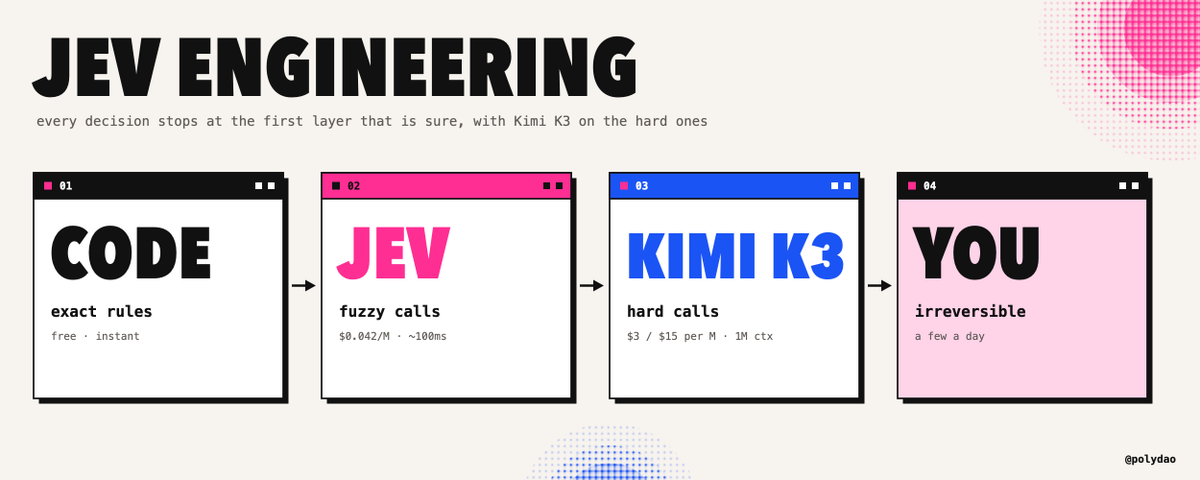
pick one, build on it this week, and you'll be the person on your team who actually knows Jev engineering when it gets asked for

Rajat S. retweeted

INSTEAD OF WATCHING NETFLIX TONIGHT.
Spend 1 hour with this.
Claude AI FULL COURSE that teaches you how to BUILD and AUTOMATE anything.
The people who watch this tonight will wake up tomorrow with a new skill.
Watch it and bookmark it now.
Rajat S. retweeted

My friend makes around $1.1 million a year as an Anthropic engineer
I asked him how he got so good at prompting
He sent me a video that was never meant to be released
The exact prompting playbook their core team actually uses
You probably won't find a better resource on prompting than this video
I watched it last night
Halfway through, I realized I'd been using Claude wrong for the past 18 months
Watch it and save it

Rajat S. retweeted

if i had to build a second brain today, i'd start with the ideas buried in my old ai chats...
i asked drex 1.5 to classify 806 codex conversations and help me figure out what deserves my attention next.
it did all of this <21 seconds
[here is the exact prompt i used to set it up ⬇️]
turn my codex chat history into a second brain using drex 1.5.
first, inventory every accessible conversation, including archived chats. report the actual count and any gaps in coverage.
use DREX_API_KEY from .env and read drex.nace.ai/llms-full.txt. use model drex-v1.5. never expose the key.
classify each chat from its title and summary. inspect more context when those are insufficient. use drex’s typed questions to identify:
- topic and project
- active work, reusable knowledge, experiment, or completed task
- whether it contains an unresolved next action
- whether it contains a useful decision, lesson, workflow, or idea
- priority and confidence
process the chats in resumable batches. save results as you go and track failures separately. keep uncertain classifications available for review.
build a searchable index linking each entry to its original chat. group related conversations and extract useful knowledge with source links. flag possible duplicates without deleting them.
organize the sidebar into clear topic groups, with “now & next” for actionable work and “needs review” for uncertain items. preserve pinned chats and archived status.
finish with the verified chat count, a classification breakdown, ten worthwhile next actions, and a browsable second-brain index.
[end of prompt]
🤝 Paid partnership

Drex 1.5 is Live! 128k context window, more rivalry to Jev
#1 on the Decision Index 0.2.1 + JevBench (SOTA)
Absolute leader in long context decisions
Latency: sub-second
Decision models are getting better!
Price: $0.04 per 1M input tokens
Try Drex with 250M free tokens
nace.ai/drex
#drex #jev #nace
Rajat S. retweeted
My top 3 skill makers:
- @poteto
- @dexhorthy
- @emilkowalski
Always learn a ton from reading their skills.
Rajat S. retweeted

Build your own harness, folks.
This is absolute banger paper from NVIDIA on self-evolving agent harnesses.
(bookmark it)
They introduce SoL-Pi which cuts token traffic by nearly half.
And it matches its baseline harness on GPT-5.6 Sol and Opus 5.
More details below:
Instead of tuning a harness by hand, they run auto-research loops at the harness layer across many repository-derived and verifier-driven environments, keeping only the mechanisms that survive selection.
Four mechanisms survived:
> Action Fusion changes how actions execute
> Online Context Compact handles compaction during a run
> ObservationPack reshapes observation handling
> Evidence-Preserving Reducer covers delegated reading
On the 51-task EdgeBench evaluation, the savings translate to about a third off API cost. In dollars that is an estimated $8.75 to $13.50 per hour against native Codex and Claude Code harnesses, and $4.36 to $5.71 against the baseline harness.
Because the search runs across many environments rather than one, the retained mechanisms keep working outside the setting that produced them. Code is on GitHub under NVlabs.
Paper: arxiv.org/abs/2609.20519
Chat with Paper: academy.dair.ai/papers/sol-p…
