

AI Agent System that runs on hardware you own.
Joined February 2026
- Tweets27
- Following2
- Followers7
- Likes22








Pinned Tweet
AI models keep getting smarter. But most businesses still use them just to chat.
ProductiveBot gives AI agents their own workstation to do real work.
Read the full article to see how it works.

Your next business report could be ready before you even open your laptop.
With ProductiveBot, you can give AI agents the job of preparing reports instead of spending hours collecting information yourself.
Welcome back to our ProductiveBot Workflow Series, where we share practical ways AI agents can help businesses save time, cut costs, and get more work done.
ProductiveBot Workflow: Make Business Reports in Minutes
Think about the reports your business needs every week.
Sales updates. Marketing results. Customer activity. Project progress.
Instead of gathering all that information by hand, you can set up ProductiveBot to prepare it for you.
Here's how the workflow works:
Connect your tools: Give ProductiveBot access to the business data and files it needs.
Collect information: Pull together sales figures, project updates, or other key details.
Organize the data: Turn scattered information into a clear report.
Highlight important changes: Find trends, problems, and updates worth checking.
Prepare the report: Get a summary, spreadsheet, or document ready for review.
For example, a marketing agency could use ProductiveBot to prepare a weekly client report.
Instead of opening several apps and copying numbers into a document, the agency gets a report with campaign results, key updates, and items that need attention.
The team reviews the numbers before sharing it with the client.
You can even schedule the workflow to run every week.
The result? Less time building reports. More time making decisions based on them.
ProductiveBot handles the research and preparation. You review the results and decide what happens next.
Your business needs reports. You don't need to spend hours making them.

What if the latest news in your industry was already in your inbox every morning?
With ProductiveBot, you can set up AI agents to find and organize news that matters to your business.
No more checking dozens of websites, scrolling through X, or searching for updates throughout the day.
ProductiveBot Workflow: Get the Latest Industry News Delivered to You
Here's how you can set it up:
- Choose your topics: AI news, industry trends, competitor updates, or market changes.
- Find the latest updates: Use research skills like X Research to look for relevant news and discussions.
- Filter the results: Focus on stories that matter to your business.
- Prepare a summary: Get the key updates, source links, and why each story matters.
- Schedule delivery: Have ProductiveBot prepare updates throughout the day and send them through a configured channel.
For example, a marketing agency could set up ProductiveBot to check AI news three times a day.
Instead of spending hours searching, the team gets a short report with new tools, industry updates, and topics worth creating content about.
The owner can review the findings and decide which ideas are worth acting on.
The result? Less time searching for news. More time using it to make better business decisions.
And this isn't limited to AI news.
The same workflow can help track competitors, customer trends, and changes in your industry.

Your business can own its AI workstation without another required software subscription.
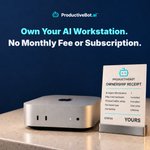
ProductiveBot gives your business AI agents running on a Mac mini you own.
And the best part?
There's no required monthly ProductiveBot subscription to keep using your workstation.
Instead of paying another monthly software fee, you get an AI setup built around your business for a one-time fee.
Here's what's included:
- Your own Mac mini: A dedicated computer for your AI agents.
- AI agent system: Give agents tasks like lead research, follow-ups, and reports.
- Business memory: Keep useful information available across tasks and sessions.
- Model choice: Use supported AI models based on your needs.
- Setup and support: Get help putting your AI workstation to work.
You can start with one useful workflow and add more as your business grows.
Want AI to research leads while you're away? Or prepare weekly reports before Monday morning?
ProductiveBot gives you a place to run those workflows without requiring monthly subscriptions.
Third-party AI providers and connected apps may still have their own usage or subscription costs.
The goal is simple: Own your AI workstation, put it to work, and spend less time on tasks you don't need to do yourself.
Your workstation. Your agents. Your control.

ProductiveBot users are finding new ways to save time, cut costs, and grow their businesses with AI agents.
From building websites to handling everyday tasks, they're finding work they can give to AI instead of doing it all themselves.
And we're starting a new series to show what's possible.
Introducing ProductiveBot Workflows.
Each post will show one useful job you can give ProductiveBot, how it works, and what your business can gain from it.
Let's start with sales.
Imagine opening your laptop to a list of local businesses that may need your services.
Instead of spending hours searching for prospects, you can set up ProductiveBot to do the research.
Here's how the workflow works:
1. Find local businesses in your target area.
2. Check their websites for problems or missing features.
3. Find opportunities where your services could help.
4. Rank the leads based on how well they match your ideal customer.
5. Prepare a list of businesses worth contacting.
For example, a web design agency could use this workflow to find businesses with outdated websites or missing contact forms.
The agency owner reviews the list, picks the best prospects, and decides who to contact.
ProductiveBot can also prepare outreach messages for approval. Less time searching for leads. More time reaching out to potential customers.
This is just the first of many workflows we'll share to help businesses save time, reduce costs, and get more work done.

Jed saved nearly $217,000 in potential software development costs with ProductiveBot.
And he did it without writing a single line of code.
Jed is a 47-year-old business owner who works in marketing, business development, and web projects.
He wanted to build a software platform for a nonprofit.
After 6 months of working with an agency, he still didn't have a working product he could click on.
With ProductiveBot, Jed built a working software prototype in just 45 minutes.
No coding skills. No development team needed for that first build.
And that was just the beginning. With ProductiveBot, Jed has now:
- Built 3 live projects, including 2 websites and a full web app.
- Built a home services app with an AI chatbot, photo uploads, and a working backend.
- Publishing blogs in under 10 minutes.
- Fixes website issues in under 5 minutes.
ProductiveBot gives Jed AI agents running on a Mac mini he owns.
He describes what he wants, gives the agents clear tasks, and reviews the results.
He can even access his workstation while traveling to keep projects moving.
And Jed isn't stopping at these 3 projects.
He's still building, testing new ideas, and adding features to his existing projects.
He's exploring new ways to use ProductiveBot across his businesses, from building software to managing content and everyday work.
What started as a way to build one software platform has become a tool Jed uses to bring more of his business ideas to life.
And he's still finding new things he can build with it.

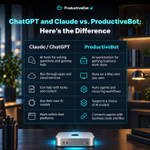
ProductiveBot is not a replacement for ChatGPT or Claude. It puts them to work.
A lot of people asked us about this difference this week. Here's the simple answer.
ChatGPT and Claude provide the AI intelligence. AI agents use that intelligence to carry out tasks.
ProductiveBot brings everything together on a computer you own. It turns a Mac mini into an AI workstation for your business.
Here's how the pieces work together inside the ProductiveBot ecosystem:
AI models: Use supported models from OpenAI or Anthropic to power your agents.
AI agents: Tools like OpenClaw help carry out tasks, work with files, and use connected apps.
ProductiveBot: Provides the workstation, memory, setup, security tools, and support to bring it all together.
And because ProductiveBot runs on its own Mac mini, it can keep working even when your laptop is closed.
For example, a business owner can set up an agent to research leads overnight.
The agent uses an AI model to do the research, works with the tools it's allowed to access, and prepares the results for review.
The next morning, the work is ready.
ChatGPT and Claude provide the intelligence. AI agents do the tasks. ProductiveBot gives them a place to work.

ProductiveBot helps businesses get everyday tasks done while keeping owners in control.
For example, a roofing company can use ProductiveBot to research leads and prepare customer follow-ups.
The AI agents handle the routine work. The owner reviews important details before anything gets sent.
But here's the key. Business owners shouldn't have to approve every small task.
That only creates more work.
Instead, AI should know when to bring a decision back to the owner.
With ProductiveBot, businesses can:
- Give AI routine tasks to handle
- Set rules for what AI can access and do
- Review important actions before they happen
- Keep control over final decisions
An agency, for example, can let AI prepare client messages while the team decides what gets sent.
The goal isn't to let AI make every decision. It's to let AI handle the busywork so business owners can focus on decisions that matter.

An AI agent should know your business. But it doesn't need access to everything.
ProductiveBot gives your business an AI agent workstation with security and control built into the setup.
Your AI agents can work with the files, tools, and business information you choose to share.
That means they can help with everyday work like:
- Preparing customer follow-ups
- Organizing business reports
- Managing files and project information
But here's what matters. You decide what your AI agents can access.
With ProductiveBot, you can:
- Choose which tools and files your agents use
- Set permissions for different tasks
- Review important actions before they happen
- Start with limited access and expand as needed
ProductiveBot also includes security tools to help protect your AI setup.
Your Mac mini belongs to your business, and you stay in control of how your agents work.

AI agents are no longer just answering questions. They are starting to do the work.
OpenAI’s Dots, Meta’s Muse, and ProductiveBot all move in that direction.
All three can help get work done. But which one makes the most sense for a business?
Dots are cloud-based AI agents that run on OpenAI's cloud infrastructure.
Muse is mainly built for personal needs, not as a dedicated business workstation.
ProductiveBot gives your AI agents their own workstation, running on a Mac mini that belongs to your business.
It includes agent software, memory, security tools, guided setup, and support.
Your business can use it to:
• Research leads and prepare follow-ups
• Turn meetings into action items
• Organize files and business information
• Prepare weekly reports
Here's where ProductiveBot stands out:
Ownership: Your business owns the workstation instead of relying only on a cloud computer.
Model choice: Use supported AI models without building your whole business around one provider.
Business memory: Keep useful context available across tasks and sessions.
Control: Choose what agents can access and review important actions.
Setup and support: Get a ready-to-use agent system without building everything yourself.
For a business that wants its own AI workstation, model choice, and control over its workflows, ProductiveBot is the stronger option.
And there's another difference.
ProductiveBot doesn't require an ongoing ProductiveBot software subscription. Third-party AI and app costs are separate.
AI models will keep changing. Your business shouldn't have to rebuild its setup every time they do.
Your computer. Your agents. Your control.

Your business doesn't have to stop working when you're away.
Imagine you're traveling, spending time with family, or taking a few days off.
But the work doesn't stop.
Leads still need follow-ups. Projects need updates. Research needs to get done.
What if some of that work could keep moving without you sitting at your desk?
That's where ProductiveBot comes in.
ProductiveBot gives your business an AI virtual assistant that runs on a Mac mini you own.
Give it tasks to work on while you're away, like:
- Researching new leads and prospects
- Preparing customer follow-ups
- Organizing files and business information
- Turning meeting notes into action items
- Preparing weekly reports
You can set up repeat tasks so ProductiveBot can keep working even when you're not at your desk.
And when you return?
The research is ready. The follow-ups are drafted. The reports are waiting for your review.
You still control what your AI can access and approve important actions before they happen.
Taking time away from your desk shouldn't mean putting every task on hold.
With ProductiveBot, work can keep moving while you enjoy your time away.

Your AI agents are supposed to reduce your workload.
But if they cannot share information, they create more work for you.
You have to copy details between agents, explain what happened, answer questions, and assign the next step.
Instead of running your business, you are managing your AI.
ProductiveBot takes a better approach.
Your AI agents work from shared business information and have clear jobs. Each agent knows:
What happened
What information matters
What still needs an answer
Who handles the next step
You should not spend your day keeping AI agents updated.
They should work together and bring you the work that needs your review.

AI agents still need human judgement.
It sounds great to give an AI agent a job and let it handle everything on its own.
But AI can still make the wrong call.
Say you give an AI agent your lead follow-ups. Most leads are easy to handle.
Then it finds an unusual conversation. It picks the wrong contact or prepares the wrong next step.
That’s why human review still matters.
A better way looks like this:
The AI handles the repetitive work. You review the important decisions. You correct it when something is wrong.
Those corrections can help guide how the work is handled next time.
That’s how we think about ProductiveBot. You don’t need to check every little task.
But when a decision matters, you should be part of it.
Let AI handle the repetitive work. Keep humans in charge of the important decisions.
Where would you want a human check before your AI takes action?

Your AI can remember a conversation today and still forget the work next week.
Means your AI may not have an intelligence problem. It may have a memory problem.
Say you spent an hour working through a vendor deal with your AI.
A week later, you ask it to prepare a follow-up. But instead of picking up where you left off, it asks:
What did they offer?
What did we agree on?
What happens next?
Now you’re explaining everything again.
A useful AI assistant needs more than a chat history.
It needs a living knowledge base where important decisions, updates, and approved business details can be kept and found later.
That way, each conversation can build on the work that came before it.
This is how ProductiveBot approaches memory.
It gives your AI a central place to work with useful business context across sessions, instead of starting from scratch each time.
The result is simple: Less repeating yourself. More useful help from an AI assistant that can keep up with your business over time.

You can spend an hour with ChatGPT and still have a full to-do list afterward.
You got some good answers. Maybe drafted an email, worked through an idea, or planned what needs to happen next.
But someone still has to do the work:
• Emails need reviewing
• Leads need follow-ups
• Meetings need preparing
• Customers need answers
That’s the gap ProductiveBot is built for. Think of it like an AI teammate you can give real work to, not just questions.
It can help find the context, prepare the work, and move your workflows forward across the tools you use.
You still stay in control when a decision needs you.
Because nobody measures a productive day by how much they talked with the AI.
They measure it by what actually got done.

Your AI needs its own workstation to work.
That’s why ProductiveBot comes with a Mac mini.
It gives your AI teammate its own computer that stays on and is ready when you need it.
We chose the Mac mini because it’s small, powerful, energy-efficient, and reliable enough to stay running day after day.
It gives your AI a dedicated machine without needing a large desktop or complicated server setup.
From there, ProductiveBot can connect to the tools you choose, keep useful business context, and help with the workflows you give it.
We’re not just sending you a Mac mini and leaving you to figure everything else out.
ProductiveBot brings together the AI agents, setup, memory, support, and other tools needed to make the workstation useful.
So you’re not just buying a computer.
You’re giving your AI teammate its own place to work, with the system already set up around it.

You probably don’t need another AI tool in your business. You need help with the work that keeps piling up.
Following up with leads before they go cold. Finding customer details. Getting ready for tomorrow’s meeting.
Remembering the small things that somehow always end up back on your plate.
That’s the kind of work we think about with ProductiveBot.
It’s less about asking, “What cool things can AI do?”
And more about asking, “What work am I doing every week that I’d happily hand to someone else?”
Give ProductiveBot those clear, repeatable tasks first.
Let it help prepare the work, keep track of the context, and bring things back to you when a decision is needed.
Because you don’t need more AI for the sake of AI. You need it to make your workday easier.

Here’s the hidden cost of building an AI agent setup by yourself:
AI agents are supposed to save you time, not become your new side project.
But that is where a lot of business owners get stuck.
You start with a simple goal: automate lead follow-ups, sort emails, or prepare weekly summaries.
Then you discover n8n, Zapier, APIs, MCPs, custom GPTs, and dozens of tutorials explaining how to connect everything.
You can absolutely build it yourself. But getting it working is only the beginning.
You still have to fix broken connections, manage security, update tools, and maintain everything when something changes.
ProductiveBot is for business owners who want to use AI agents without building the whole setup themselves.
The Mac mini, agents, setup, security, diagnostics, and support are already brought together.
So you can spend less time figuring out how AI works. And more time giving it useful work to do.

ChatGPT is great when you need help with answers. But you still have to take the answer and move the work forward.
ProductiveBot is built for the next step.
Think of it like an AI teammate with its own workstation.
You can give it work like:
• Preparing customer follow-ups
• Researching leads
• Organizing business information
• Drafting responses
• Finding useful context from past work
The Mac mini gives your AI a dedicated place to work.
ProductiveBot adds the setup, memory, connections, security, support, and workflows that help turn it into something useful for your business.
So instead of only asking AI questions, you can start giving it work.
You still decide what it can access and where you want to review the work.
ChatGPT gives you a powerful AI to work with. ProductiveBot gives that AI a workstation and a job to do.

ProductiveBot retweeted

Full gestation is only about 24 months away. Clip from the #moonshortslive conference