

Private crypto swaps. No account, no sign-up. Privacy is normal. https://xitter.cf/t.co/sKOtFrAWpZ $PRIVAZ CA: DoqsX2uvZnZNTzbxuS5nbXLoxrrPUWE8BZXRQfEPpump
- Tweets190
- Following8
- Followers222
- Likes5




ALT Eyebrow: How other places work · Feeds. Headline "Their feed shows who you paid. Ours doesn't exist." Text: Some payment apps put your payments in a feed: who you paid, when, even a note saying what for. Priva-Z has no feed, no profiles and no friends list. In the middle, a payment feed that fades out at the top and bottom, with example posts such as "Alex paid Sam, 'Pizza night', 2m, Friends" and "Jo paid Riley, 'Concert tickets', 18m, Friends", each with like and comment icons. On the right, a gold Priva-Z card: a dashed empty box, "Nothing to scroll. No public list of swaps"; checks for No feed, No profiles and No friends list; and a lock: Your swap's status page opens with your secret note. Footer: priva-z.app/privacy.

ALT Headline "The form fits your amount." Eyebrow: Swap form · Fast and Private mode. Text: Below where Fast starts, the form moves your swap to Private mode with Zcash and says why, right under the switch. Raise the amount and it's set to Fast again. On the right, two switches. "Below Fast's start", [amount] SOL: Private · Zcash selected, with the note "Fast starts at [amount], so this amount uses Private mode with Zcash." An arrow, "Raise the amount", leads to "Past Fast's start": Fast selected, with "This amount fits Fast, so your swap is set to Fast again."

ALT Headline "BNB on BNB Smart Chain." Eyebrow: BNB · Pick the network. Text: BNB on Priva-Z is native BNB on BNB Smart Chain (BEP-20). On an exchange's withdrawal page, pick BNB Smart Chain (BEP20). Send it or receive it. On the right, a "Withdraw BNB · Network" picker, "On an exchange's withdrawal page", with BNB Smart Chain (BEP20) selected in gold with a check, and opBNB and BNB on Ethereum unselected. Below, an example address 0x9Fb2…4dC1: The same 0x address works on more than one chain, so the network you pick matters.


ALT Headline "Add your destination tag." Eyebrow: XRP · Exchange accounts. Text: Exchanges often share one XRP address and tell customers apart by destination tag. Getting XRP paid to an exchange account? Add yours in the Destination tag field. On the right, a form: XRP payout address rH4q…7tWm; Destination tag, highlighted in gold, "[your tag]", "The one your exchange gave you"; "Tagged payouts run on" Fast and Private mode with Monero. Below, a check: An X-address carries its own tag (X7d3…Lk9q).

ALT Headline "A brand-new XRP address opens with its payout." Eyebrow: XRP Ledger · New addresses. Text: On the XRP Ledger, a new account opens once it receives at least the network's base reserve. Priva-Z XRP payouts start at 5 XRP. On the right, a card "Your XRP address" rH4q…7tWm marked "Never used", a gold arrow past a "First payout: 5 XRP and up, from Priva-Z" card, down to the same address in gold marked "Account open".

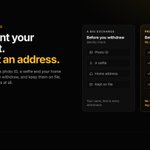
ALT Headline "They want your passport. We want an address." Eyebrow: No account · No ID. Text: Big exchanges ask for a photo ID, a selfie and your home address before you can withdraw, and keep them on file. Priva-Z has no accounts at all. On the right, two cards. "A big exchange, before you withdraw, identity check": Photo ID, A selfie, Home address, Kept on file; "Your name, tied to every withdrawal." In gold, "Priva-Z, before you swap, no account": checks for Your coins, A fresh address, No sign-up, No email; "No identity checks. Nothing to log in to."

ALT Headline "A wallet link that carries little." Eyebrow: SOL deposits · On your phone. Text: Paying a SOL deposit from your phone? Tap to open the payment in your wallet app's own browser, ready to send in one tap. On the right, a phone showing the wallet app's browser: Send SOL to Hd5P…w2Kc, Amount [amount] SOL, and a gold Send button with a tap ring. Beside it, a gold card "The link holds just": the deposit address, the amount; and a card "Stays with you", with locks: your swap, your note.

ALT Headline "A confirm you meant." Eyebrow: Swap form · Confirming. Text: A click that lands while your quote is still settling creates nothing, and the button asks you to press again. Change a choice after quoting, and you get a fresh quote first. On the right, three cards. "Quote still settling": a dashed "Confirm swap" button with a spinner and a tap ring, "An early click creates nothing". "Then", in gold: an "Almost ready, press again" button, "One deliberate press makes the swap". "Changed a choice?": a check, A fresh quote comes first.

ALT Headline "Want it gone even sooner?" Eyebrow: Privacy · Your swap's record. Text: Finished a swap? Email its deposit address to Priva-Z support and ask for its record to be deleted early. On the right, an email draft: To, Priva-Z support; Subject, "Early delete, please"; "Please delete this finished swap's record early. Deposit address: Hd5P…w2Kc"; and a gold Send button. Below, a check: With no accounts, the deposit address is how support knows which swap is yours.

ALT Eyebrow: Priva-Z · 简体中文. Headline "转移加密资产 保护隐私。" (Move crypto privately.) Text: 发送 SOL、BTC、ETH、LTC、USDT 或 USDC,在你选择的新地址收款,发送方与接收方之间没有直接付款。 On the right, a language list headed 语言 (Language): English, Español, Português, and 简体中文 selected in gold. Below, 任意页面底部 (at the bottom of any page) with a "语言 · 简体中文" picker, and a check: 无需账户 (no account needed). Footer: priva-z.app; 转移加密资产,保护隐私。

ALT Headline "See it on-chain for yourself." Eyebrow: Swap details · On-chain. Text: The deposit address links to a public block explorer, and a SOL deposit's transaction does too, each in a new tab. On the right, a "Swap details" card: Deposit address Hd5P…w2Kc and Deposit transaction 5kTz…Wq3e, each a gold link with an open-in-new-tab icon, the transaction with a copy button. Below, a browser window on a "Block explorer · new tab" tab showing Transaction 5kTz…Wq3e. Caption: The copy button takes the transaction id to any explorer you prefer.

ALT Headline "22.57% of the supply, burned." A wide bar labelled "774,235,751 remaining" with a striped slice at its end marked "22.57% burned". Three cards: Burned, 225,764,248, gone for good; Supply now, 774,235,751, down from 1,000,000,000; Check it, on-chain, the token page on Solscan. Footer: the token address DoqsX2uvZnZNTzbxuS5nbXLoxrrPUWE8BZXRQfEPpump and "Move crypto privately."

ALT Headline "A little over or under is fine." Eyebrow: Private mode · SOL deposits. Text: Within 0.001 SOL of the amount shown, either way. Send it in one transaction and keep a little extra SOL in your wallet for the network fee. On the right, a "Your SOL deposit" gauge: a marker for "Amount shown" inside a gold band from −0.001 SOL to +0.001 SOL, "Anywhere in the band is fine". Below, three checks: One transaction; A little extra SOL for the network fee; The page spots your deposit by itself.

ALT Headline "Round amounts, one tap away." Eyebrow: Swap form · Quick amounts. Text: Under the amount field, quick amounts like 0.5, 1 or 2 SOL, showing the ones your route takes. Each coin has round figures of its own. On the right, a "You send" field showing 1 SOL, quick-amount buttons 0.5 SOL, 1 SOL (selected, with a tap ring) and 2 SOL, and a check: Round amounts are more private. Below, "Each coin, its own round figures": BTC, ETH, LTC, USDT, USDC.

ALT Headline "Give your wallet address." Eyebrow: Solana · USDT and USDC. Text: On Solana, USDT and USDC sit in token accounts that belong to a wallet. To receive them through Priva-Z, give the address your wallet shows to receive. On the right, a gold card "Your wallet · give this one" (7xQ4…a9Lm) branching to two cards, "USDC token account" and "USDT token account", each "belongs to your wallet". Below, a form field "Payout address" with 7xQ4…a9Lm and a check: The form checks it is a wallet address.