
builder @mulan_ai_ | a curious human being
San Francisco, CA
Joined May 2025
- Tweets140
- Following40
- Followers33
- Likes413
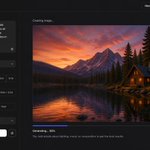




This is so cool!
Go try GPT image 2 + Seedance 2 on mulan.pro. Crazy combo 🤯

/// Inspired by the amazing @0xInk_ here's my phone game concept "NEON RUSH".
/// Made with GPT image 2 and Seedance 2 on @mulan_ai_
2
107
Free to start. Enjoy creating everybody 🥳

GPT Image 2 is now live on MulanAI.
OpenAI’s most advanced image model brings thinking-level intelligence to your workflow—delivering perfect typography, complex layout adherence, and production-ready 2K visuals.
✦ Near-Perfect Text: Precision rendering in any language.
✦ Thinking-Level Reasoning: Spatial logic for dense compositions.
✦ Superior Fidelity: Ultra-realistic textures and sharper edits.
✦ Pro Flexibility: Flexible aspect ratios for any use case.
From brand campaigns to editorial visuals, just open MulanAI and generate.
#MulanAI #GPTImage2 #OpenAI #GenerativeAI

1
30

I finally got around to building a little directory for Seedance 2 prompts!
Gathered 200+ prompts on X and will keep updating everyday.
If you’re still trying to figure out what SD2 is actually capable of, this should make it easier to dive in.
Highlights:
- Filter by use case, from cinema to UGC
- Sort prompts by Trending or Newest
- The largest SD2 prompt hub in the world
Link in comment. Go check it out!

1
5
724
JoyceQ retweeted

If you are still building video workflows manually, you are out of date.
Millions of users on Mulan AI have been creating marketing assets with the first AI content agent who can build workflow and write professional prompts for you.
99% Cost Reduction
90% Efficiency Improvement
Full tutorial below (stay for the MV in the end!):

JoyceQ retweeted

➡️ My friends at @mulan_ai_ are getting ready to give everyone a chance to play with #Seedance2 on Feb 24 with massive discounts🤯
Signing up is FREE and you get free DAILY credits!
Anyone who signs up with my invitation link gets the launch discount + extra credits.
Check the link 🔗 in the reply below 👇
JoyceQ retweeted
Your AI doppelgänger in Pixar style—fully generated in seconds.
Use this prompt to create a character turnaround (front, side, back) from any photo:
“Transform the person in the image into a Pixar-style character turnaround (front, back, side). Same outfit. White clean background.”
Bookmark this. It’s insanely good for avatars, games, and AI videos.

Your AI doppelgänger in Pixar style—fully generated in seconds.
Use this prompt to create a character turnaround (front, side, back) from any photo:
“Transform the person in the image into a Pixar-style character turnaround (front, back, side). Same outfit. White clean background.”
Bookmark this. It’s insanely good for avatars, games, and AI videos.
JoyceQ retweeted

Claude is going for the girls ✨
My IG and TikTok feeds have been flooded with sponsored Claude videos from one demographic of creator - artsy girls who can't code.
I saw so many of them that I decided to start saving them down (excerpts ⬇️). There's definitely a pattern!
JoyceQ retweeted

how to generate AI photos that look 100% real:
nano banana normally has a very grey scale color grade which is why we are going to be using inspiration photos for color grading and creative direction
> go on pinterest and grab any photo you like that has the aesthetic you want
> upload that pinterest photo into chatgpt 5.1 thinking mode and ask for this:
"analyze this photo and give me a very detailed json prompt that can recreate it, it should be very detailed, really make sure to break down the color grading and all the exact colors in the photo"
the reason we're using chatgpt is because of its very strong photo analysis capabilities + its less lazy than gemini when writing json code
we're not using claude because it doesnt do actual thinking photo analysis, which is important for good json with this method
> take the json prompt gemini gives you and put it into nano banana pro in google ai studio
> upload your product image and prompt: "using this json as reference, generate a person holding my product [attach product image]"
> nano banana generates the photo with that person holding your product
you will notice the photo looks more realistic than usual and the color grading will be really good
> save that generated character photo as your reference
> for future generations, attach the character photo each time for facial consistency
now you have a consistent ugc model that can hold different products across multiple photos
you can also interate the base json prompt and chat back anf foruth with chatgpt to create a json prompt based on what you want, then repeat the same process..
i like this because it makes the color grading really good in the photo
the #1 sign a photo is generated with nano banana is the grey colours, but with this method it removes that
this is how you can build a library of high quality ugc content without hiring creators
the json from chatgpt handles the realistic lighting and color grading, nano banana handles the character consistency, and you control the product placement
takes 5 minutes to set up, then you can generate unlimited variations

JoyceQ retweeted
I made this video in a few hours last week.
Almost all of it - script, voice, image, and character animation - is AI. The product demos were filmed by me.
I can't see how the future of video production doesn't include AI in most workflows. So easy, cheap, and fast!
If you need to generate multiple food choices at once, add this one line at the bottom of the prompt:
“Food choices:
Hamburger, Chocolate cookie, Carrot cake, Salmon Bagel” (or whatever food you want)
Then, tell your AI assistant to:
“Generate 4 image prompts by replacing the word "FOOD" with the food name in the bottom of the text”
This way you can get a batch of different prompts in one go 👍


Super cool AND creative prompt here! Thank you @TechieBySA for sharing 🔥
Very consistent result, so only one generation is needed 👏
Replicated my own in @mulan_ai_

1
98
Super cool AND creative prompt here! Thank you @TechieBySA for sharing 🔥
Very consistent result, so only one generation is needed 👏
Replicated my own in @mulan_ai_


JoyceQ retweeted

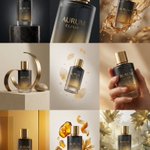
It's less a perfume more a luxury art
Gemini nano banana pro
Prompt:
Create a 3×3 grid in
3:4 aspect ratio for a high-end commercial marketing campaign using the uploaded product as the central subject.
Each frame must present a distinct visual concept while maintaining perfect product consistency across all nine images.
Grid Concepts (one per cell):
1. Iconic hero still life with bold composition
2. Extreme macro detail highlighting material, surface, or texture
3. Dynamic liquid or particle interaction surrounding the product
4. Minimal sculptural arrangement with abstract forms
5. Floating elements composition suggesting lightness and innovation
6. Sensory close-up emphasizing tactility and realism
7. Color-driven conceptual scene inspired by the product palette
8. Ingredient or component abstraction (non-literal, symbolic)
9. Surreal yet elegant fusion scene combining realism and imagination
Visual Rules:
Product must remain 100% accurate in shape, proportions, label, typography, color, and branding
No distortion, deformation, or redesign of the product
Clean separation between product and background
Lighting & Style:
Soft, controlled studio lighting
Subtle highlights, realistic shadows
High dynamic range, ultra-sharp focus
Editorial luxury advertising aesthetic
Premium sensory marketing look
Overall Feel:
Modern, refined, visually cohesive
High-end commercial campaign
Designed for brand websites, social grids, and digital billboards
Hyperreal, cinematic, polished, and aspirational
🤖 Made with AI

JoyceQ retweeted

Quick 3x3 grid prompt share + extraction prompt
· 1st use Nano banana pro and 👇
DIRECTIVE: Generate a 3x3 grid of photorealistic images depicting Darth Vader's journey through a desert canyon.
CHARACTERS: Darth Vader in slightly worn, dust-covered iconic armor. His cybernetic mount is a large, four-legged mechanical creature with exposed gears, pistons, and sand-blasted metal plates.
PANELS:
Panel 1 (Top Left): Wide shot of Vader on his mount atop a canyon ridge at sunrise.
Panel 2 (Top Middle): Medium shot of the mount's mechanical legs traversing rocky ground, kicking up dust.
Panel 3 (Top Right): Close-up on Vader's gloved hand holding a weathered control reign.
Panel 4 (Center Left): Wide shot of the pair dwarfed by towering canyon walls in deep shadow.
Panel 5 (Center): Medium shot of Vader pausing, looking out over the vast, arid landscape.
Panel 6 (Center Right): Close-up on the mount's optical sensor head covered in fine sand.
Panel 7 (Bottom Left): Low-angle shot looking up at Vader and the mount against the harsh sun.
Panel 8 (Bottom Middle): Medium shot of them navigating a narrow, winding crevice.
Panel 9 (Bottom Right): Wide shot of Vader and his mount disappearing into the distance as the sun sets.
TECHNICAL: Photorealistic style, cinematic lighting, gritty texture, warm color palette.
Then extract each frame using this simple technique
attached you'll find a 3x3 grid with 3 rows and 3 columns. Extract only the frame from row X column Y
share your creations in comments!


ALT attached you'll find a 3x3 grid with 3 rows and 3 columns. Extract only the frame from row 1 column 1

ALT attached you'll find a 3x3 grid with 3 rows and 3 columns. Extract only the frame from row 2 column 1

ALT attached you'll find a 3x3 grid with 3 rows and 3 columns. Extract only the frame from row 3 column 3