
Lexmount Inc. — building the infrastructure for AI agents. ☁️ Lexmount Browser: cloud browsers & control plane ⚡ Moli: open-source Rust headless browser
Joined July 2026
- Tweets67
- Following60
- Followers1.2K
- Likes61





Today, we’re introducing Awesome Moli, our open-source directory.
Explore 52 projects, examples, and deployment guides. Browse the directory in 7 languages.
Test web apps. Extract data from dynamic pages. Give AI agents a browser.
Built something with Moli? Add yours.
Checkout our link: github.com/lexmount/awesome-…

1
2
178
We teamed up with AI Explained Daily to give an agent a Hacker News reading assignment: find stories about AI agents, follow the links, and write a short summary of each article.
Watch it go from headline to source in Lexmount Cloud Browser 👇
youtube.com/watch?v=F_yFLlJe…
5
11
1,710
We brought Lexmount Browser into @NVIDIAAI’s NeMo Gym for Agent RL on the real web. 🚀
With Qwen3-1.7B + GRPO, we ran the full loop:
Agent → Browser → Reward → Model Update 🔁
Across 40 unseen MiniWoB++ examples, average reward improved:
0.162 → 0.315 📈
Then we pushed it further — multi-step tasks on real websites, running with 64 concurrent browser sessions.
That’s where we found a critical issue:
Environment failure ≠ model failure.
A browser timeout shouldn’t become a bad training signal.
So we improved session recovery, failure detection, and end-to-end tracing — making browser environments more reliable for Agent RL at scale.
That’s what we’re building Lexmount Browser for: reliable browser infrastructure for agents to operate and learn on the real web. 🌐
Try Lexmount Browser ↓
browser.lexmount.com

1
5
481
Our web search benchmark is live. 🔎
This evaluation compares Lexmount, Serper, Browserbase and Bright Data across speed, search quality and published pricing.
⚡ Lexmount averaged 1.46s latency across 980 calls per provider, including failures and retry waits — the lowest in this comparison.
🎯 Lexmount scored 77.2% Success@5 on 149 scenario queries and 72.1% Answer Match@5 on 773 SimpleQA Verified questions — the highest scores on both metrics among the four providers.
For ranking quality, Lexmount scored 64.0 nDCG@5 ×100, close to Serper’s 64.4.
Explore all eight metrics in the four charts, including published pricing. Read the full results, methodology and limitations:
browser.lexmount.com/blog/we…
#WebSearch #Lexmount #AIAgent #Moli


2
7
494
Introducing Lexmount Web Search API 🔎
Search the web. Choose your sources. Build it into your agent.
⚡ Fast retrieval: 1.46s average latency across 980 calls in our benchmark, including failures and retry waits.
🎯 Control your sources: include or exclude domains to focus on the documentation and sites you need.
🧩 Structured results: ranked titles, URLs and snippets in JSON, ready for your app or agent to process.
Pair Search with Moli Web Fetch to read selected pages and take your research workflow further.
Watch the demo, then try your own query in the Playground:
browser.lexmount.com/playgro…
11
16
538
Moli Takes the #1 Spot on Product Hunt 🥇
We’re excited to share some great news: Moli by Lexmount was named Product Hunt’s #1 Product of the Day for October 25, 2026! 🎉
When an AI agent needs to visit websites, read information, or fill out forms, the browser is an essential tool for getting things done. Moli provides page structure, web interaction, and on-demand rendering capabilities, helping developers bring these actions into their AI workflows.
🌐 Read web pages and extract informationGive agents access to page content and structure for tasks like web research and data collection, so information from the web can flow into the next steps of your workflow.
🖱️ Interact with pages and move tasks forwardMoli supports web interactions such as clicking and filling out forms, giving agents the browser capabilities they need to take action on the web.
☁️ Run locally or in the cloudDevelopers can run Moli locally or use managed browsers through the Lexmount cloud platform, with multiple isolated sessions running in parallel. Cloud Live View lets you watch tasks as they happen and take manual control when needed.
During the launch, we also heard from the community about parallel sessions, workflow integration, and human takeover. These specific questions and suggestions helped us better understand what people need.
Thank you to everyone who tried Moli, joined the conversation, shared feedback, and supported us 💙
We’ll keep improving Moli to help agents accomplish real-world web tasks. Visit the Lexmount Playground to try a cloud browser powered by Moli.
Give Moli a try: github.com/lexmount/moli

Our open-source project Moli just hit 20,000 stars on GitHub! ⭐
Honestly, seeing so many developers believe in what we're building has been incredibly motivating.
So we took the next step.
We brought Moli, our browser engine built specifically for AI agents, to the cloud.
Why? Because we want more developers to experience a browser that's actually designed for agents.
Here's what makes Moli different:
⚡ 5× faster cold starts than Chrome
🧠 Just 1/7 of Chrome's memory usage
☁️ No browser infrastructure to manage
Now imagine running 100 browser tasks simultaneously.
Your agents browsing websites, extracting data, filling out forms, and getting real work done. All in the cloud.
That's what we're building with Moli by Lexmount.
🚀 We're launching on Product Hunt today!
If you're excited about the future of agent-native browsers, we'd love your support and feedback.
👉 producthunt.com/products/lex…

🏆 Moli takes #1 in Web Fetch with an 89.8% task pass rate!
We tested 5 browsers across 430 real-world web tasks and 545 saved pages. Moli ranked first in both benchmarks.
📊 Real-world retrieval
89.8% task pass rate vs. Chromium's 54.4%.
📄 Content extraction
39.27 overall on WebMainBench vs. Lightpanda's 35.00.
Moli also passed:
• 88/100 bot-protected cases
• 91/100 popular sites
• 90/100 dynamic cases
⚡ Built for AI agents
Built from scratch in Rust, with JavaScript support, iframe handling, and native Markdown extraction.
In a separate benchmark, Moli's median CPU time was about 1/7 of Chrome's.
🔗 Explore Moli on GitHub:
github.com/lexmount/moli

How reliably can AI browsers extract content from the real web?
We tested Moli against Chromium, Lightpanda, Obscura, and Kitesurf across 150 Web Fetch tasks.
Moli came out on top. 🏆
Here’s what we found:
✅ 90.0% task pass rate (vs. Chromium's 83.3%)
✅ 80.0% pass rate on document & media tasks (vs. 46.7%)
⚡ 42.8% faster on average than Chromium across 98 mutually successful tasks
From web pages to PDFs, images, and videos, reliable extraction matters for AI agents.
That's why we built Moli, an open-source browser engine for AI agents.
Explore Moli on GitHub 👇
github.com/lexmount/moli

2
4
246
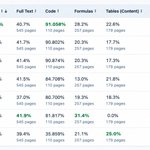
Not all browsers extract web content equally well.
We benchmarked Moli against Chromium, Lightpanda, Kitesurf, and Obscura across 545 web pages.
The results 👇
🏆 #1 in overall Web-to-Markdown extraction quality — 39.27%
💻 Highest code extraction score — 91.06%
✅ Markdown output generated for all 545 pages
For AI agents, loading a webpage is just the first step.
What matters is extracting meaningful content while preserving its structure.
That's what we're building with Moli — an open-source browser engine designed for AI agents.
Explore Moli on GitHub:
github.com/lexmount/moli

2
6
421
Let AI agents reliably complete real web tasks in the cloud.
AI agents can think.
But they still can't reliably complete real web tasks without a browser.
Lexmount AI provides:
→ Cloud Browser: isolated browser sessions for browsing, clicking, and filling forms
→ Web Fetch: extract titles, text, and links from public pages in one request
No browsers to deploy. No infrastructure to maintain.
Build agents that can actually use the web.
browser.lexmount.com/
We just opened an official community for Moli 🚀
A place to ask questions, share what you build, suggest features, and help shape where the browser for AI agents is headed.
Join us → discord.gg/4eXGtdWWnq
10
10
1,606
As agents get more capable, browser infrastructure can't be measured by speed and memory alone.
Isolation, permissions, session boundaries, and observability are now part of the browser's core product surface.
The browser is no longer just where an agent acts — it's a security boundary.
That's exactly the philosophy behind how we're building Moli. 🧺
10
5
792
🔐 **Session boundaries.**
Profiles, cookies, and HTTP cache are scoped per session. Start clean, finish clean — with full control over what persists across runs.
1
24