

Microsoft Copilot tips, prompts and shortcuts 🪄 Learn how to save time in Outlook, Teams, Word, Excel and PowerPoint with Copilot.
Joined September 2026
- Tweets103
- Following13
- Followers39
- Likes50





Pinned Tweet
Welcome to Learn Copilot with Rishona
I'm Rishona Elijah, a Microsoft MVP and trainer who helps people get more value from Microsoft Copilot.
Discover new ways to save time and work smarter with Copilot.
🔗 LinkedIn: linkedin.com/in/rishonaelija… 🔗 Blog: rishonapowerplatform.com
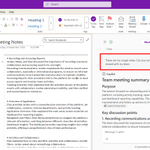
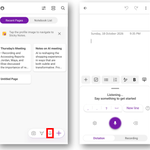
If you need to jot down some notes while away from your desk, dictate in the OneNote mobile app. Then, back at your desk, use Copilot in OneNote to tidy it up.


Even on the basic Copilot license, you can still use Notebooks 📓
m365.cloud.microsoft/project…
Use it to create a hub for a project or other work task. It will make searching through files and emails related to a topic much faster ⚡

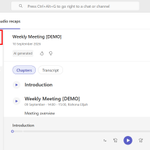
Turn your meetings into an AI podcast you can listen to on the go 🏃♂️🎧
In Microsoft Teams, launch the Meeting Recaps app. You can create an audio recap with up to 8 of your past meetings (that were recorded or transcribed) at a time.

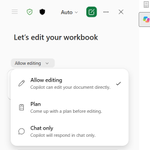
Copilot in Excel has three modes, and picking the right one saves you from surprises.
Chat only answers questions without touching your workbook. Allow editing makes the changes for you. Plan shows you the steps first and waits for your OK.

When you ask Copilot to build a something from scratch in Excel, add to your prompt "include fictional data".
This way you can get a clear understanding of what it created for you.

Fixing up date formats every time Copilot creates something for you can get repetitive. Set it as a personal instruction in Excel once:
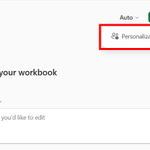
Open Excel > Copilot >... > Personalization
Then add the instruction:
"Dates should be in the format DD/MM/YYYY"


Keep your class on track with a countdown timer built directly into your PowerPoint presentation⏰
You can choose a duration, then display the countdown while attendees take a break or complete an activity. When time runs out, an alarm sounds so everyone knows when to return.
Try the prompt below in Copilot for PowerPoint ⤵️
PROMPT ✒️
"Use the interactive slides skill and create a break slide with a countdown timer.
When the timer reaches zero, play a bell chime and show that the break is over.
Include preset break time options, with the ability to add a custom time
When the break starts, automatically hide the configuration buttons, but show the ability to bring them back.
Start/Pause and Reset buttons stay visible all the time
Design: [Add your preferred colours, fonts, dial style and any other design details here. OR leave this section blank, and it will use the theme of your current presentation]"
Researcher and Analyst in Copilot do different jobs.
🔍Use Researcher for background, context and comparisons.
📈 Use Analyst when you have data and need calculations, trends or forecasts.

When your data is spread across spreadsheets, CSVs and a Word document, use the Analyst agent in Copilot.
Attach them all and ask one question. It reads across every file for you.

💡 You don't need to memorise Excel functions. Ask Copilot for a worked example instead:
"Give me an example of how to use =[FUNCTION NAME] in Excel."
It explains the syntax and shows you a realistic scenario.
An inherited spreadsheet full of mystery formulas doesn't need to be reverse engineered cell by cell.
Open Copilot in Excel and ask:
"Explain all of the formulas used in this spreadsheet and their purpose"
You'll get a plain English breakdown of what each part does.

Learn Copilot with Rishona retweeted

One-shot with Opus 5.5 💪
I gave it images of sewing pattern instructions, and asked it to turn it into a visual, step-by-step guide for a beginner.
Even added in a sizing calculator!
A table pasted into your Word doc as an image can't be sorted, edited or updated. Ask Copilot to read the image and rebuild it as a real table.
PROMPT 🖊️
"Turn the table in the selected image into an editable table"

Coming back to a document full of open comments is overwhelming. Ask Copilot in Word for a review summary first 💬
PROMPT:
"Go through all unresolved comments and create a short Review Summary section at the top that captures (1) proposed changes in the document and (2) open questions from comments"
When every stock photo starts to look the same, describe the visual you need and let Copilot in PowerPoint create it for your slide. Then refine it with follow up prompts.
PROMPT:
"Create an image for slide [number] showing [description], using the colours in this presentation"

Typing a table of contents by hand means fixing page numbers at the end. Ask Copilot in Word instead:
"Insert a table of contents"
It's built from your heading styles, so it can be updated as the document changes.
Try it in Word Online: word.cloud.microsoft/
Learn Copilot with Rishona retweeted
The Copilot in PowerPoint skill "Create Interactive Slides" is starting to roll out more widely now. I've used for creating an icebreaker activity for a training session and turning raw data from a spreadsheet into a dashboard. It can even create a cooking tutorial 🥪