

the fastest video editor and AI editing agent for creative teams
San Francisco, CA
Joined April 2015
- Tweets4.3K
- Following4.8K
- Followers13.2K
- Likes11.3K






Make the viral Storm II effect in minutes ⚡🌪️
Recreate it in Kapwing with Seedance 2.5!
Full tutorial + prompt included.
The journey to word-by-word animated subtitles on TikToks
kapwing.com/research/history…

Kapwing retweeted

💡 Lights -> kapwing.com/ai/prompt-genera…
🎥 Camera -> kapwing.com/ai/prompt-genera…
💻 Action! kapwing.com/kai
Turn a simple idea into a full cartoon micro drama with AI.
Using Seedance 2.5 in Kapwing, you can build short animated scenes with consistent characters, expressive motion, and cinematic storytelling.
Create the characters, generate each scene, then stitch everything together into one mini story. 🍿
This viral Hotel Lobby AI trend is basically a full character swap without reshooting the scene.
Here’s how to recreate it in Kapwing:
1. Upload the original video + two character reference sheets.
2. Tell AI which performer each character should replace.
3. Preserve the original gestures, expressions, timing, framing, and camera movement.
Finish with photoreal faces, natural skin texture, and matching studio lighting for a seamless swap.
Use Kai to edit your own footage into a polished video
speed up editing 5x
try it out at kapwing.com/kai

This FPV architectural build effect looks unreal.
With Seedance 2.5, start from a finished building image and turn it into a fast drone fly-through where the structure assembles around the camera.
Keep the motion smooth, the geometry consistent, the materials realistic, and the final reveal clean.
The final shot feels like a seamless high-end architectural reveal.
One clip can look like an entire multi-camera shoot. 🎥
With Seedance 2.5, turn the same video into overhead, low-angle, tracking, wide, close-up, or orbit shots.
Use the original clip as your reference, then generate each angle separately.
Keep the subject, movement, setting, and timing consistent so every cut feels like it came from the same shoot.
Not sure how to prompt Seedance 2.0 and 2.5?
Check out the inspiring examples on the Kai homepage
Every one has the prompt and reference files included

This AI Street Bump trend is easier to recreate than it looks!
- Add reference photos of your character + the objects you want flying.
- Prompt a passerby to bump into them in one continuous shot.
- Send the objects flying in slow motion.
- Track the action with shallow depth of field and crisp detail.
Finish with a smooth, attention-grabbing AI effect that keeps the entire shot feeling seamless.
Updated articles on closed captions and subtitles specs across all platforms
YT 👉🏼 kapwing.com/resources/a-comp…
IG 👉🏼 kapwing.com/resources/a-comp…
TikTok 👉🏼 kapwing.com/resources/a-comp…
Reddit 👉🏼 kapwing.com/resources/new-re…
X 👉🏼 kapwing.com/resources/how-to…
Snap 👉🏼 kapwing.com/resources/how-to…
Recreate this viral AI product-reveal effect in Kapwing with Seedance 2.5.
1. Choose a clip with a clean handoff.
2. Capture the key frames from each transition.
3. Use those frames as references for the next transformation.
4. Keep the subject, camera angle, and motion consistent throughout.
The result: smoother AI-generated transitions that feel like one continuous shot.
🚀 Recreate with Kai
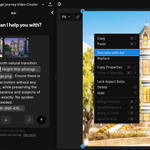
If you generate an asset, right click on the asset to Recreate
The original prompt and reference assets are loaded in
so that you can remix and regenerate.
One more way that Kapwing simplifies collaboration for marketing teams in the age of AI

Use seedance 2.5 and H3 with up to 10 reference videos or audio on Kai
Perfect for:
- Video inpainting
- Generating in a specific style
- Using a voice or music reference
Turn a storyboard into a video in minutes with Seedance 2.5. Use one reference frame per shot, then describe the action, camera movement, pacing, and visual style. Generate each scene, choose the best takes, and assemble them into one polished sequence.
Kapwing retweeted

جرب موقع kapwing.com/tools/translate يترجم ويدبلج أي مقطع فيديو ولأي لغة

Keep AI characters consistent across poses, expressions, angles, and settings with a character reference sheet.
Include facial features from multiple angles, several expressions, signature details, and a defined outfit. Use it as the visual source of truth for every new scene.
Read more here 👉 kapwing.com/resources/how-to…

